-
 kevinsbirnbaum
Hi.
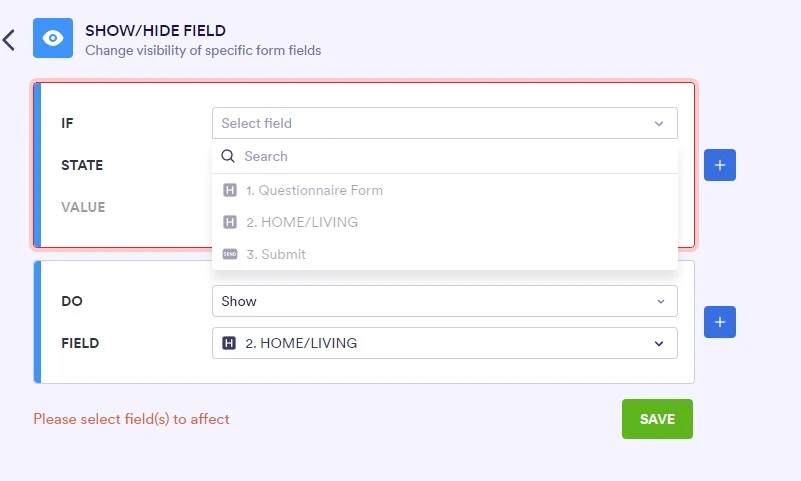
I'm having an issue with using the SHOW/HIDE FIELD option.
My choices are greyed out.
Thank you.

-
 Podo: Support Specialist
Hi Kevin,
Thanks for reaching out to Jotform Support. I'm here to assist you with the Show/Hide Field option issue where your choices are greyed out.
Let me show you how to troubleshoot and use the Show/Hide Field option properly:
- Go to Form Builder and open your form.
- Click on the field you want to apply the Show/Hide condition to.
- Check if the fields you want to show or hide are available and not disabled. Sometimes, choices may be greyed out if the fields are not compatible or if the form has certain restrictions.
- Ensure you are using the Show/Hide Field option correctly: Under the Conditions menu, select Show/Hide Field and then set the rules based on your field selections.
- Try refreshing the page or clearing your browser cache as this can sometimes resolve UI glitches.
If the issue persists, it might be related to the specific field types or form configuration.
Give it a try and let us know how it goes.
-
 Kris JotForm Support
Hi Kevin,
From the screenshot you shared, it seems you're trying to select non-fillable fields. Take note that when creating conditions, the form field in IF should be fillable form elements and widgets. The examples are Full Name, Email, Short Text elements. I can see in your screenshot the Heading element and the Submit button, which are non-fillable form elements.
Let us know if you have any other questions.