-
MMichael Basile
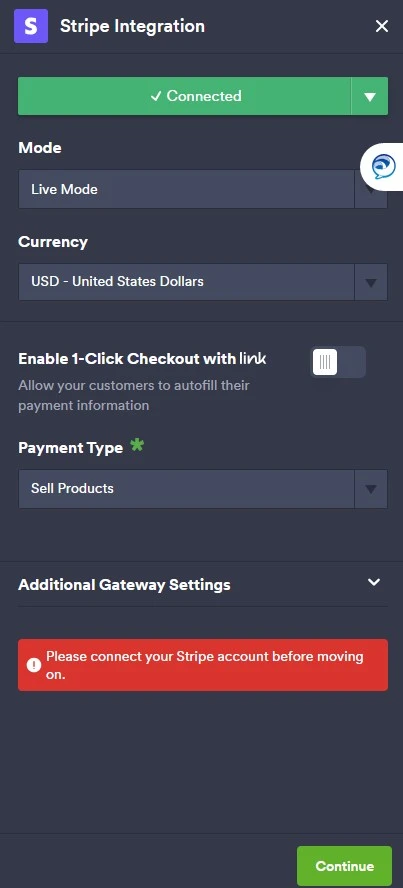
Stripe test payment is not working on JotForm. It has worked before when my predecessor did it but not it is not. Stripe told me to reach out to trouble shoot with JotForm.

-
 Podo: Support Specialist
No worries, we can definitely help you troubleshoot this.
To start, could you please share the form URL or the direct link you’re using for the Stripe test payment? Once I have that, I’ll check how Stripe is integrated on your form and we’ll go step by step from there.
-
MMichael Basile
-
Podo: Support Specialist
Hi Michael,
Thanks for sharing the form link. Based on the information about Stripe integration with Jotform, here are some key points and troubleshooting steps to check for your Stripe test payment issue:
- Mode Selection: Ensure that the Stripe payment element in your form is set to Test Mode if you are running test payments. Switching between Test and Live modes requires reconnecting your Stripe account.
- Stripe Account Connection: Verify that your Stripe account is properly connected in the payment settings of your form. If needed, disconnect and reconnect the account.
- Payment Settings: Check the currency, payment type (e.g., sell products, subscriptions, donations), and other options like billing information and customer record creation to ensure they are configured correctly.
- Reusable Payment Connections: If you are using reusable payment connections, confirm that the connection is active and set to the correct mode.
- Stripe Webhook: For some Stripe integrations like ACH, ensure that the webhook endpoint URL is correctly set in your Stripe dashboard to communicate payment status back to Jotform.
- Test Card Details: Use valid Stripe test card numbers and details when making test payments.
If you have recently changed any settings or updated the Stripe account credentials, these could affect the test payment functionality.
Let me help you with that: Could you please confirm if the Stripe integration on your form is set to Test Mode and if the Stripe account connection is active? Also, let me know if you receive any specific error messages when attempting the test payment.
Give it a try and let us know how it goes.
-
MMichael Basile
Not working. Can someone call me to troubleshoot?
-
Podo: Support Specialist
Hi Michael,
One of our Support Team members will take it from here to follow up shortly.
-
 Kyle JotForm Support
Hi Michael Basile,
Thanks for using Jotform. I see that you have an Enterprise account, which means that we have a dedicated Enterprise Support Team to help you. We have a guide that explains How to Contact Enterprise Support Team. Create a ticket there and someone from the Enterprise Support Team will get in touch with you shortly.
Thanks for your patience and understanding, we appreciate it.