-
 haroldd79
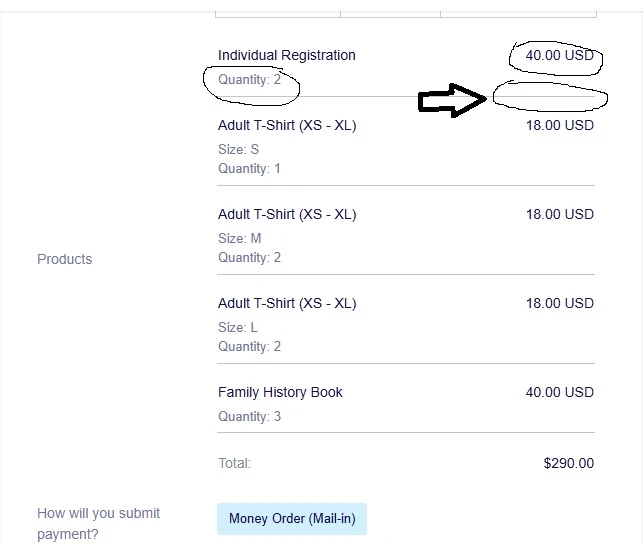
In the Autoresponder email, there is a unique name {myProducts} to include the products selected in the product element of the form. However, the subtotal for each product is not shown. See the image below. The subtotal should show $80.00. It shows this on the form.

-
 Podo: Support Specialist
Hi Harold,
Thanks for reaching out to Jotform Support. I'm an AI assistant here to assist you.
Regarding your question about showing the subtotal for each product in the Autoresponder email, Jotform provides a way to include specific payment details using suffixes with the product element's unique name.
In your case, if your product element's unique name is {myProducts}, you can add the :subtotal suffix to display the subtotal for each product. For example, use {myProducts:subtotal} in your Autoresponder email template to show the subtotal amounts.
This method allows you to customize the email content to include individual product subtotals, totals, taxes, shipping, and other payment-related details by using the appropriate suffixes.
Here are some common suffixes you can use with your product element tag:
- transactionid
- total
- subtotal
- tax
- shipping
- product
- firstname
- lastname
- addr
- city
- state
- zip
- country
- customerid (Stripe)
So, to include the subtotal for each product in your Autoresponder email, replace {myProducts} with {myProducts:subtotal}.
Give it a try and let us know how it goes.
-
haroldd79
Did not work.
The {myProducts:subtotal} did not cause anything to show in the responder email.
-
Podo: Support Specialist
Hi Harold,
Thanks for your update. Since using {myProducts:subtotal} did not show the subtotals in the autoresponder email, here are some important points to consider:
- Make sure you are editing the correct email template under the Settings > Emails section of your form.
- Use the exact unique name of your product element followed by the suffix. For example, if your product element's tag is {myProducts}, then {myProducts:subtotal} should work.
- If the subtotal suffix does not display anything, it might be due to how the payment element data is formatted or limitations in the autoresponder email template.
- As an alternative, you can try using {myProducts:total} to show the total amount for all products, but this won't show individual product subtotals.
- Check if your product options are set as sub-products or if you have quantity selectors, as this can affect how subtotals are displayed.
For a detailed example and further customization, you can refer to Jotform's guide on editing email templates and using payment suffixes: How to Edit the Email Template for Notifications and Autoresponders.
If you want, you can also share more details about your form setup, and I can help you troubleshoot further.
Give it a try and let us know how it goes.
-
haroldd79
My element tag is {myProducts} and it works. {myProducts:subtotal} did not and just show empty
Here is a link to my responder email settings: https://www.jotform.com/build/260575901574058/settings/emails
I have modified Autoresponder Money Order to contain both {myProducts} and {myProducts:subtotal} .
Here is the autoreponder email. "Products" show the result if {myProducts}. "Product SubTotals" show the result of {myProducts:subtotal}. Let me know what else I can provide to aid in the troubleshooting.
Thanks,
-
Podo: Support Specialist
Hi Harold,
Thank you for sharing the details about your autoresponder email setup with the product element tag {myProducts}.
Based on the information and Jotform's email template customization, here are some important points to consider for troubleshooting why {myProducts:subtotal} shows empty in your autoresponder email:
- Ensure you are editing the correct autoresponder email template under Settings > Emails in your form builder.
- The suffix :subtotal is intended to show the subtotal for the entire product element, not individual product subtotals. This means it may not display individual product line subtotals as you expect.
- Jotform's current functionality typically supports showing the full product list with quantities and prices using {myProducts}, but individual product subtotals per line item may not be supported directly in autoresponder emails.
- As a workaround, you might consider customizing the product options or using calculation fields to capture subtotals per product and then include those fields in your autoresponder email.
- Double-check if your product element includes sub-products or quantity selectors, as complex product structures might affect the display of subtotals.
If you want, you can share more about your form's product setup or consider using calculation fields to generate subtotals for each product, which can then be referenced in the autoresponder email.
Give it a try and let us know how it goes.
-
haroldd79
My product elements do include sub-products and quantity selectors. I would be interested in using calcuation fields to capture subtotals, but I need an example of how that can be used. I am not familiar with that.
-
 Kris JotForm Support
Hi Harold,
I made multiple tests on this to include the subtotal of each product from the Product List element in the Autoresponder Email. I tried to strip down the sub-elements of the subtotal, but they're unavailable. While the feature you're looking for isn't available at Jotform right now, we've gone ahead and escalated your request to our developers.
Exactly when or if it's developed depends on their workload, how viable it is, and how many other users also request it. If there are any updates, we’ll circle back to this thread and let you know.
Thanks for your patience and understanding, we appreciate it.
-
haroldd79
Thank you. I look forward to a solution.



Your Reply
Something Went Wrong
An error occurred while generating the AI response. Please try again!