-
 haroldd79
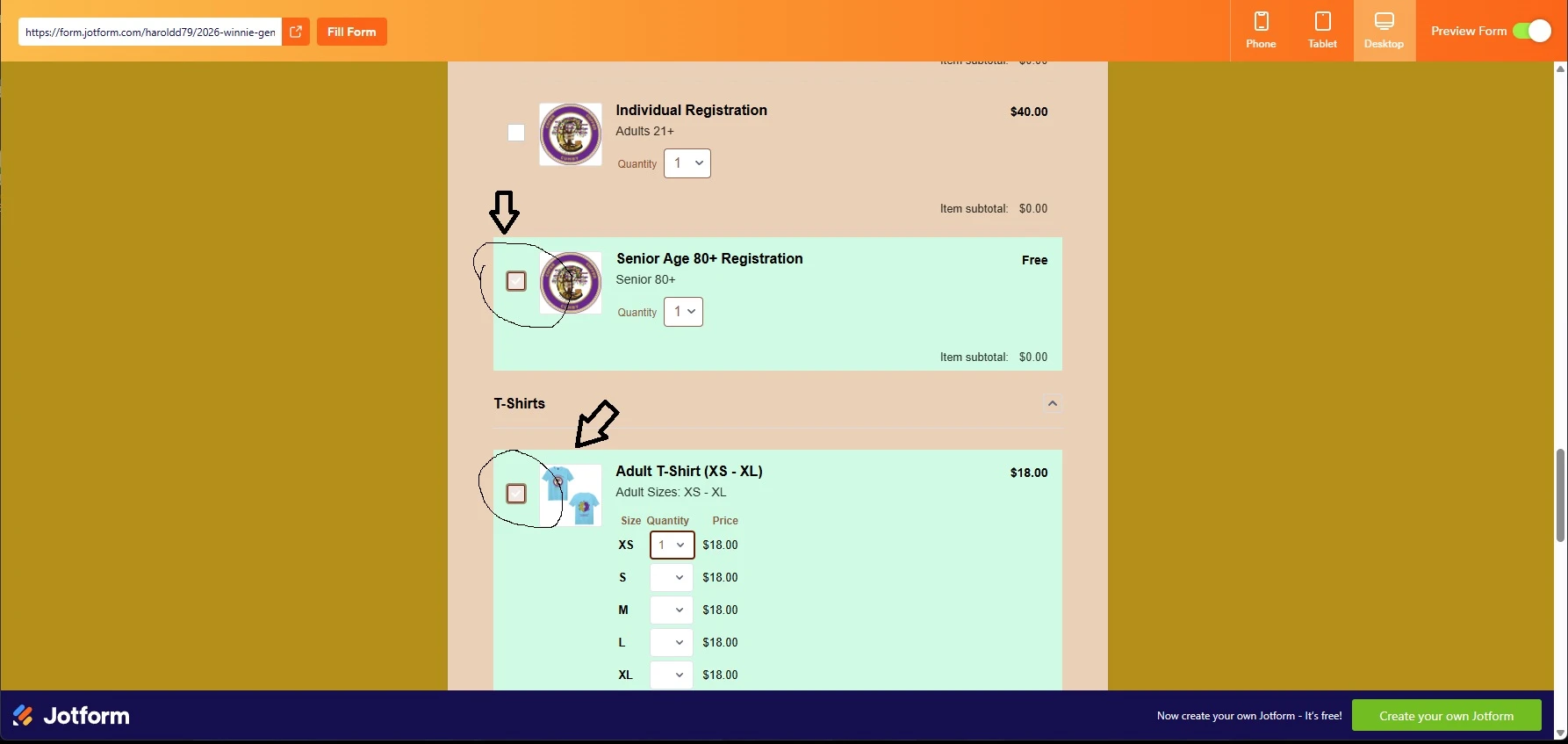
The checkmark color for all the products in the product Element, is a low contrast white when selected. I want to change the color to black.

-
 Podo: Support Specialist
Hi Harold,
Thanks for reaching out to Jotform Support. I'm an AI assistant here to assist you.
Regarding your request to change the checkmark color of the selected product checkboxes in the Product Element to black, Jotform allows customization through injecting custom CSS code in the form builder.
Unfortunately, the default knowledge does not provide a direct CSS selector example specifically for changing the checkmark color of the product element checkboxes. However, you can try adding custom CSS targeting the checkbox checkmark color by inspecting the checkbox element and applying CSS such as:
.form-product-item input[type="checkbox"]:checked::after {
  color: black !important;
}
This CSS attempts to change the color of the checkmark when the checkbox is selected. You can inject this CSS in your form's Custom CSS section under the Form Designer.
If this does not work due to the theme or specific selectors, you may need to inspect the exact class names or elements in your form and adjust the CSS selectors accordingly.
Let me help you with that:
- Open your form in Form Builder.
- Click on the paint roller icon (Form Designer) on the right side.
- Go to the Styles tab and scroll down to the Inject Custom CSS area.
- Paste the CSS code above and save.
This should change the checkmark color to black for your product checkboxes.
Give it a try and let us know how it goes.
-
haroldd79
This had no effect on changing the checkmark color in the checkbox. How do I inspect the exact class names or elements in my form and adjust the CSS selectors?
-
Podo: Support Specialist
Hi Harold,
To inspect the exact class names or elements in your Jotform form and adjust the CSS selectors accordingly, you can use your web browser's developer tools. Here’s how to do it:
- Open your form in a web browser.
- Right-click on the checkbox or element you want to inspect.
- Select "Inspect" or "Inspect Element" from the context menu. This will open the browser's developer tools panel.
- In the developer tools, you will see the HTML structure of the form. Look for the classes or IDs associated with the checkbox or the checkmark element.
- Note the class names or IDs you find. You can use these to create more specific CSS selectors.
- Test your CSS changes live in the developer tools. You can add or modify CSS rules in the "Styles" pane to see immediate effects.
- Once you identify the correct selectors and CSS rules, inject them into your form's Custom CSS section in Form Designer.
For more detailed guidance on injecting custom CSS, you can also check Jotform's guides on Customizing Your Form Using CSS Codes and How to Inject Custom CSS Codes.
Give it a try and let us know how it goes.
-
haroldd79
I cannot figure out how to make it work. I need help with the exact CSS code
-
 Silvano JotForm Support
Hi Harold,
You can insert this CSS codes to make the checkbox black once a product is selected:
.form-sub-label {

color: #223019;

}


.form-product-item.new_ui.hover-product-item:hover {

    background: rgba(85, 115, 215, 0.6);

    background-color: rgba(85, 115, 215, 0.6);

}


.form-product-item-detail:has(.form-checkbox:checked) {

 background-color: #d1fae5; /* Light green */

 border-color: #eb24dd;

}


.form-product-input + .checked,

.form-product-input:checked + .checked,

.p_checkbox .checked,

.p_checkbox .select_border {

background-color: #000000;

border-color: #000000;

}


.form-product-input:checked + .checked,

.form-product-input:checked ~ .checked,

.p_checkbox .form-checkbox:checked + .checked,

.p_checkbox .form-checkbox:checked + .checked + .select_border {

background-color: #000000;

border-color: #000000;

}
Here's a guide on how to inject CSS codes to your form.
Reach out to us if you need any other help.
-
haroldd79
Worked!!! Thank you!
-
Podo: Support Specialist
Hi Harold Doss,
Your request has been answered and the thread is closed.
If you have another question or need more help, feel free to reply here and we'll assist you right away.