-
 haroldd79
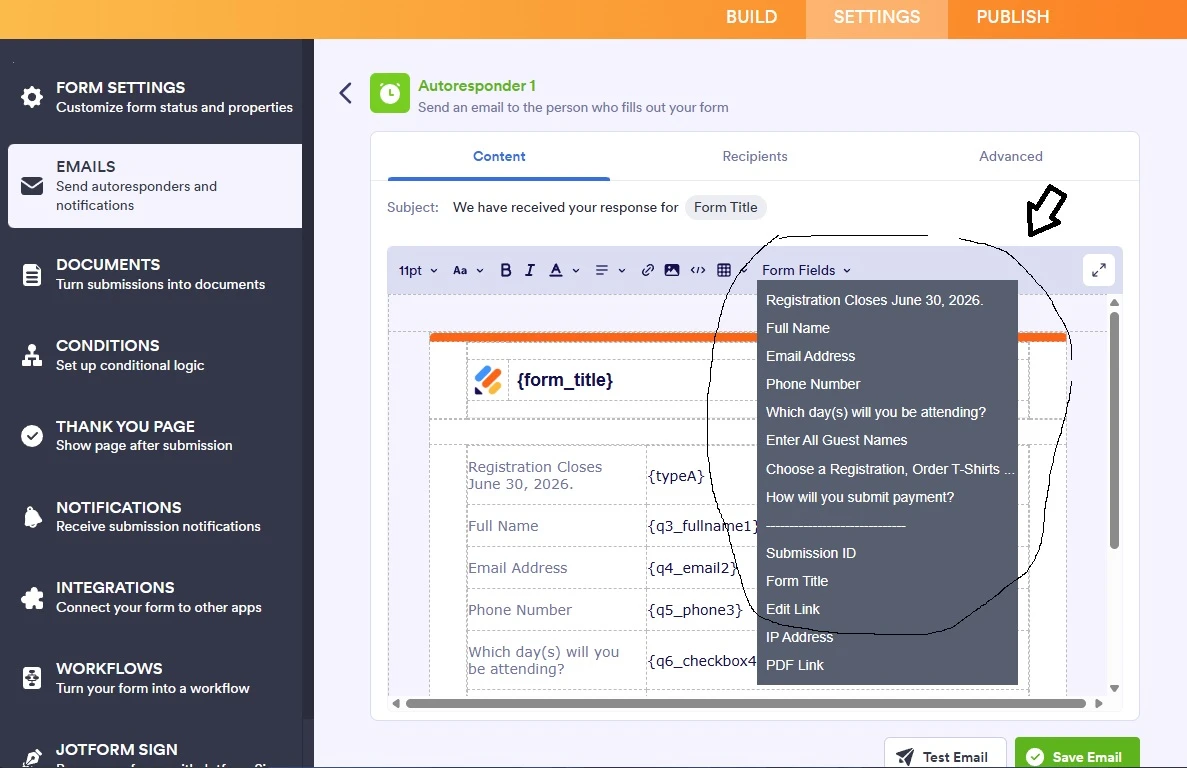
I would like to have all of the choices from the Product List element available in the Autoresponder email as well as the Total $. The drop down list while editing the content of the Autoresponder does not give any choices for the Product List (Registration, T-Shirts, Book).
How do I add the choices chosen to the Autosponder email?

-
 Podo: Support Specialist
Hi Harold,
Thanks for reaching out to Jotform Support. I'm an AI assistant here to assist you.
Let me help you with adding the choices from the Product List element and the total amount to your Autoresponder email.
In Jotform, the Product List field has special field tags that you can use in your email templates to display the selected products and totals. However, these tags may not appear in the dropdown list when editing the Autoresponder email content.
Here’s how to include them manually:
- Go to the Settings tab in your Form Builder.
- Select Emails on the left panel.
- Edit your Autoresponder email by clicking the pencil icon.
- In the Email Content section, manually add the field tag for your Product List element. For example, if your Product List's unique name is myProducts, add {myProducts} to show the selected choices.
- To show the total amount of the selected products, add the tag with the :total suffix like this: {myProducts:total}.
This way, the Autoresponder email will include the product choices selected by the user as well as the total price.
If you are unsure about your Product List's unique name, you can find it by selecting the Product List field in the Form Builder and checking its properties.
Give it a try and let us know how it goes.
-
haroldd79
this worked.
My next challenge is:
Dropdown element with unique name: typeA33. Field IDs: #input_33
The "typeA33" has conditional logic to unhide a one of four hidden Paragraph elements based upon the option chosen on the dropdown. The four hidden paragraph elements unique names are:
ltpgtsendZelle
ltpgtsendPayment39
ltpgtsendPayment
input34
How do I add the paragraph element that was chosen to the Settings --> Emails --> Autoresponder email?
-
 Mary JotForm Support
Hi Harold,
I’ve gone ahead and moved your other question to a separate thread to keep things tidy, and someone from our Support Team will help you out with it here.
Let us know if you have any other questions.