-
 sankyogroup
I have a stopwatch on a form. I also generated a PDF with the questionnaire and its results. I would like the time recorded by the stopwatch to appear in the PDF. Is this possible?
-
 Podo: Support Specialist
Hi Sankyots,
Regarding your question about having the time recorded by a stopwatch on your form appear in the generated PDF with the questionnaire and its results, the current knowledge base does not explicitly confirm that the stopwatch time can be directly included in the PDF output.
The available information primarily covers the use of countdown timers and global countdown widgets for timing purposes on forms, but it does not specify if the stopwatch widget's recorded time is captured and displayed in the PDF generated from form submissions.
If you want the stopwatch time to appear in the PDF, you may need to ensure that the stopwatch field's value is saved as a form field and included in the submission data that the PDF generator uses. Then, you can customize the PDF template to include that field.
Give it a try and let us know how it goes.
-
 Kris Ann JotForm Support
Hi sankyogroup,
Thanks for reaching out to Jotform Support. Can you send me the link to your form so I can take a look for you? You can easily find your form's URL in Form Builder. Let me show you how:
- In Form Builder, in the orange navigation bar at the top of the page, click on Publish.
- In the Quick Share tab, click on Copy Link in the Share With Link section.
 Once you share the form URL with us, we’ll be able to help you better with this.
 -
sankyogroup
-
 Kris JotForm Support
Hi sankyogroup,
Are you referring to the Timer widget? I've made a simple form and added the widget. After submitting the form, I went to the PDF Editor to check the PDF file. The recorded time of the Timer widget shows in the PDF file. It will show the time only, but you can add a label to it. Let me show you how you can do this:
- In PDF Editor, double-click on the Timer widget result.
- Now, in the Timer Settings on the right side, enter the label on the Enter Text box
Let us know if you have any other questions.
-
sankyogroup
Okay, thank you
-
Podo: Support Specialist
Hi Sankyots,
Your request has been answered and the thread is closed.
If you have another question or need more help, feel free to reply here and we'll assist you right away.
-
sankyogroup
Hi, how have you been?
Unfortunately, my problem has not been solved.
Explaining the use of the form:
I want to create a color blindness test form with an attached PDF response.
The user should look at the image and answer by selecting the number they see and entering this value in field "1" of the attached PDF.
The value of the "Timer" WIDGET should be automatically inserted below field "1" after answering.
After answering, it should automatically advance to the next page.
Form: https://form.jotform.com/260852129838061
-
 Raymond JotForm Support
Hi sankyogroup,
After testing a few potential workarounds, unfortunately, there's no timer widget available that can stop conditionally yet. While the feature you're looking for isn't available at Jotform right now, we've gone ahead and escalated your request to our developers. Exactly when or if it's developed depends on their workload, how viable it is, and how many other users also request it. If there are any updates, we’ll circle back to this thread and let you know.
Thanks for your patience and understanding, we appreciate it.
 Once you share the form URL with us, we’ll be able to help you better with this.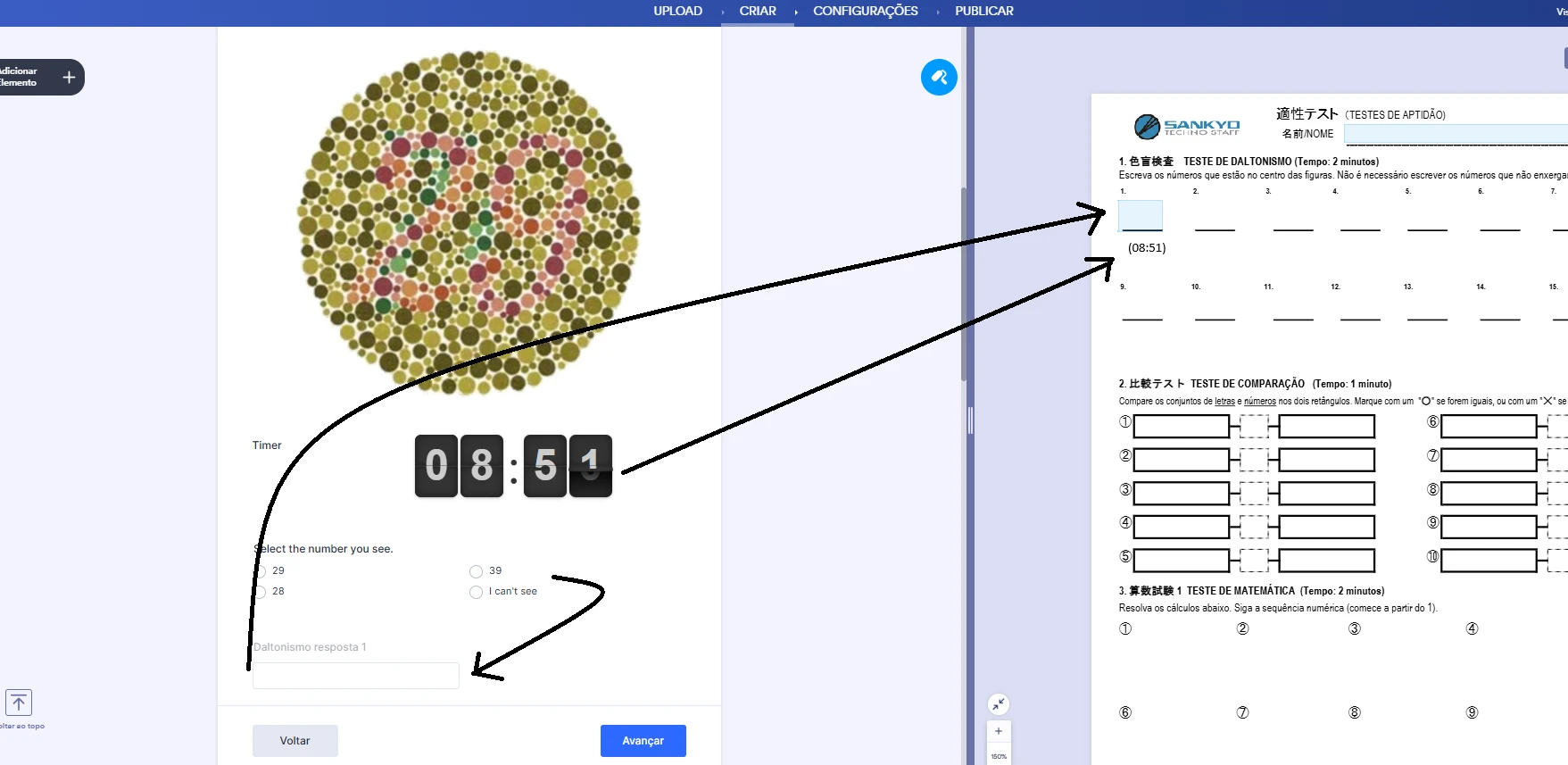
Your Reply
Something Went Wrong
An error occurred while generating the AI response. Please try again!