-
 srh545
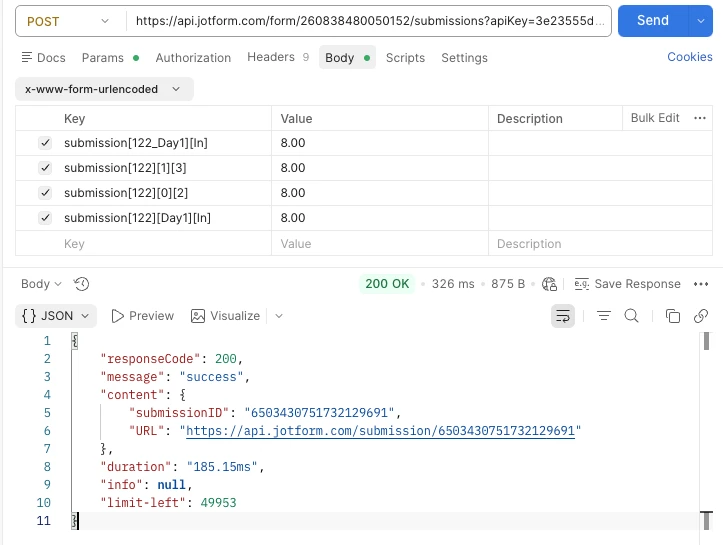
In Postman as a proof of concept I'm attempting to submit input table data via API to the first row Day1 and third column In with value of 8.00. I've tried the urlencoded request in multiple formats but the table values are not populating (except for some initial sample submissions using JotForm fill form tool). Attached is a screenshot of the Postman request.
Thanks!
 Page URL: https://form.jotform.com/260838480050152
 -
 Podo: Support Specialist
Hi,
Regarding your attempt to submit input table data via API in Postman, specifically targeting the first row Day1 and the third column In with a value of 8.00, the Jotform knowledge base does not provide explicit details on the exact format for urlencoded requests for input tables via API.
However, generally, to update or submit data to a form field such as an input table via API, you need to ensure the correct field names and keys are used in your request payload. The input table fields often require a specific naming convention that corresponds to the rows and columns of the table.
Since you mentioned that values are not populating except for some initial sample submissions using the Jotform fill form tool, it suggests that the API request format or field keys might not be matching what Jotform expects for input table data.
Unfortunately, the current knowledge base does not include detailed API examples or troubleshooting steps for submitting input table data via urlencoded requests in Postman.
If you want to update or edit submissions, Jotform Tables allows inline editing or editing and resubmitting entries via the Jotform Tables interface, but this is separate from API submission.
For precise API usage, including how to format input table data in your API request, I recommend checking Jotform's API documentation or developer resources directly, as this information is not covered in the current support knowledge base.
Let us know if you have any other questions.
-
 Jan JotForm Support
Hi Sean,
To narrow this down, try sending only one Input Table key format in your request body for the next test. Since the request currently includes multiple formats for the same field, it is difficult to tell which mapping the form is reading. For this table, use only this format:
submission[122][Day1][In]=8.00
This format uses the Input Table field ID together with the row label and column label, so it is the clearest way to test whether the value is being passed into the correct cell. Try these steps:
1. Remove the other Input Table entries from the request body so only one table value is being sent.
2. Send the request again using only this line:
submission[122][Day1][In]=8.00
3. After that, open the created submission and check whether the value appears in the Timesheet table under Day1 and In.
If the value still does not appear, send us these so we can check the field mapping more closely:
1. The response from the form questions endpoint for the Timesheet field.
2. A view of the created submission after the API request
That will help us compare the table structure with the payload and check whether the row label, column label, or field ID needs to be adjusted.
Let us know how it goes.