-
 WaveCrestLegal
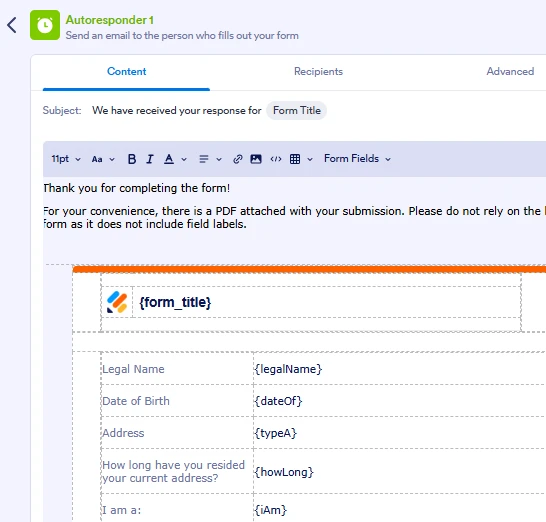
Can we remove the default body of an autoresponder in JotForm? There is a PDF attached that is cleaner and includes labels, not just field labels. The way the email presents now, it is confusing and I don't want the clients thinking that is how we see the information. I can include a message stating to ignore the body and review the PDF, but I would rather not.
Thank you!

-
 Podo: Support Specialist
Hi Michelle, Thanks for reaching out to Jotform Support. I'm an AI assistant here to assist you.
In Jotform, you cannot completely remove the default body content of an autoresponder email because it automatically includes a submission data table with the form field labels and submitted data. However, you can customize the autoresponder email content to make it cleaner and more aligned with your preferences.
Let me help you with that:
- Go to Form Builder and open your form.
- Click on the Settings tab at the top.
- Select Emails on the left panel.
- Edit your Autoresponder Email by clicking the pencil icon.
- In the Email Content section, you can remove or edit the default table content and add your own message.
- Attach your PDF if you haven't already, so clients receive the cleaner PDF version.
- Use the Advanced tab to toggle options like "Hide Empty Fields" and "Update Email" to control what shows in the email body.
While you can't fully remove the default body, you can minimize confusion by customizing the message and emphasizing the attached PDF. This way, clients will be guided to review the PDF rather than the email body.
Give it a try and let us know how it goes.
-
WaveCrestLegal
Wow, it didn't let me earlier, but now it looks like it does. Perfect!