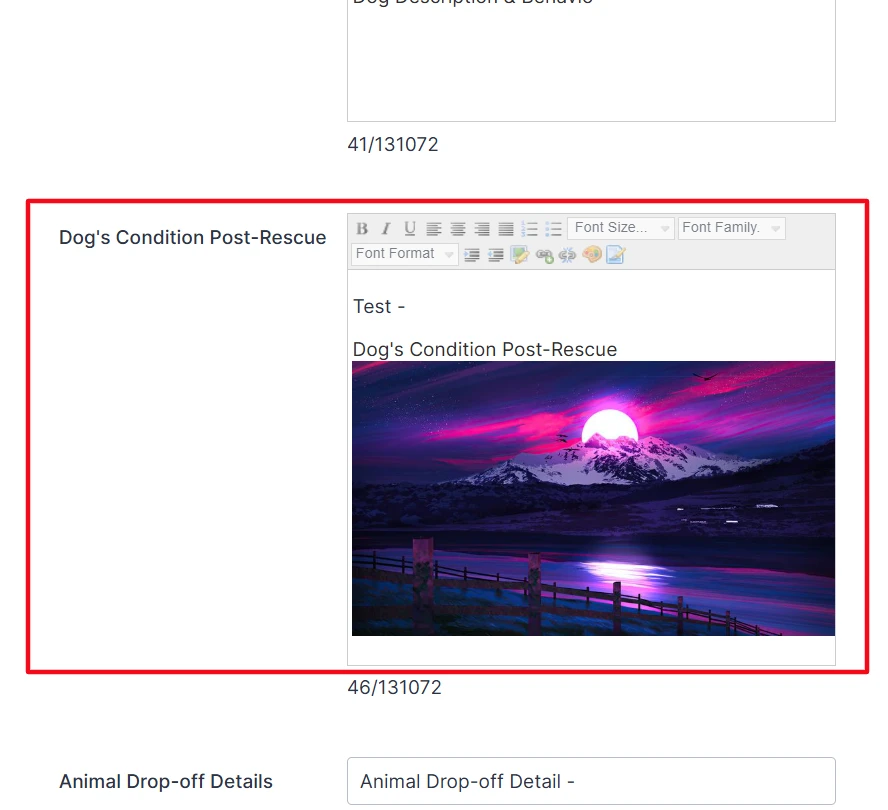
-
 Goh_Eugene
Hi Team,
I am facing an issue with JotForm PDF generation when integrating with Salesforce.
I have a Rich Text Area field in Salesforce that contains an image. This image is successfully displayed in the JotForm Long Text field when the form is loaded and also appears correctly in the preview.
However, when the PDF is generated from the JotForm submission, the image does not appear in the PDF. Instead, only the field content (or sometimes the image reference/text) is shown.
Summary of the issue:
- Image is present in Salesforce Rich Text Area field
- Image is visible in JotForm Long Text field (form view & preview)
- Image is NOT visible in generated PDF
Could you please help identify why images from Rich Text fields are not being rendered in the generated PDF and suggest a solution or workaround?
Thanks in advance!
Salesforce Rich Text field Image :
Jotform Image :
-
 Podo: Support Specialist
Hi Eugene,
Thanks for reaching out to Jotform Support. I'm an AI assistant here to assist you.
Regarding your issue with images from Salesforce Rich Text Area fields not appearing in the generated PDF from Jotform submissions, here is what I found:
Jotform's PDF Editor allows adding images and rich text content, but sometimes images embedded within Rich Text Area fields may not render properly in the PDF output. Although the image is visible in the form's Long Text field and preview, the PDF generation process might not support rendering embedded images from external sources or Rich Text fields directly.
To address this, consider these approaches:
- Use the PDF Editor's Text Field element to manually add images by inserting image URLs or uploading images directly within the PDF template.
- Ensure that the images in the Rich Text Area are accessible via direct URLs that the PDF generator can fetch.
- Alternatively, use a dedicated Image element in your form or PDF template to display images instead of embedding them inside Rich Text fields.
This way, images are more reliably included in the generated PDFs.
If you want, I can guide you on how to customize your PDF template to include images properly.
Give it a try and let us know how it goes.
-
Goh_Eugene
please guide me
-
Podo: Support Specialist
Hi Eugene,
Let me help you with customizing your PDF template to include images properly.
Here’s how to do it:
- Go to the Jotform PDF Templates page and search for the template you want to use.
- Hover over the template images and click on Preview to take a quick look.
- If you find the PDF template you want, click on Use Template in the window that opens.
- Select the form you want to apply this PDF document to or click on Create A New Form. That's it.
Give it a try and let us know if you need any help.