-
 jaroslawdudachef
Hello team!
I have some issue to get final result.
I trying to create control quality card in Jotform...
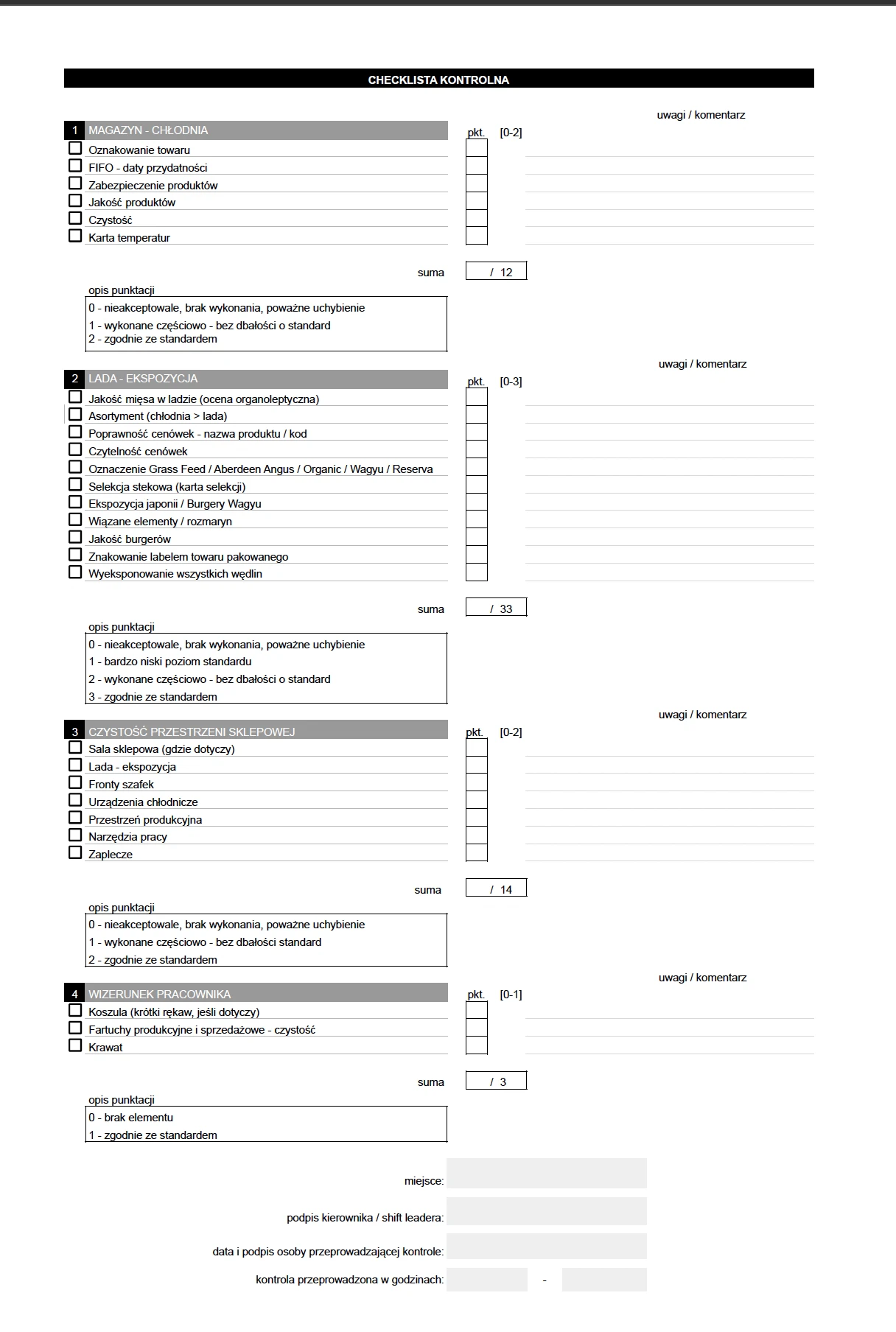
Te card have for stard any important details like name of the shop, date, time and name with surname of person who make control card on shop
Card have 4 sections with few questions where we can jump step by step an choose some ratings from answer option.
I want to make on the end the final procentage score result od each section with problems from zero pionts check to show for menager to look whats going wrong. Of each question i wanna put comment field and also camera button to make pic of some bad thing during control to report.
After show whole rating for menager it will be confirmed by signature and after click on confirm button send on email shop to later check details and summary information in raport file from email.
How to get started with that?
Regards!

-
 Podo: Support Specialist
Hi Jarosław,
Thanks for reaching out to Jotform Support. I'm an AI assistant here to assist you.
Let me help you with that:
You can create your quality control card form with the features you described by building a form with sections for shop details, ratings with options, comment fields, and camera upload buttons. Then, you can add a signature field for confirmation and set up email notifications to send the summary report to the shop.
Here’s how to do it:
- Create the form with fields for shop name, date, time, and inspector's name.
- Add multiple sections with rating questions using multiple choice or dropdown fields.
- Include comment fields for each question using long text entry fields.
- Add a file upload field with the option to take pictures (camera button) for reporting issues.
- Insert a signature field for the manager or inspector to confirm the report.
- Use calculation fields to calculate the percentage score for each section based on the ratings.
- Set up email notifications to send the completed report with all details and attachments to the shop's email.
This setup will allow you to collect detailed quality control data, capture photos, get signatures, and send summarized reports automatically.
Reach out again if you need any other help.
-
jaroslawdudachef
How to use calculation fileds when i have 8 questions in scale from 0 - 2 points ? and get summary point on report? also show where i 0 point with comment on the end of report ?
-
Podo: Support Specialist
Hi Jarosław,
Adding and setting up calculation fields for your 8 questions rated from 0 to 2 points and summarizing the results in your report can be done as follows:
Let me help you with that:
- Add Scale Rating elements for each of your 8 questions, setting the scale from 0 to 2.
- Use Calculation Values for each rating option to assign numeric values (0, 1, 2) to the answers.
- Add a Form Calculation widget to sum the points from all 8 questions to get the total score.
- Calculate the percentage score by dividing the total score by the maximum possible score (16 points) and multiplying by 100.
- To show where 0 points were given, add conditional logic to display comments linked to each question if the rating is 0.
- Use long text fields for comments on each question, and set conditions to show these comments only if the rating is 0.
- Include all these results and comments in your email notification or PDF report to the manager.
This way, you get a summary score and detailed feedback on problem areas with zero points and comments.
Reach out again if you have any other questions.