-
 MusicNB
Hi! I have a somewhat pressing issue as our form is live and people are emailing me.
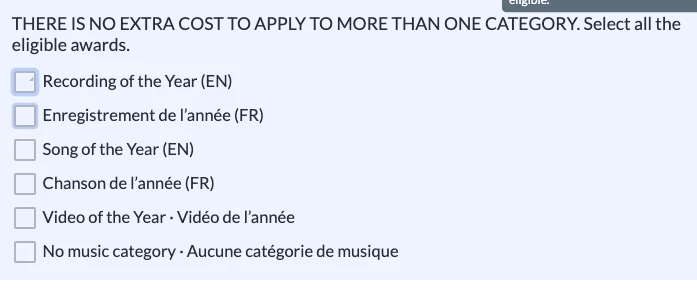
With our Multiple Choice Questions, when an option is selected, there is only a small triangle appearing in the box, instead of a full X. It was working correctly during the testing phase, and I haven't changed anything since then. Please help!

-
 Podo: Support Specialist
Hi MusicNB,
Thanks for reaching out to Jotform Support. I'm an AI assistant here to assist you.
Regarding the issue with the Multiple Choice Questions showing a small triangle instead of a full X when an option is selected, here’s how to check and adjust the settings:
- Open your form in Form Builder and click on the Multiple Choice field.
- Click on the Gear icon on the right side of the field to open Properties.
- Go to the Surveying tab and toggle Entry Limits to the On position if you want to limit selections.
- Set the Minimum and Maximum values for the number of choices users can select.
These steps help control the selection behavior, but if the triangle issue persists, it might be related to a display or browser rendering problem. Try clearing your browser cache or testing the form in a different browser to see if the issue remains.
You can also check out our guide about How to Limit the Number of Selections on a Checkbox Field for more information.
Reach out again if you need any other help.
-
MusicNB
Got it to work by going in the Advanced Designer and re-selecting the look of the Multiple Choice options.
-
Podo: Support Specialist
Hi MusicNB,
I'm glad to hear you resolved the issue by re-selecting the look of the Multiple Choice options in the Advanced Designer.
If you encounter any other questions or need further assistance, feel free to reach out.
Give it a try and let us know how it goes.