-
 tylerbeaucamp
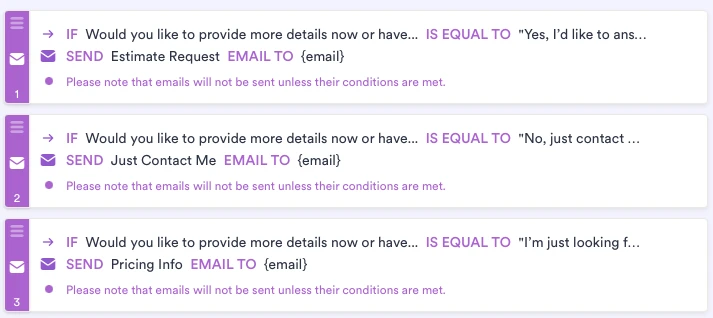
Hello, I have conditional emails set up for different responses on my form but it doesn't seem to be sending? Is the {email} tag not allowed or what is the deal?
Please help.

-
 Podo: Support Specialist
Hi Allyson,
Thanks for reaching out to Jotform Support. I'm an AI assistant here to assist you.
You can use the Change Email Recipient feature in Jotform, which lets you select which email will be used based on the conditions you set. I'll show you how to do that:
1. In Form Builder, in the orange navigation bar at the top of the screen, click on Settings.
2. In the menu that opens on the left side of the page, click on Conditions.
3. Under the New Condition section, click on Change Email Recipient.
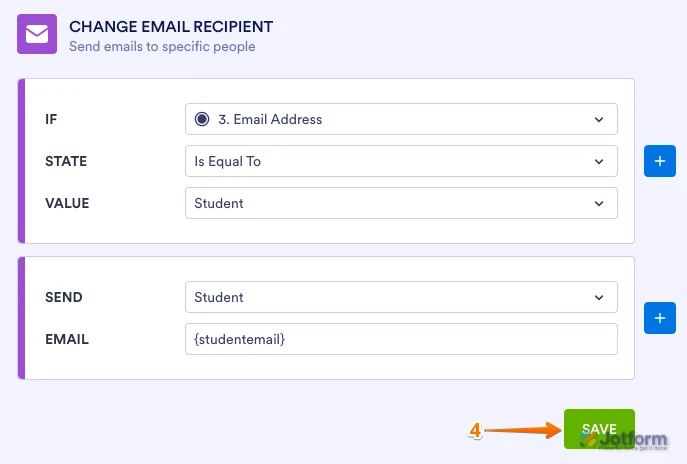
4. Set up the conditions as you see below and click on Save:
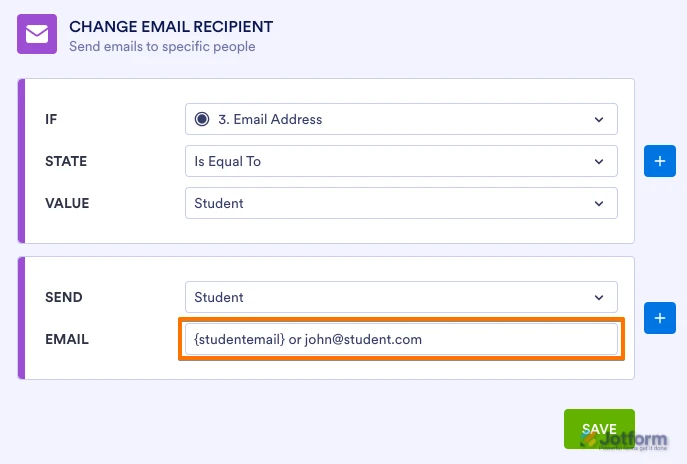
You can either manually enter the desired email address or use the Unique Name of the email field you created, so the respondent's email address is captured automatically:
If you don't see different options in the Send section of the conditions, it's because you haven't created autoresponders yet. Let me show you how to create one:
1. In Form Builder, in the orange navigation bar at the top of the page, click on Settings.
2. In the menu on the left side of the page, click on Emails.
3. Now, click on Add Email, and select the Autoresponder Email option.
4. Then, customize the options the way you want them, and click on Save.
You can also check out our guide on Setting Up Autoresponder Emails to learn more.
Reach out again if there’s anything else we can help you with.
-
tylerbeaucamp
I only want the email sent if a specific form response happened not at every submission?
-
Podo: Support Specialist
Hi Allyson,
It's easy to send emails only if a specific form response occurs by using conditional logic in Jotform. Let me show you how:
1. In Form Builder, click on Settings in the orange navigation bar at the top.
2. On the left menu, select Conditions, then choose Change Email Recipient.
3. Set up the condition to specify when the email should be sent based on the respondent's answer, then click Save.
You can create different Notification or Autoresponder emails for each condition if needed. For more details, you can check our guides on Setting Up Email Notifications and Autoresponder Emails.
Give it a try and let us know if you have any other questions.
-
tylerbeaucamp
Does the Send Email Automatically
Automatically trigger the email when a specific action occurs have to be checked to do this? I unchecked it assuming it would ignore the condition
-
Podo: Support Specialist
Hi Allyson,
The Send Email Automatically option does need to be checked for the email to be sent automatically when the specified condition is met. If you uncheck this option, the email will not be triggered automatically, even if the condition is true.
In other words, to have conditional emails sent only when a specific form response occurs, make sure the Send Email Automatically box is checked in your Notification or Autoresponder email settings. This ensures the email is sent immediately upon submission that meets your condition.
If you leave it unchecked, the email will be ignored regardless of the conditions you set.
Let us know if you need further clarification.
-
tylerbeaucamp
ok this was the problem then. Confused me, Thanks for the help