-
MMark Allen
I was trying to use Podo this past week and Podo couldn't see the Product section on my form and I couldn't get past the loop Podo went into. Somehow I was finally sent to a real person but the support went through emails. They reported that could see the products section and that Podo was still learning. But I dealt with Podo for about an hour. An hour wasted.
Also, although I had only picked paypal, the final form displayed Checkout (for credit cards), Pay Later and Venmo. The support person said they only saw Paypal on their screen, but that wasn't the case for me or my wife on her phone. Jotform told me it was on PayPal's side, but PayPal says it wasn't and they don't even offer the Check Out (credit card) or Venmo as an option
-
 Kyle JotForm Support
Hi Mark,
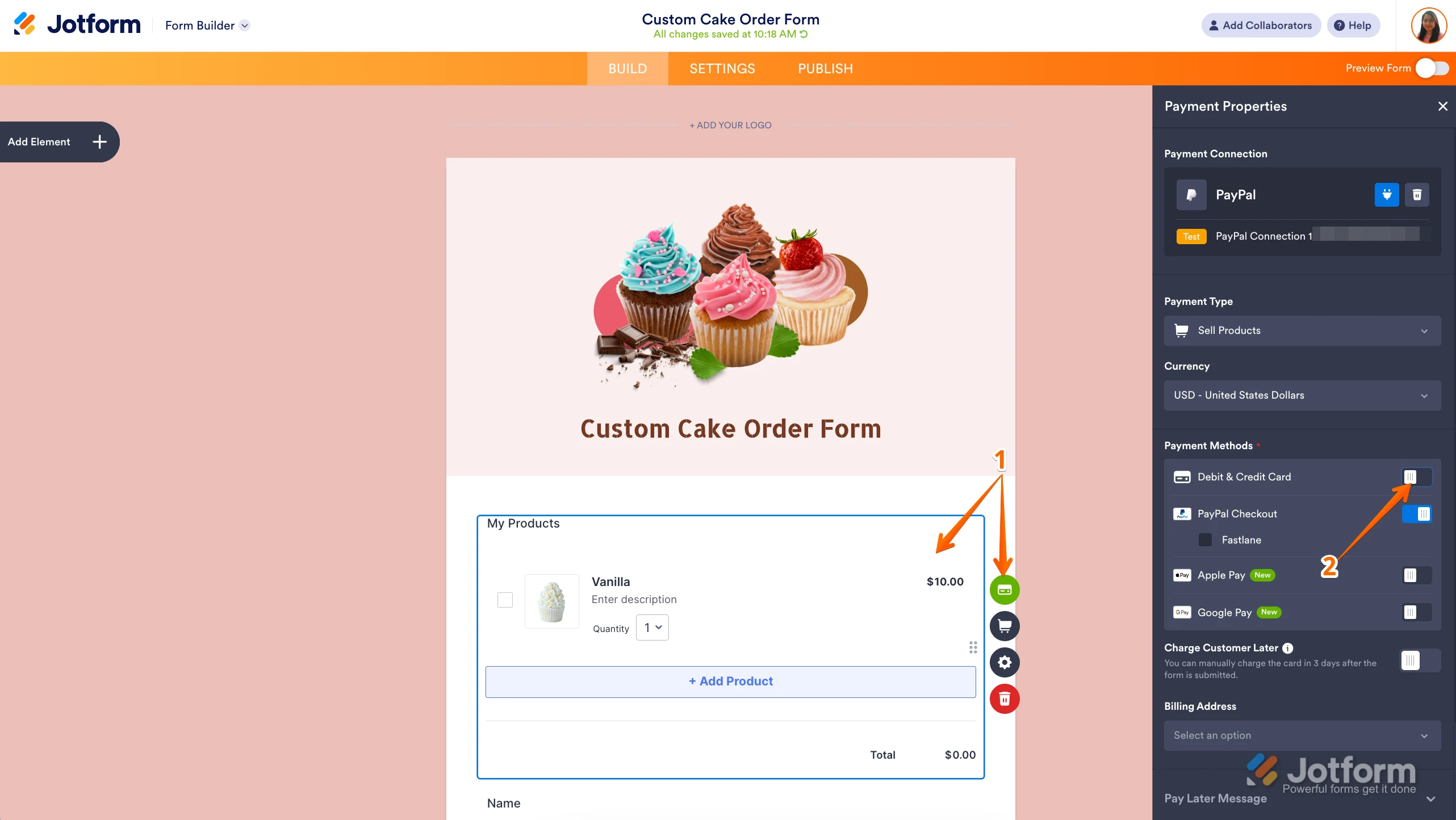
Thanks for using Jotform. Once your PayPal connection is set up, the default option will be PayPal Checkout. You can easily switch to another payment method anytime. Let me show you how:
- In Form Builder, click on your Product List field, and click on the Credit Card icon.
- Next, in the Payment Settings menu that comes up on the right side of the page, toggle on Debit & Credit Card.
 Note that Fastlane and Card Fields cannot be enabled at the same time.
Reach out again if there’s anything else we can help you with.
-
 markeallenosu
I tried this but it said I could not change since I have Fastrack on
-
 Lorenz JotForm Support
Hi Mark,
I'm not sure what Fastrack you're referring to. If you mean Fastlane, as mentioned earlier by my colleague you cannot use Debit&Credit card payment method if Fastlane is turned-on. If you're referring to something else, you can provide us a screenshot so we can check. Let me show you how to post a screenshot to our Help Center:
1. On the Help Center page, scroll down to the Your Answer section and click on the Image icon.
2. Drag and drop your image into the Upload box, or click on it and select your file.
3. Then, click on the Add button in the bottom-right corner of the window.
4. To resize it, click on your screenshot and then click on one of the boxes in the corners, and drag it inward.
5. Once you're finished, click on the Post Answer button at the bottom right of the Your Answer section.