-
 Diverse_Logistics
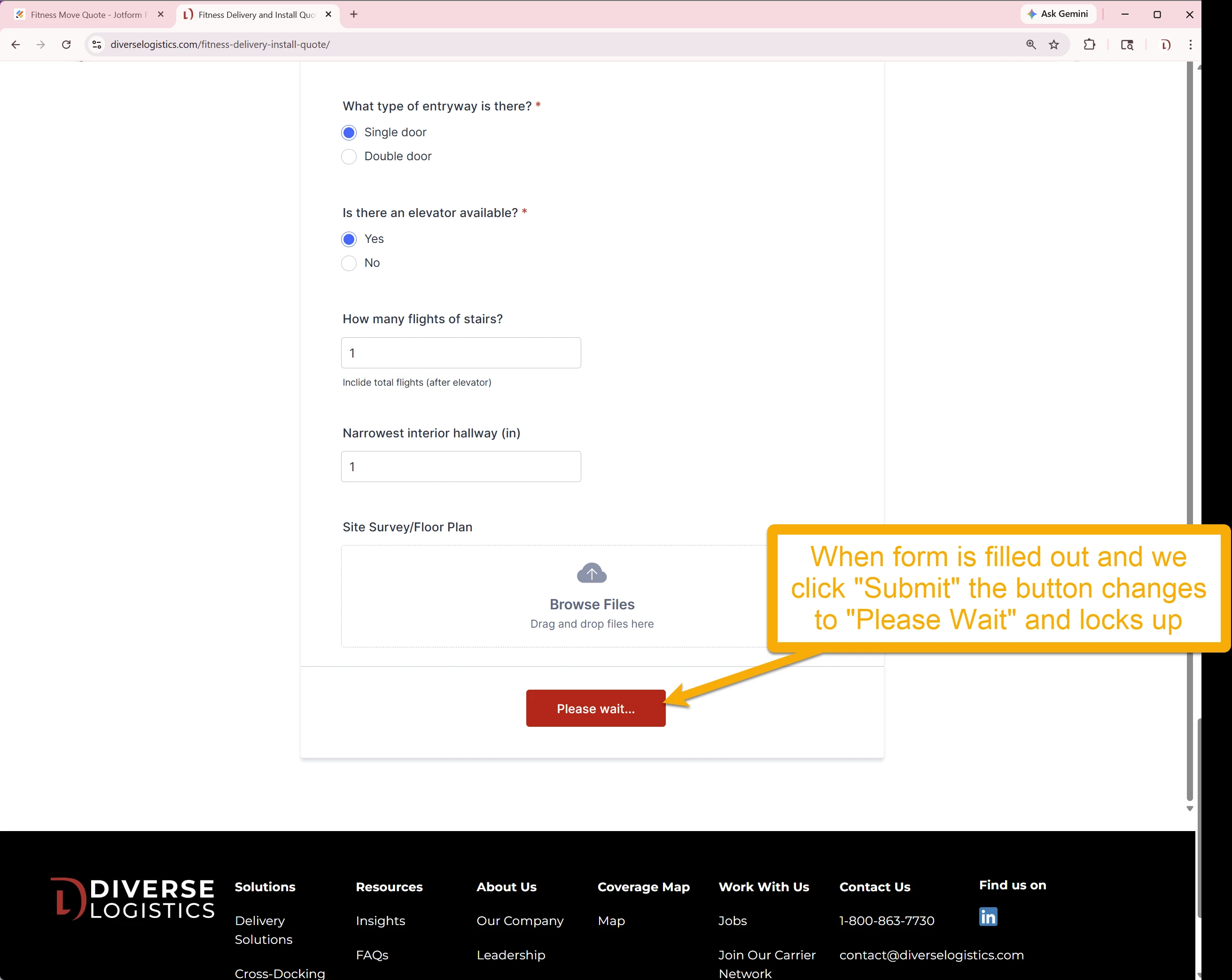
We have a few forms we created a few months back that were working as expected. But today we found out 3 of the forms are not actually working at all. Below is one of the 3 forms where we see "Please wait" after we click "Submit". Is there an issue with the JotForm platform? I cannot see how/where there is an issue with the actual form.

-
 Podo: Support Specialist
Hi Diverse,
Thanks for reaching out to Jotform Support. I'm an AI assistant here to assist you.
The issue where your forms show "Please wait" after clicking submit can be caused by several factors, but it is not necessarily a platform-wide problem. Here are some common reasons and solutions to consider:
- Network or connectivity issues: A weak or unstable internet connection can cause the form submission to hang on "Please wait." Ensure you have a stable connection.
- Form cache problems: Sometimes, an old cache of your form can cause issues. Clearing your form cache often resolves this. You can clear your form cache by going to your Workspace page, clicking your Profile Picture on the top-right, selecting Settings, and then clicking Clear Cache in the Form Caches section.
- Form settings or conditions: Check if there are any conditions or integrations that might be causing the form to stall during submission.
- Submission limits or quotas: If your form has reached its submission limit for the month, it might not submit properly. Verify your submission limits and upgrade your plan if needed.
- Payment or incomplete submission issues: If your form includes payment fields, incomplete payments might cause submission delays or issues.
Since you mentioned this issue is happening on three forms that were working previously, clearing the form cache is a good first step to try.
Let me show you how:
- Go to your Workspace page.
- Click your Profile Picture/Avatar on the top-right side of the page.
- Select Settings to open your Account Settings page.
- On the right side of the Form Caches section, click Clear Cache.
This will clear the cache and may resolve the "Please wait" issue.
If the problem persists after clearing the cache, please let me know, and we can explore other troubleshooting steps.
Give it a try and let us know how it goes.
-
Diverse_Logistics
This this not work
-
Podo: Support Specialist
Hi Diverse,
One of our Support Team members will take it from here to follow up shortly.
-
 Lesther Support Team Lead
Hi Diverse_Logistics,
I cloned your form to test, but I was unable to replicate the issue. Check out the screencast below showing my test:
Keep us updated and let us know if you need any more help.
-
Diverse_Logistics
https://diverselogistics.com/big-and-bulky-quote/
Yes, please submit a test submission. -
 Jason Enterprise Support
Hi Diverse_Logistics,
I tested your form directly on your website and ran into the same issue. Check out the screencast below to see my results:
But when I tested it using the direct link to your form, it was submitted without any interruption. Check out another screencast below:
To help fix this issue, can you re-embed your form to your website using the iFrame embed code? Embedding your form on a webpage is really easy. Let me show you how:
- In Form Builder, in the orange navigation bar at the top of the page, click on Publish.
- In the menu on the left side of the page, click on Embed.
- Now, select the iFrame, and click on Copy Code.
- Paste your code into your webpage's embed area, and that’s it.
Let us know how it turns out.