-
AAmae Brown
I need help canceling an order. submission date:
Mar 16, 2026 5:52 PM for Shareeta Jones. Please advise. Thank you
-
 Podo: Support Specialist
Hi,
You can easily cancel a Workflow in Jotform Inbox. Let me show you how:
- In Jotform Inbox, select the submission you want to restart.
- Next, click on the Three Dots icon on the top-right corner of the page, and in the Dropdown menu, select Cancel Flow.
- Now, in the Confirmation window that opens, click on Cancel Flow.

Reach out again if there’s anything else we can help you with.
-
 Kyle JotForm Support
Hi Amae,
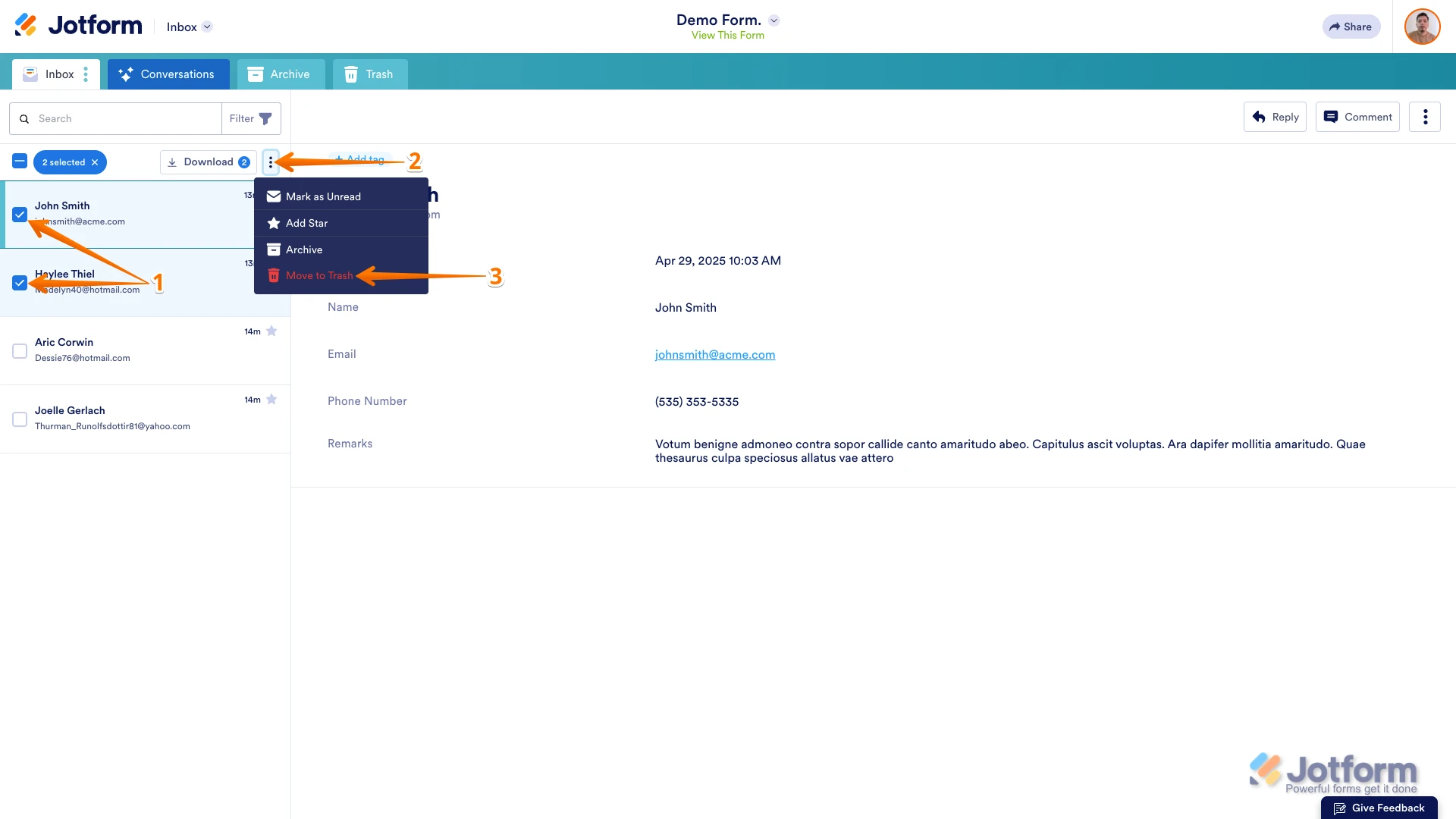
Thanks for using Jotform. If you're the form owner, you need to delete the submission if you want to cancel an order. If not, you need to contact the form owner to cancel the order. You can easily delete submissions in Jotform Inbox. Let me show you how:
- In Jotform Inbox, on the left side of the screen, tick the boxes next to the submissions you want to delete.
- Then, click on the Three Dots icon next to the Download button in the upper left of the page.
- Now in the Dropdown menu, select Move to Trash.
Deleted submissions stay in the Trash folder for 30 days from the deletion date before getting permanently erased.
Let us know if you need any more help.