-
EEmilee Burgess
Hi,
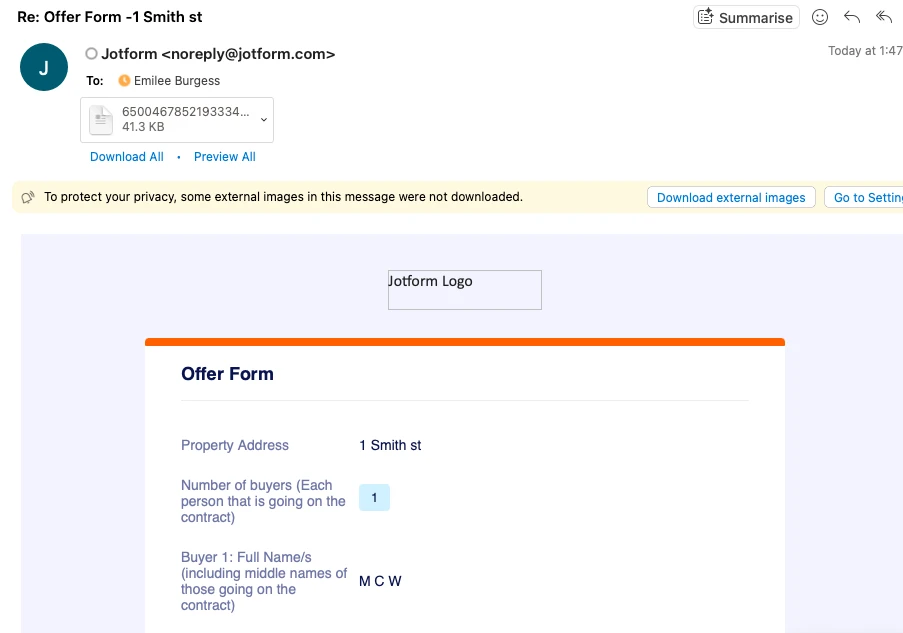
I have just set up some jotform accounts for my team.
Through my account I am receive form submissions to my email and receiving the form in the body of the email.
However, on my colleagues account, I am not receiving the form in the body of the email. I am just receiving a notification to say the form was signed successfully with a PDF attachement.
However both the settings in both accounts are the same.
We would like to come through in the body of the email.
Can you please assist with enabling this feature?

-
 Podo: Support Specialist
Hi Emilee,
Thanks for reaching out to Jotform Support. I'm an AI assistant here to assist you.
Regarding your issue with email notifications, it sounds like your colleague's email notification is set to only send a notification with a PDF attachment rather than including the form submission data in the body of the email.
Here’s how to ensure the form submission appears in the body of the email notification:
- Go to Form Builder and open the form you want to edit.
- Click on Settings in the top orange bar.
- Select Emails from the left panel.
- Edit the Notification email by clicking the pencil icon.
- Under the Email tab, make sure the email content includes the form fields and submission data (this is usually the default template). If the email only contains a short notification message, you may need to customize the email body to include the submission details.
- Check the Advanced tab and see if the PDF attachment option is enabled. If you want the form data in the email body, the PDF attachment can be enabled or disabled independently, but the email body must contain the submission data template.
- Save the changes after editing the email template.
Make sure your colleague's notification email template is not set to a minimal notification message but instead includes the full submission data in the email body.
If both accounts have identical settings but the behavior differs, it might be worth comparing the exact email templates side by side to ensure no differences exist.
Give it a try and let us know how it goes.