-
 bm2575
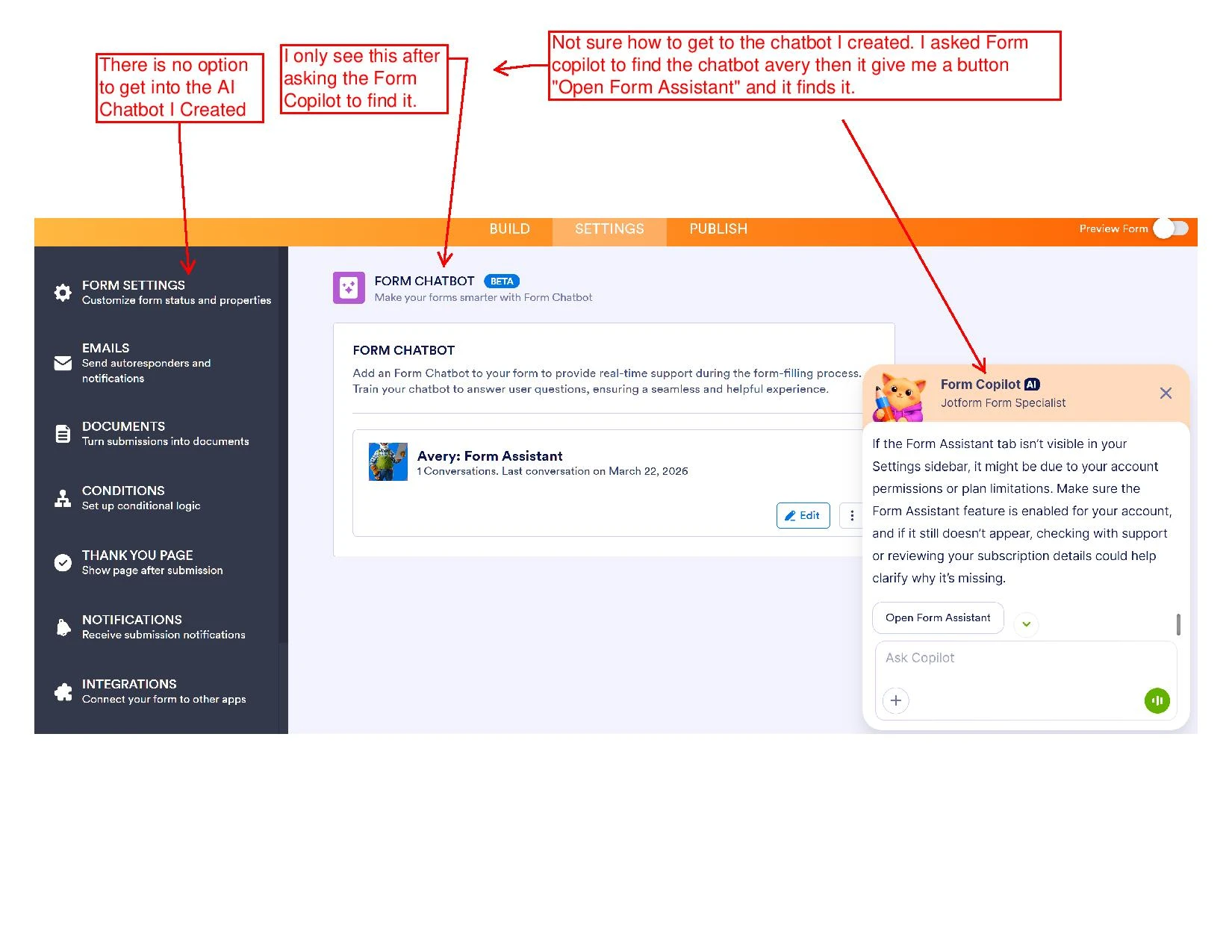
I am not able to locate a formchat that I created specifically tied to a form. I am trying to learn about chatbot and created this form https://www.jotform.com/build/252158685585168. Then I created an AI chatbot specifically tied to this form called Alex.
My main question is why Alex does appear in under the My Agents section. But also Alex does appear under the specific form settings, there is no button or option to get to it. However I was able to find under by asking the Generic Form Copilot AI and it did give me a button to hit "form

-
 Kris JotForm Support
Hi bm2575,
Thanks for reaching out to Jotform Support. I accessed the Form Builder from the link that you shared. The Form Chatbot option is shown in the left menu under the Settings tab. You can refer to the screencast below:
Is this happening to this specific form only, or all the forms you created? If there's no vertical scrollbar showing on the right side of the browser, you can try zooming out the screen. This allows us to know where the issue is coming from. Can you also try to use other browsers or incognito?
Let us know if you have any other questions.
-
bm2575
We have zoomed out and also checked on 3 different computers and coont see the Form Chatbot option below jotform sign, it simply not showing at all on any pc any browser
-
Kris JotForm Support
Hi bm2575,
I've cleared the caches of your forms. This usually resolves this kind of issue. But if the Form Chatbot isn't showing, let us take a look at this for you. To do that, we’ll need your permission to access your account. Don’t worry, you can turn it off again once we’re done. Let me show you how to do it:
1. In the top-right corner of your Workspace page, click on your Avatar/Profile Image icon.
2. Then, in the Dropdown menu that opens, click on Settings.
3. Next, in the panel on the left, click on the Security tab.
4. If you haven’t opened your Security page in a while, it’ll ask you to verify. To do that, click on Send Verification Code.
5. Then, enter the Verification Code you receive in your email.
6. Finally, at the bottom of the page, toggle on Jotform Support Access.
After we hear back from you, we’ll have a better idea of what’s going on and how to help. -
bm2575
Hi Kris, we've enabled the Jotform Support Access , thank you for looking into this.
-
 Lorenz JotForm Support
Hi bm2575,
I checked your account and I don't see that Form Chatbot section as well. That product is actually still in BETA, so that isn't made available to everyone yet. But I've gone ahead and enabled it to your account. You should be able to navigate to that section now, without relying on the AI Copilot.
Let us know if there's anything else we can help you with.
-
bm2575
Hi Kris,
Thank you for your help, I appreciate it alot!


 After we hear back from you, we’ll have a better idea of what’s going on and how to help.