-
 Neil_armer
Email is not getting sent per condition

-
 Podo: Support Specialist
Hi Neil,
Thanks for reaching out to Jotform Support. I'm an AI assistant here to assist you.
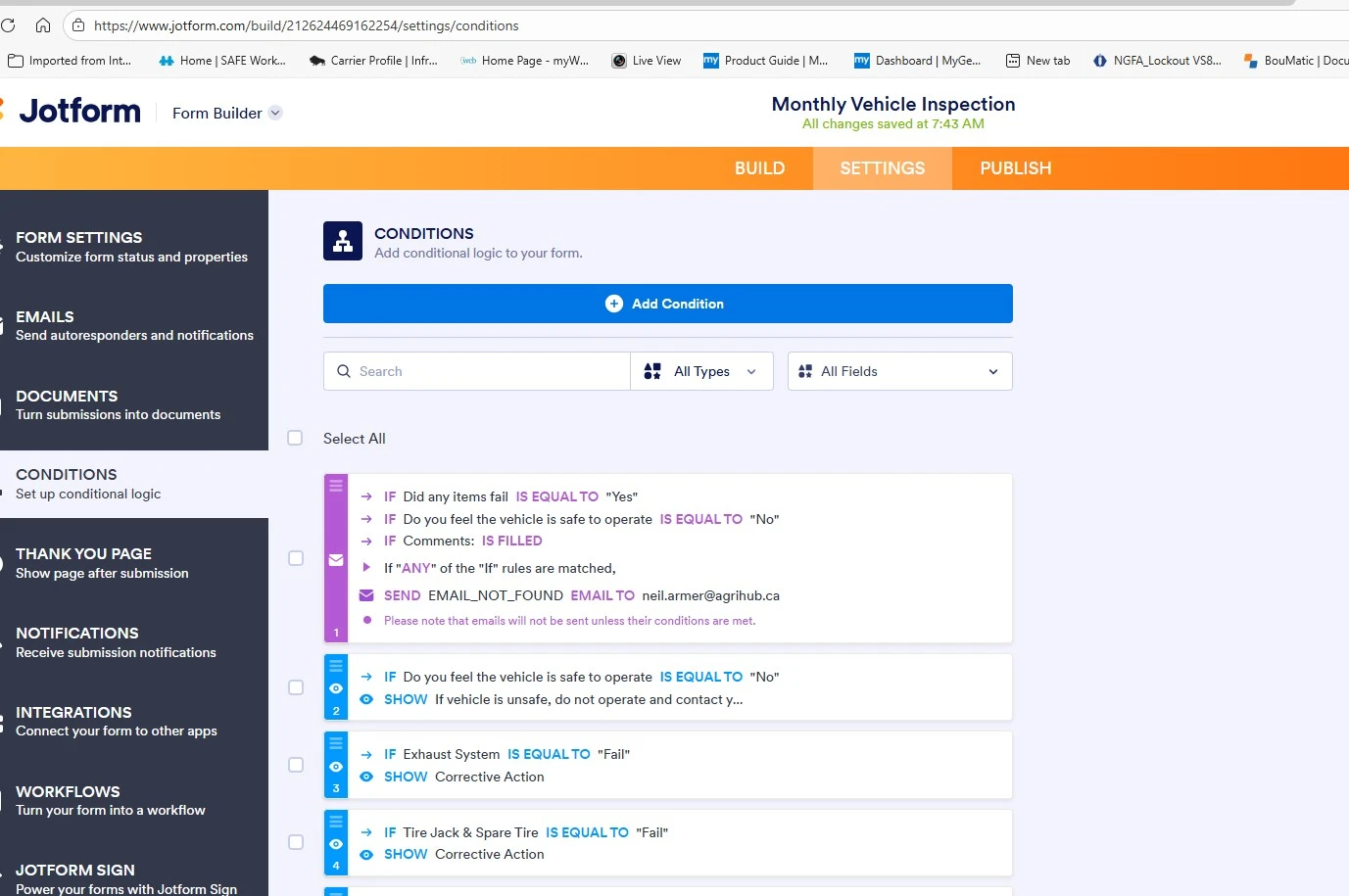
Based on the information you provided and the image description, it looks like you have set up conditional logic to send an email notification labeled "EMAIL_NOT_FOUND" to your email address when any of these conditions are met:
- If "Did any items fail" is equal to "Yes"
- If "Do you feel the vehicle is safe to operate" is equal to "No"
- If "Comments:" field is filled
The note in the image also mentions that emails will only be sent if their conditions are met.
To troubleshoot why the email is not being sent, please check the following:
- Ensure the conditions are correctly set and the form inputs meet those conditions when submitted.
- Verify the recipient email address is correct and not on the bounce list in your Jotform account settings.
- Check your spam or junk folder to make sure the emails are not being filtered out.
- Review your form's email notification settings under the Emails tab in the Settings section of your form builder to confirm the notification is active and properly configured.
- Use the Test Email feature in the notification settings to verify if the email can be sent successfully.
- Check the email logs in your Jotform account to see if the email was triggered and if there were any delivery issues.
If all these are correctly set and you still face issues, please provide more details about the form or any error messages you see.
Give it a try and let us know how it goes.
-
Neil_armer
the conditions are correct but no emails going to me or my junk folder
-
Podo: Support Specialist
Hi Neil,
Since the conditions are correct but you are not receiving any emails in your inbox or junk folder, I need to check a few details to assist you better.
Could you please confirm the email address you have set as the recipient for the notification?
This will help me verify if there are any issues related to email delivery for that address.
Looking forward to your response.
-
Neil_armer
-
Neil_armer
that is the correct address
-
 Kyle JotForm Support
Hi Neil,
I checked your form and noticed that your Change Email Recipient doesn't have email to sent to. Check out my screenshot below:
To fix this, you need to create a Notification Email and select it in your conditions. Let me show you how:
1. In Form Builder, in the orange navigation bar at the top of the page, click on Settings.
2. Next, click on Emails in the menu on the left.
3. Select Notification Email from the Other Email Options section aclick on Save Email at the bottom.
4. Then, go to the Conditions on the left.
5. Hover your mouse over the condition and select the Pencil icon.
6. Select the Notification Email you created from the Send dropdown section and select Save.
Try that and reach out again if you need more help.