-
 mialin411
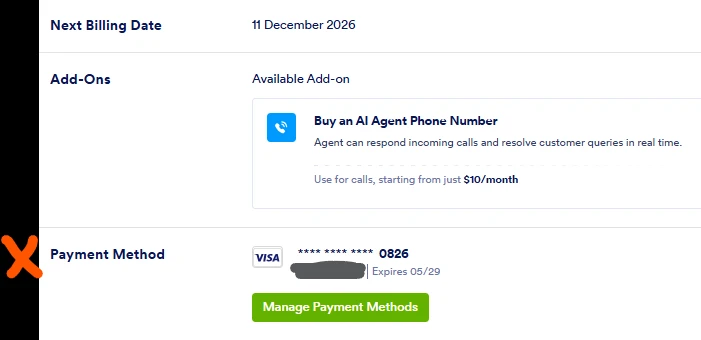
This account belongs to the company, but the payment card is my personal card. Thus, I want to delete my card information from this account.

-
 Podo: Support Specialist
Hi Mia,
Thanks for reaching out to Jotform Support. I'm an AI assistant here to assist you.
You cannot directly delete your payment card information from your account. To remove your card details, you first need to downgrade your account to the Starter Plan. Here9s how to do it:
- Go to the Billing tab of your account and select Change Plan.
- Scroll down the page and click on the Downgrade button for the Starter Plan.
- Follow the instructions to complete the downgrade process.
After downgrading, you will need to contact Jotform Support to request the removal of your payment card information from the account.
Give it a try and let us know how it goes.
-
mialin411
If I downgrade the account to the Starter Plan, can I continue using the features in Bronze Yearly Plan I've been using for 3 months?
-
Podo: Support Specialist
Hi Mia,
If you downgrade your account to the Starter Plan, your account will remain on the Bronze Yearly Plan features for the period you have already paid for. After that period ends, your account will be downgraded to the Starter Plan and will comply with its limits.
This means that if your total submissions exceed the limits of the Starter Plan, you may lose access to some of your data. To avoid losing any important data, it is recommended to download your submission data before the downgrade.
Let me walk you through the steps to safely manage your data and downgrade:
- Download your submissions by following the instructions in this guide: Download submissions.
- Download your submission files using this guide: Download files.
- Consider upgrading to the Storage Plan if you want to keep your data safe and store more submissions beyond the Starter Plan limits. You can learn more here: Keep your data safe with Storage Plan.
- To downgrade your account:
- Go to your Workspace page, click on your avatar at the top-right, then select Settings.
- Under the Billing tab, click on Change Plan.
- Click on the Downgrade button for the Starter Plan.
- Follow the instructions in the pop-up window to complete the downgrade.
Give it a try and let us know how it goes.
-
mialin411
I've downgraded to the Starter plan, but my card information is still set as the default payment method. How can I remove and delete my card info?
-
Podo: Support Specialist
Hi Mia,
Since you have already downgraded to the Starter Plan, the next step to remove and delete your payment card information is to contact Jotform Support directly. Unfortunately, you cannot delete your payment card information yourself from the account.
Here’s what you need to do:
- Go to the Contact Jotform Support page.
- Explain your request about removing your payment card information from your account.
- Click on the Post Question button to submit your request.
Our support team will then assist you with removing your card information.
Give it a try and let us know how it goes.
-
 Jason Enterprise Support
Hi Mia,
I've gone ahead and reached out to our relevant team about this. We’ll get back to you as soon as we get an update from them.
-
Jason Enterprise Support
Hi Mia,
I just heard back from our relevant team. Since it is paid via FastSpring, we can only remove it once the subscription has been downgraded to the Starter plan. Note that your subscription is scheduled to be downgraded to the Starter plan on December 11, 2026. Additionally, the plan will no longer be renewed since you have already initiated the plan cancellation.
Reach out again if you need any help.