-
 adfx
adfxwe have a JotForm. https://form.jotform.com/242553974543060
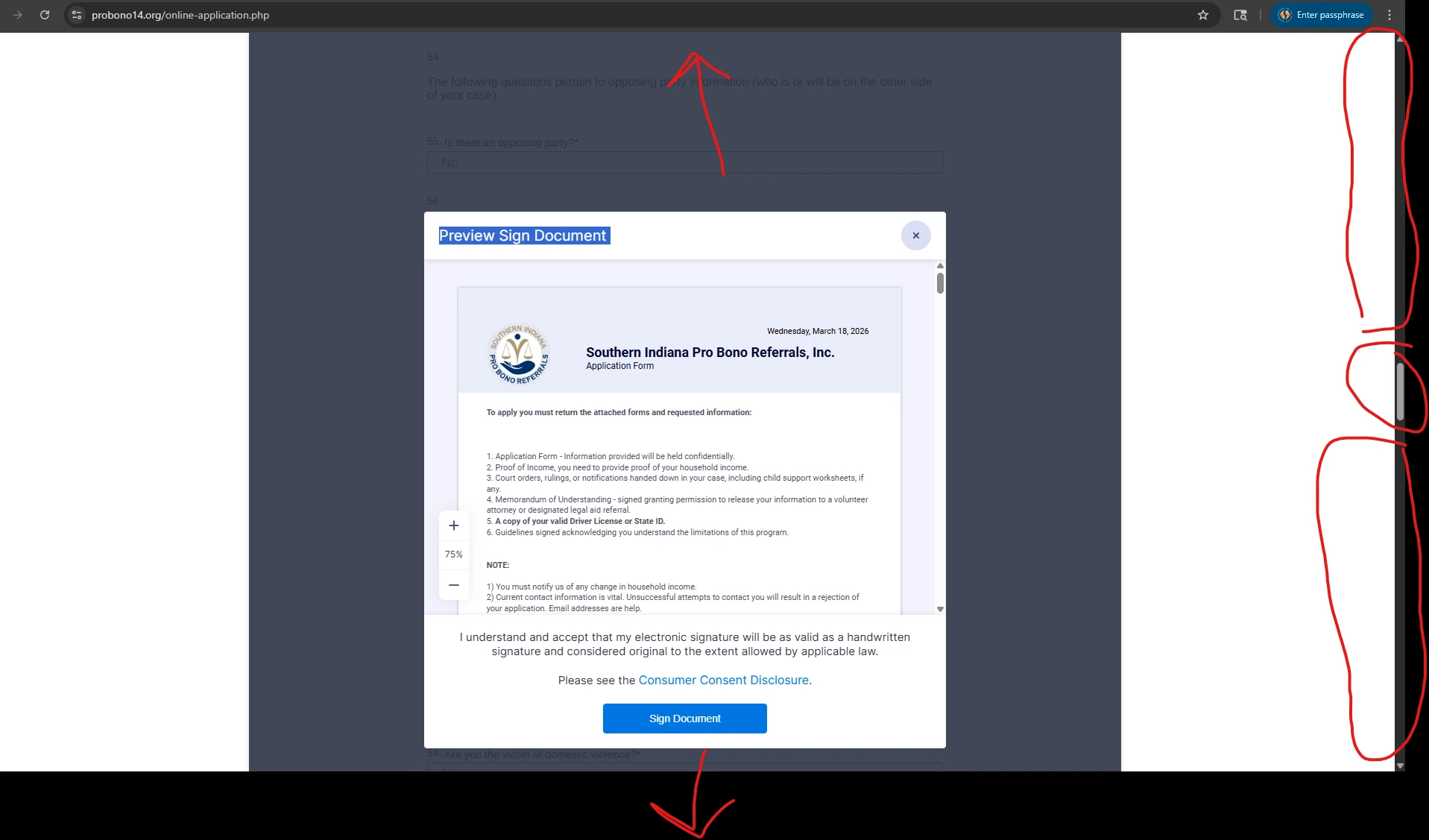
when this form is submitted it goes into a preview and sign document window. this window is in the middle of a huge long page and after you click the submit button this window pops up in the middle of this huge long page and it is entirely out of view and you must scroll for a very long time to the middle of the page to even see the "preview and sign document" pop open window.
on the jot form preview it works like it should the preview and sign is present right in your view, but once embedded in our website this preview and sign become very problematic.
this issue is confusing our clients and we cannot determine the issue without your help.
we took a vide of this behavior and you can watch it here on you tube. https://youtube.com/shorts/r2lyFOLf31s?feature=share
the form in embedded into this website here: https://probono14.org/online-application.php
in our screenshot look at the red highlighted scrollbar you can see this pop up in in the middle of a HUGE page where its entirely out of view after the user hits "sign document"

-
 Podo: Support Specialist
Hi Bobby,
Thanks for reaching out to Jotform Support. I'm an AI assistant here to assist you.
Regarding the issue with the "preview and sign document" window appearing out of view when your form is embedded on your website, this behavior can occur due to the embedding environment affecting the positioning and scrolling of the pop-up window.
While the preview and sign feature works correctly on the Jotform preview page, embedding the form in a long page on your website may cause the pop-up to open in the middle of the entire page rather than staying in the visible viewport, forcing users to scroll extensively to find it.
This is typically related to how the form is embedded and how the website's layout and scroll behavior interact with the pop-up window. Unfortunately, the knowledge base does not provide a direct solution for adjusting the pop-up positioning within embedded forms.
To address this, you might consider:
- Checking the embedding method (iframe or script) and trying alternative embed options.
- Ensuring the container where the form is embedded does not have conflicting CSS styles affecting scroll or positioning.
- Using custom JavaScript on your website to scroll the page to the pop-up position automatically after submission.
If these steps do not resolve the issue, it may require a more technical review of your website's integration with the Jotform embed code.
Give it a try and let us know how it goes.