-
 lizsmg
Hello, we just launched a new website built on squarespace, that has forms set up for users to fill out and submit to us...which i was told is through jot form. We have a distribution list of 6 emails that these forms are supposed to go to. Three of the email addresses, howver, are not receiving the forms. Please help
-
 Podo: Support Specialist
Hi,
Thanks for reaching out to Jotform Support. I'm an AI assistant here to assist you.
To help resolve the issue with the forms not being received by some email addresses on your distribution list, could you please provide the email addresses that are not receiving the form submissions?
This will help us investigate the delivery problem more effectively.
Looking forward to your response.
-
lizsmg
melvinf62@aol.com - hasn't received any
smgmediquip@optonline.net - receiving them sporadically
tamismgmed@optonline.net - hasn't received any
bart.smgmediquip@gmail.com - hasn't received any
-
Podo: Support Specialist
According to our logs, the emails were successfully sent to bart.smgmediquip@gmail.com. Please check your spam or junk folder. Consider whitelisting Jotform's sender email or domain to avoid future issues. Also, make sure your form's email fields and conditions are set up correctly. To prevent email bounce issues, please use valid, correctly formatted email addresses.
Here are a few tips to help prevent future email delivery issues:
- You can view your Email Logs to see what's happening with your form emails
- Whitelist Jotform IP Addresses and Domains
- If the issue persists, Setting Up a Custom SMTP to use your own email provider as the sender may help
Feel free to let me know if it’s still not working.
-
lizsmg
what about the other three emails
-
Podo: Support Specialist
I’ve made a few changes to help resolve the problem. The message indicates that the email address provided appears invalid or improperly formatted. Please ensure you are using a correctly formatted, valid email address in your form submission. This will help prevent delivery issues and ensure you receive notifications properly.
Here are a few tips to help prevent future email delivery issues:
- You can view your Email Logs to see what's happening with your form emails
- Whitelist Jotform IP Addresses and Domains
- If the issue persists, Setting Up a Custom SMTP to use your own email provider as the sender may help
-
 Jan JotForm Support
Hi lizsmg,
The reason you’re not receiving the emails is that the email addresses were added to the bounce list. For more details on why it was bounced, check the reason below:
smgmediquip@optonline.net is IN the bounce list

Reason(s) : bounced (host mx.altice.prod.cloud.openwave.ai[65.20.63.100] said: 550 RCPT TO: User unknown (in reply to RCPT TO command))


melvinf62@aol.com is IN the bounce list

Reason(s) : bounced (host mx-aol.mail.gm0.yahoodns.net[98.136.96.93] said: 553 5.7.2 [TSS09] All messages from 152.160.205.76 will be permanently deferred; Retrying will NOT succeed. See https://postmaster.yahooinc.com/error-codes (in reply to MAIL FROM command))


tamismgmed@optonline.net is IN the bounce list

Reason(s) : bounced (host mx.altice.prod.cloud.openwave.ai[65.20.63.100] said: 550 RCPT TO: User unknown (in reply to RCPT TO command))
I removed them from the bounce list, so you should now start receiving email notifications again. To help prevent this from happening again, we recommend setting up SMTP as your sender email so the notifications are sent through your own SMTP server instead of Jotform’s. Let me walk you through setting it up:
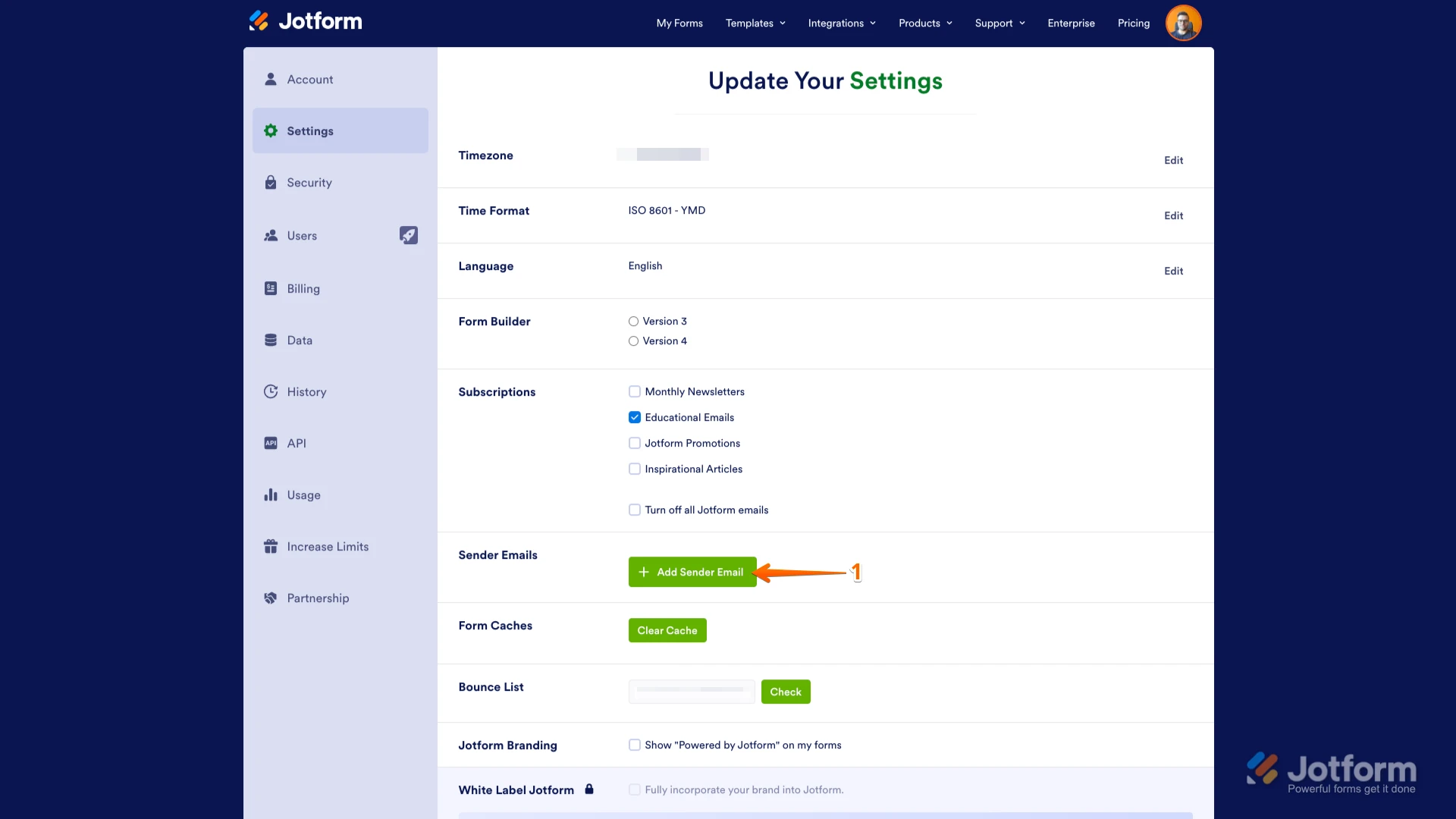
1. Go to the Settings page while logged in to your Jotform account and click on Add Sender Email in the Sender Emails section.

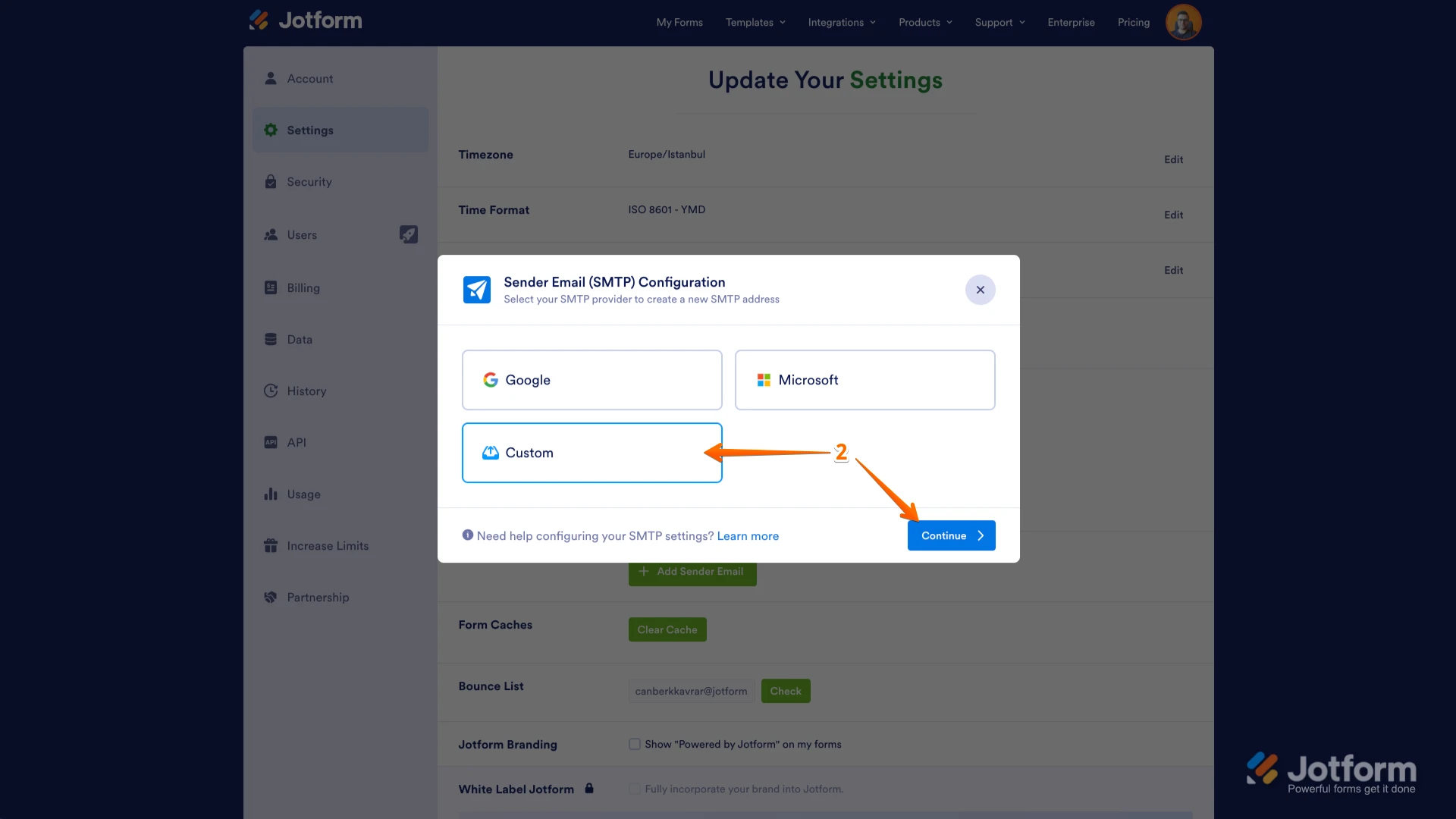
2. In the window that opens, select your Email provider and click on the Continue button. I used Custom SMTP in this example.
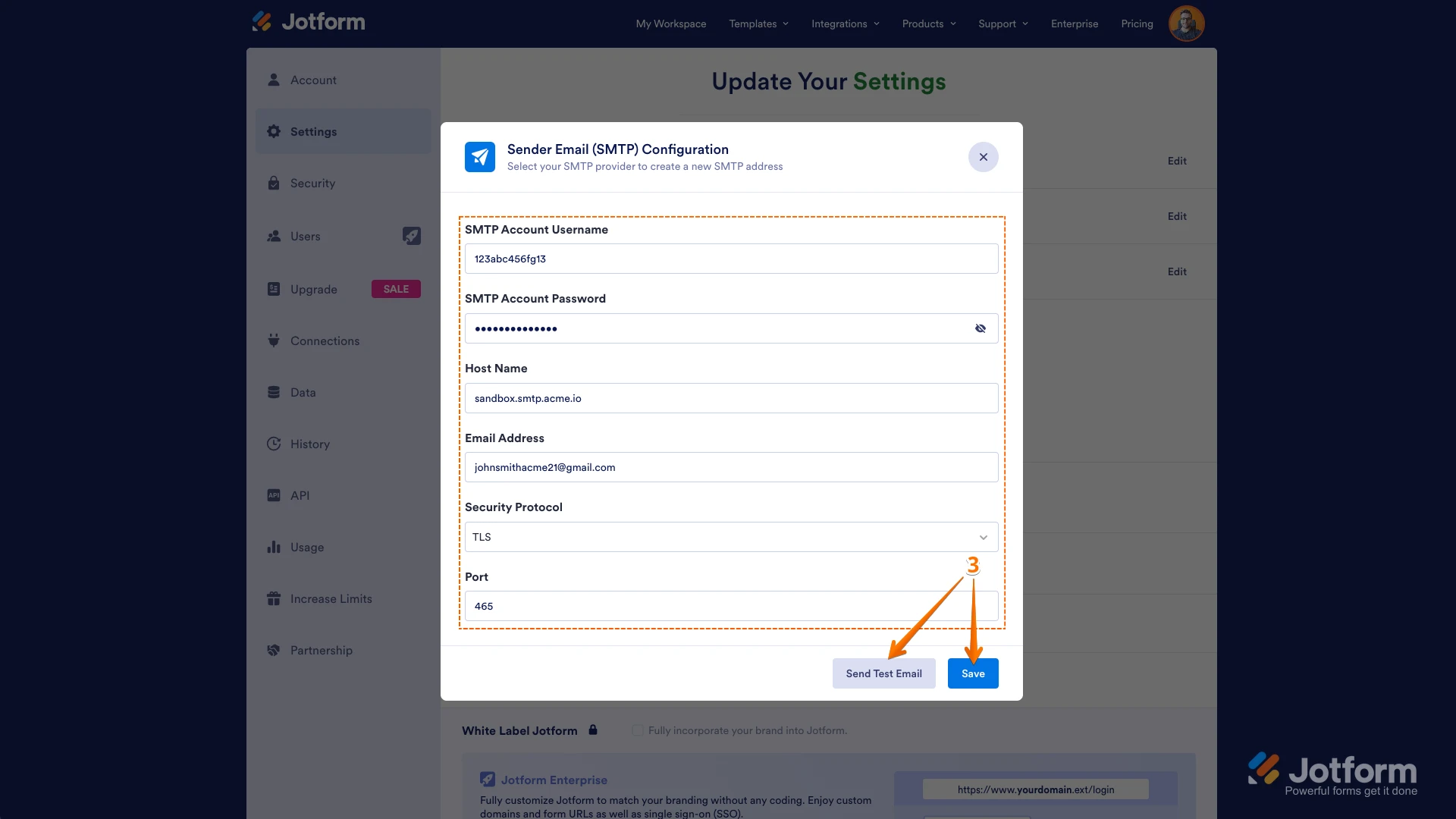
3. Enter your email provider's details, click on Send Test Email to check if it’s set up correctly, and then click on Save.
Don’t forget to also select your email address in your email settings, whether you’re using it in Form Builder or Workflow Builder. For more information about custom SMTP, check out our guide on How to Set up SMTP for a Form. You can also Whitelist Jotform IP Addresses and Domains to prevent important emails from being marked as spam or blocked. Give it a try and let us know if you need any help.
-
lizsmg
Thank you for your help!
 Don’t forget to also select your email address in your email settings, whether you’re using it in Form Builder or Workflow Builder. For more information about custom SMTP, check out our guide on