-
 PathwaystoTriumph
I have applied the same conditions in the same manor and some of them do not work accordingly. I don't understand why.
-
 Jerlan JotForm Support
Hi Chad,
Thanks for reaching out to Jotform Support. I have reviewed the form, and it has 13 conditions configured. Can you share a quick screen recording of what’s happening so we can try to replicate it on our end? You can upload it to Google Drive, Dropbox, or record with Loom and send us the link.
I also noticed that the conditions that have been configured are show/hide. Can you provide us with more details about what you're trying to show/hide?
When we hear back from you, we’ll be ready to move forward.
-
PathwaystoTriumphAs you go through the form you will notice that I have asked for fields to be hidden based on the answer of No. In about half the cases it works and the other half it is not hiding the fields that I have set to hide.
I have moved the conditions around to change outcomes and it only gets worse. Here is a google drive link for you to see the form in action and the field that is not the current answer should not appear when the message comes. I hope this helps.
https://drive.google.com/file/d/1JiCVlIKNslJ12P8CmuACf8wkO4eIwQ1u/view?usp=sharing
... -
 Kris Ann JotForm Support
Hi Chad,
I’ll need more time to check into this. I'll get back to you as soon as I can.
Thanks for your patience and understanding. We really appreciate it.
-
PathwaystoTriumphThank you for the update.
... -
Kris Ann JotForm Support
Hi Chad,
When I cloned and tested your form, the same thing happened for me. After checking, I found out that it's due to conflicting conditions. Since some of the conditions has contradictory rules that affect the same field simultaneously. After a few tests, I decided to Separate the Leadership Commitment page into two parts to meet your requirements base on how I understand the form should work.
I move the Heading and the first two questions and the paragraph field on the new page then the rest of the fields are on the other page but with same Heading and Paragraph fields. Then just adjusted the conditions. Now, take a look at the screencast below to see the results:

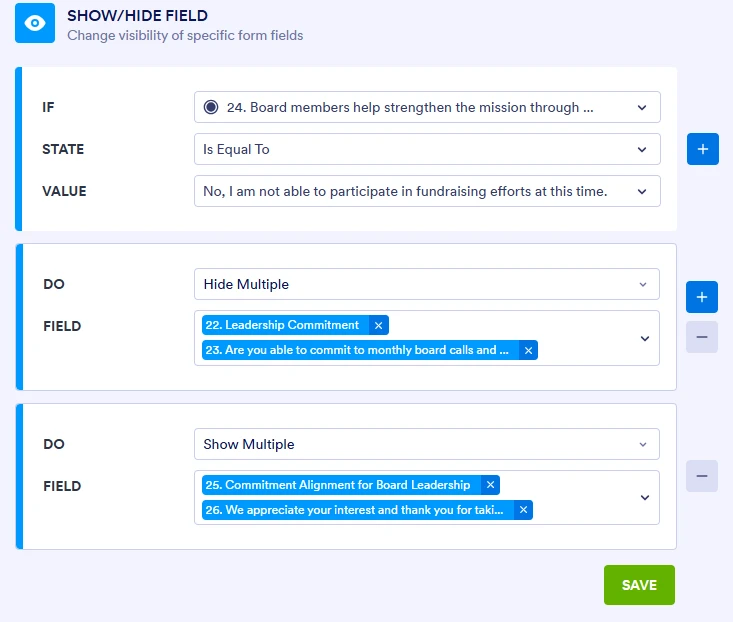
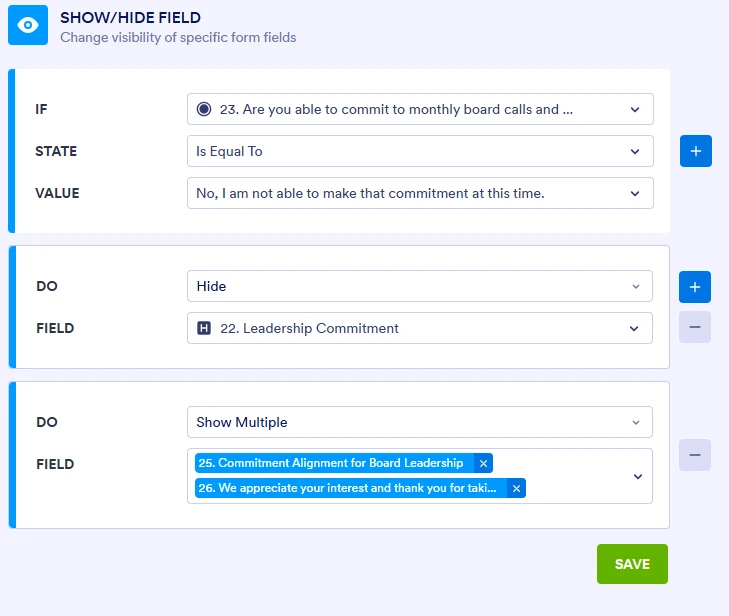
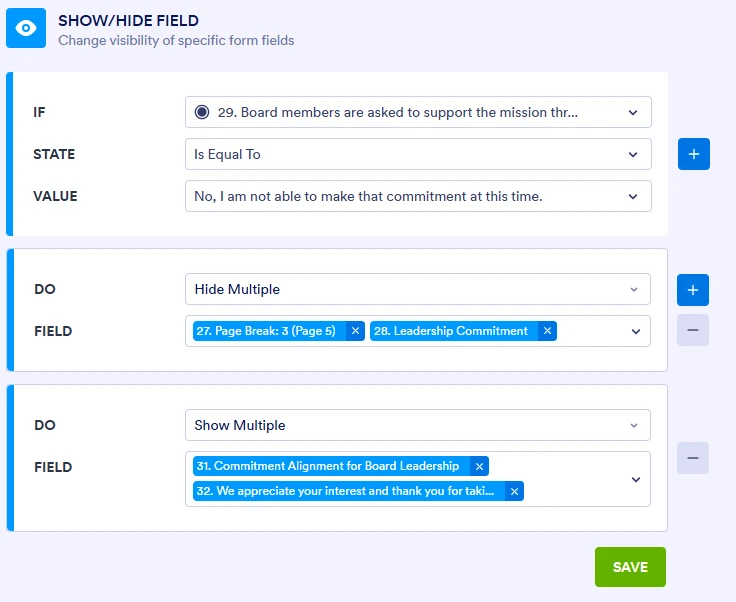
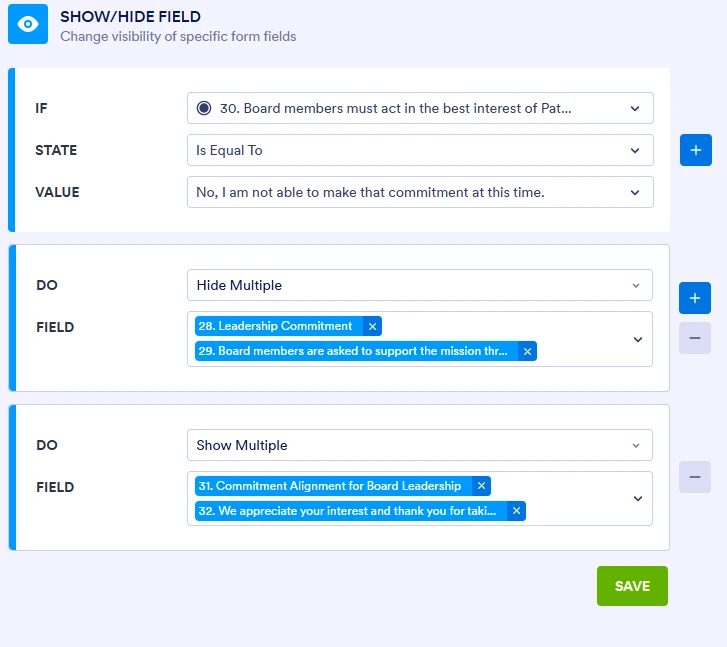
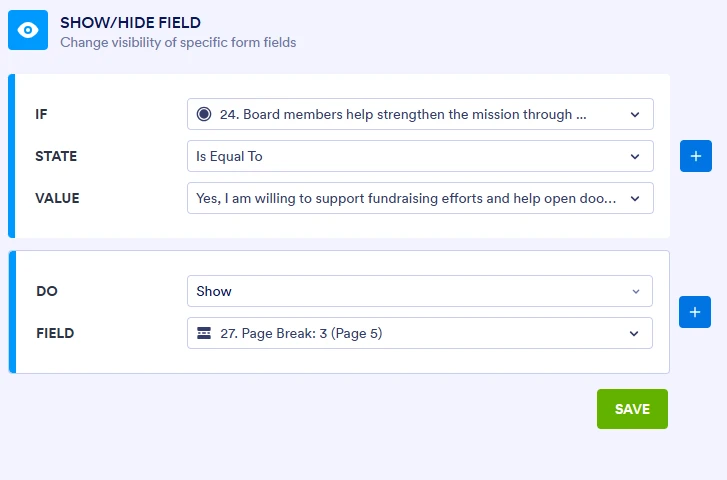
Here are the updated conditions:
You can test my demo form here to see if it works for you. You can also clone it so you can inspect how I set up the fields and condition.Give it a try and reach out again if you have any other questions.
-
PathwaystoTriumphI am not ok with this work around at all. It makes the form far too confusing and it did not address the same issue on the last page.
The only option that I can see is adding more pages with auto next while keeping the same header for each new question. I am not sure how to do that.
... -
 Raymond JotForm Support
Hi Chad,
I tested the cloned form shared by my colleague, and it seems to be working as expected. I suggest testing it through this link. If that’s not quite what you’re looking for, can you share a bit more info so I can help you better? For example, which part is not working as expected, and how are you expecting it to work?
Once we hear back from you, we can help you sort this out.
-
PathwaystoTriumphIf you were to look at the last page you would see the same issue occurs. The solution provided make the application very ugly and not user friendly. There are limitation in Jotform that do not allow for many things here. No reason the sheet should not be able to work as I built it originally.
This work around solution is NOT acceptable to me. I will check other form software to see if theirs are any better. Jotform was my favorite, not with this kind of support though.
... -
 Norwyn Enterprise Support
Hello Chad,
Thanks for getting back to us. I totally understand that the provided workaround isn't sufficient in your case. I've forwarded this to the Technical Team for further help. We'll get back to you via this same thread once we get an update.
We greatly appreciate your patience in the meantime.
-
PathwaystoTriumphI just broke this into individual pages and may need help with auto page progression. Not sure, I will let you know if and when I am done.
I would still like the feedback on my original concern before I consider a bigger partnership with jotform.On that note, I reach out to sales about non-profit pricing or free services. They pointed me back to the support contact form. You all handle this?
... -
 Reymae JotForm Support
Hi Chad,
I’ve gone ahead and moved your other question to a separate thread to keep things tidy, and someone from our Support Team will help you out with it here.
Reach out again if there’s anything else we can help you with.

 You can test my demo form