-
 assocdir
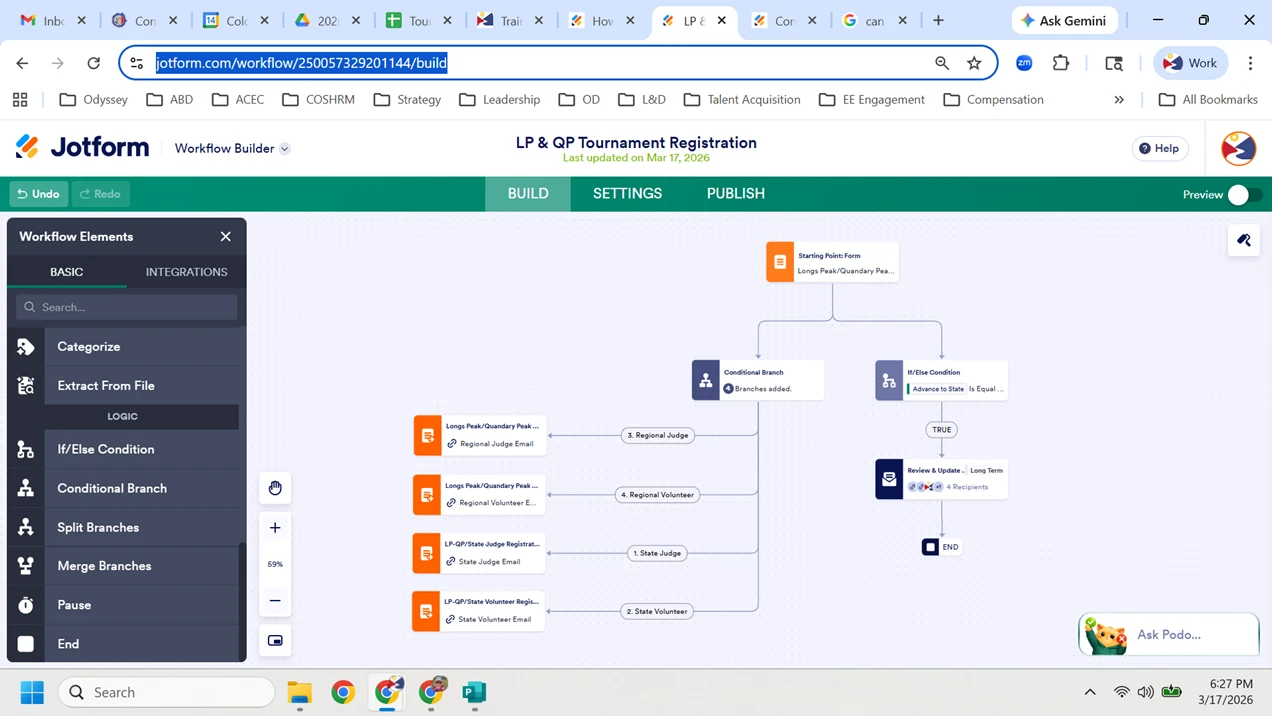
I have 2 different workflow branches, the 1st one on the left is when a team registration is originally submitted. The 2nd one on the right is after the 1st tournament and only for teams advancing to the state tournament. I only want to start the workflow on the right for teams advancing to state and don't want to restart the one on the left when I update team records and click submit to restart the workflow. Restart the workflow is enabled in settings.

-
 Rica Support Team Lead
Hi assocdir,
Thanks for reaching out to Jotform Support. You can add a Get Form Page URL widget to your form, then add an If/Else Condition element before the Conditional Branch. Use the widget’s value to prevent the branch on the left from triggering when you edit the submission, either using the Edit Link or in Jotform Tables. Here's an example:
Here's the result:
Give it a try and let us know if you need any help.
-
assocdirCan I just as easily just remove the link to the conditions on the left,
then add it back it when ready to start the process all over again next
year?
Calla Pott
Association Director
Colorado Odyssey of the Mind
970.420.4801
www.coloradoodyssey.org
Remember to Follow Us on <https:>
to get all the latest news, coaching
tips and so much more!
</https:>... -
 Reymae JotForm Support
Hi Calla,
Yes, you can remove the edit links from your workflow emails so recipients can still receive the emails without being able to modify the submission.
If you want to stop a specific workflow path entirely, you can disconnect the conditional branch from the starting point in the Workflow Builder. This prevents that branch from being triggered moving forward.
Just keep in mind that any submissions already in progress will continue following the workflow as it was originally set up at the time they were submitted. Changes you make now will only apply to new submissions. If you need those updates to affect existing submissions as well, you would need to restart the workflow for them so the new configuration takes effect.
Also, if you reconnect that branch in the future, it will only apply to new submissions from that point onward. Previous submissions will not automatically re-enter or follow the reconnected branch unless the workflow is restarted for those submissions.
Reach out again if there’s anything else we can help you with.