-
 CCOP
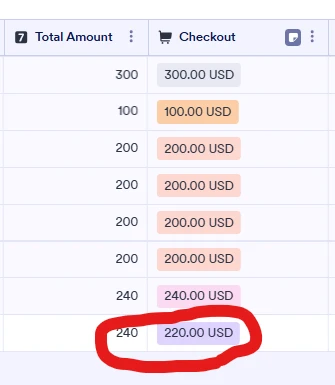
CCOPI have a form (https://pci.jotform.com/form/260717799504165) that charges parents based on the number of kids they are signing up for an event and if they are volunteering. I use conditional logic to calculate the price and that seems to be working correctly. I used this exact same form last year with no issues. However, I have two parents who are volunteering and signing up three kids. The form correctly calculates they should both be charged $240.00. However one is charged $240 and the other is charged $220.00. I cannot figure out how that is possible. $220.00 doesn't even come up anywhere in the form.

-
 Lauren
Hi CCOP,
Thanks for reaching out to Jotform Support.
I'm unable to see your form through the link, but I'd look for hidden differences in selections or logic that could make one parent's total $240 and another $220 even though they "look" the same. Here are the most common ways this can happen and how you can troubleshoot them:
A condition is firing for one parent but not the other
- Example: You have a condition like “IF volunteering = Yes AND kids = 3 THEN price = 220,” and another like “IF kids = 3 THEN price = 240,” and the order or logic makes one apply in some cases but not others.
- What to check:
- Go to Settings → Conditions and look for multiple conditions that affect the price field (Form Calculation, Update/Calculate, or Show/Hide that changes values).
- Make sure there is only one clear rule for “volunteering + 3 kids” and that no other condition can overwrite the price.
- Pay attention to IF rules that use “Contains” or “Is Filled”; a small difference (like an extra space, different option text, or a default value) can cause a different condition to trigger.
Different hidden/optional fields are being filled for one parent
- Example: One parent accidentally gets a discount field set to -20 (or a hidden “sibling discount,” “early bird,” or “coupon” field), while the other doesn’t.
- What to check:
- In Tables, open both submissions side by side and compare every column, including hidden fields.
- Look for any field that differs (e.g., a hidden discount, a checkbox, a promo code, or a “volunteer” field that has slightly different text).
- If you see a field that’s different and is used in your calculation, that’s likely where the $20 difference comes from.
Calculation formula includes more fields than you think
- Example: Your Form Calculation widget is doing something like:
- BasePrice + VolunteerDiscount + ExtraFee
- and one of those components is different between the two submissions.
- What to check:
- Open the Form Calculation widget, click the wand icon, and inspect the formula.
- Confirm exactly which fields are in the calculation and whether any of them can vary (e.g., a “volunteer discount” field that sometimes is 0 and sometimes -20).
- Make sure all fields used in the formula have the correct calculation valuesand default values.
Product List + logic mismatch (if you’re using a payment field + conditions)
- If you’re using a Product List and also using conditions or a calculation to set a User Defined Amount, it’s possible that:
- One parent’s total comes from the Product List’s own pricing, and the other parent’s total comes from a calculated amount you pass into the payment field.
- What to check:
- Open your payment field settings and see if it’s set to Sell Products or User Defined Amount.
- If it’s User Defined Amount, confirm that only one fieldis feeding that amount and that no other logic is changing it.
Rounding or manual override (less common, but possible)
- If you ever manually edited a submission or used a custom integration that can override the amount, one submission might have been changed after the fact.
- Check the submission history (if applicable) or any integrations (like custom API, Zapier, etc.) that might adjust the amount.
Give these a try and let us know how it goes!