-
 flyfishdaddy
Hello,
I hope you are doing well.
We are currently experiencing an issue with our form using Authorize.Net as the payment gateway. Previously, when a user submitted the form and completed payment, we were able to edit the submission via the edit link without being required to complete the payment again.
However, this behavior has recently changed. When we open an existing submission (that has already been successfully paid) using the edit link, the payment field is now required again, and the form cannot be resubmitted without re-entering payment details.
This is causing issues for us, as we frequently need to update existing submissions without charging the customer again.
I'd appreciate it if you could let us know of how we can bypass this.
Warm regards,
Alize
-
 Podo: Support Specialist
Hi Alize,
Thanks for reaching out to Jotform Support. I'm an AI assistant here to assist you.
You can quickly add an Edit Submission button to the Thank You page so people can make changes after submitting the form. Let me show you how:
- In Form Builder, in the orange navigation bar at the top of the page, click on Settings.
- Then, in the menu on the left side of the page, click on Thank You Page.
- Next, click on Action Buttons and select Edit Submission.
- Now, click on Create. That’s it. You’re done.

Reach out again if there’s anything else we can help you with.
-
 Sheena JotForm Support
Hi Alize,
To help us investigate this issue further, could you let us know if this problem occurs with all submissions or only specific ones? Can you provide the submission ID where the payment is being required again upon editing? This will help us check the exact submissions and understand the issue better.
Once we hear back from you, we'll be able to help you with this.
-
flyfishdaddy
it happens with all submissions across multiple forms that have payments. this is the submission id: 6486318933418840098
-
 Norwyn Enterprise Support
Hello Alize,
Thanks for getting back to us and for the additional information. Our team needs access to the Submission Data of the Forms to help us identify the cause of the behavior. To do that, we’ll need your permission to access your account. Don’t worry, you can turn it off again once we’re done. Let me show you how to do it:
1. In the top-right corner of your Workspace page, click on your Avatar/Profile Image icon.
2. Then, in the Dropdown menu that opens, click on Settings.
3. Next, in the panel on the left, click on the Security tab.
4. If you haven’t opened your Security page in a while, it’ll ask you to verify. To do that, click on Send Verification Code.
5. Then, enter the Verification Code you receive in your email.
6. Finally, at the bottom of the page, toggle on Jotform Support Access.
Also, can you capture a video of what’s going on and share it? Loom works great, or you can upload it to Google Drive or Dropbox.
After we hear back from you, we’ll have a better idea of what’s going on and how to help.
-
flyfishdaddy
hello the jotform support access setting is turned on. i cannot record a video but i can explain, i go to edit a submission and when i change the details id like to change and then try to submit, it requires me to fill the credit card information etc again and charge me once more
-
 Myla_T
Hi Alize,
I cloned your form and tested it to see if I could replicate the issue, but everything was working properly. Check out the screencast below to see my results:
I have gone ahead and cleared your form cache in case it may help. Can you go ahead and try it again? Also, can you try it on several browsers if it makes any difference? If the same thing happens, can you share a screenshot of your Console Logs? We have a guide here on How to Get a Console Report from Most Common Browsers.
Give it a try and let us know how it goes.
-
flyfishdaddy
Hello, you have not changed any details in the submission, maybe thats why it is accepting. I have just tried again and it asks for credit card details again even though the payment was made at the time of submission. i am attaching a screenshot below as well;
-
flyfishdaddy
this is the console report for the same page i have posted above
-
 Chris_L JotForm Support
Hi Alize,
To allow the users to edit the submission without making another payment, you can hide the payment field when the form is not accessed by the edit link. It's really easy to do. Let me show you how:
- In Form Builder, click on Add Element on the left side of the page.
- Then, in the Form Elements menu, under the Widgets tab, scroll down the list and choose the Get Form Page URL.
- Now, just drag and drop it to your form.
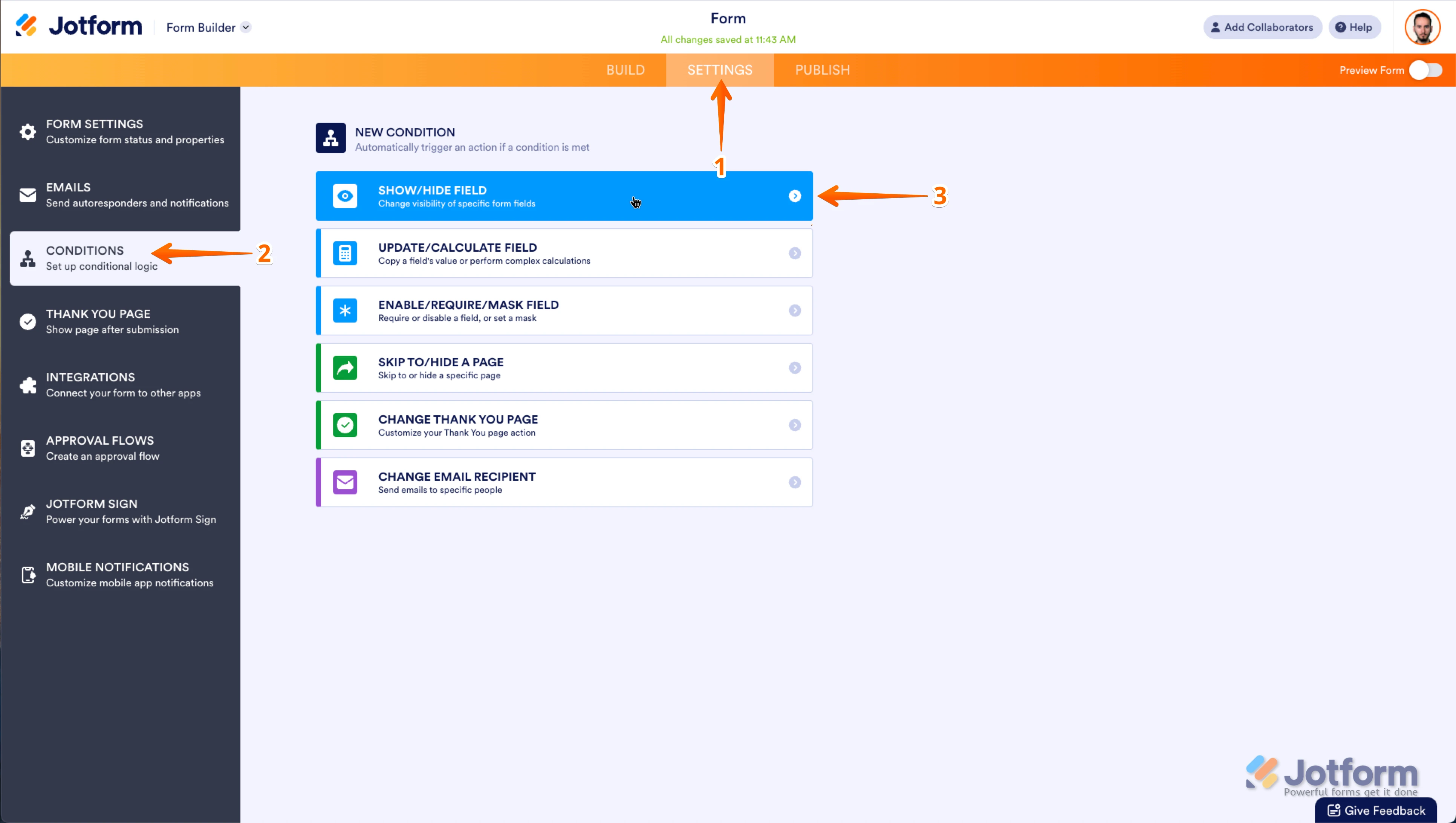
Now, let's set up the condition:
1. In Form Builder, in the orange navigation bar at the top of the page, click on Settings.
2. Click on Conditions on the left of the page.
3. Now, click on Add a New Condition and then click on Show/Hide Field.
4. Set the conditions like you see below:
Give it a try and reach out again if you have any other questions.
-
flyfishdaddy
hello, thank you for the "work around" but i don't need users to be able to edit. i as the form owner need to be able to go in and edit their form submissions without having to pay. i used to be able to do that until recently without using any extra widgets
-
 Lorenz JotForm Support
Hi Alize,
When you're editing the submission, are you doing it by resubmitting the form using the edit link? Since you're the owner of the form, I think the best way to avoid the payment again when editing the submission, is by making changes using inline edits. Let me walk you through it:
1. In Jotform Tables, simply a specific cell of a row & column you want to edit.
2. Then, make the changes directly in the cell.
Let us know if you have any other questions. -
flyfishdaddy
Hello Lorenz, if I do inline edits it doesnt automatically update the google sheets integration i have. in the past i was able to edit the submissions and re submit them without having to pay again, and it would be automatically changed in google sheets as well. if im doing inline edits, i am losing the data correction on the google sheets file
-
Lorenz JotForm Support
Hi Alize,
Thank you for the clarification. You're right about that, inline edits won't reflect to the Google Sheet integrated to the form. Now, I looked into your previous screenshot, where it shows that you're being required to enter the credit card and billing details again. Could you try disabling require option in the payment field and see if it'll allow you to proceed. Let me walk you through it:
1. In Form Builder, select the Authorize.net Payment Integration and click on the User Defined Amount button.
2. In the Property panel on the right, turn-off the Required option.
-
flyfishdaddy
will this affect the form in general? i still need people to pay upon submitting the form
-
 Bojan Support Team Lead
Hi Alize,
If you turn off option for required field, your users will be able to submit the form without making the payment. I tested cloned version your form and had the same issue, so I created a ticket and escalated this to our Developers. Although we don't know exactly when it'll be fixed, we’ll circle back to this thread when we have an update.
-
 Eda JotForm Developer
Hi Alize,
The issue has been fixed.
Can you give it a try and see how it goes?
-
flyfishdaddy
Hello Eda, it has been fixed. thank you so much!




Your Reply
Something Went Wrong
An error occurred while generating the AI response. Please try again!