-
 TaniaGomezConsulting
Hi,
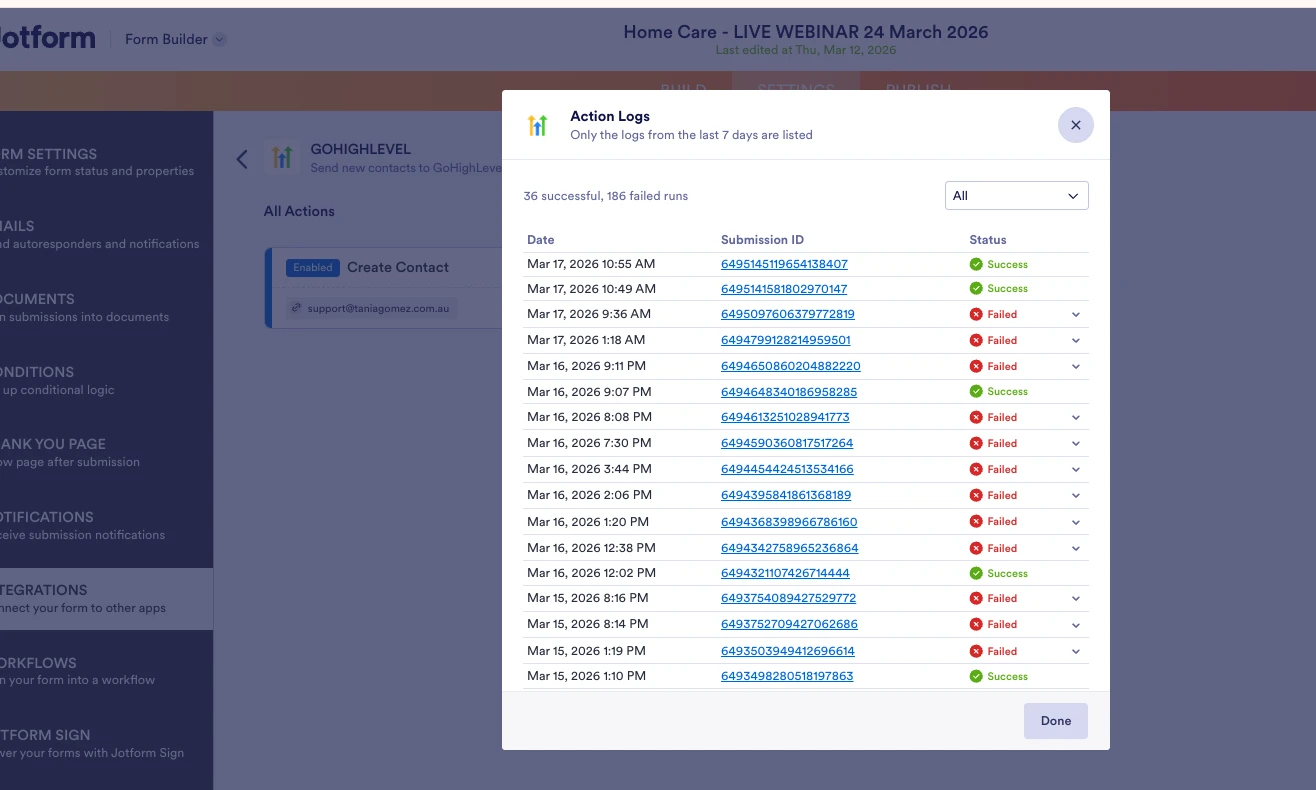
I checked the integration log for GHL, some are successful and some have errors.
Can you help investigate the issue and how it can be avoided?
Here's the form: https://www.jotform.com/build/260692058356463
-
 Podo: Support Specialist
Hi Tania,
Thanks for reaching out to Jotform Support. I'm an AI assistant here to assist you.
Regarding the GoHighLevel (GHL) integration errors you are experiencing, some submissions are successful while others fail. Although the specific error details for GHL are not provided in the knowledge base, common integration issues often arise from mismatched configurations or required fields not being properly set.
Here are some general steps to help investigate and avoid integration errors:
- Check the integration log details: Review the error messages in the integration logs to identify specific causes.
- Verify form field mappings: Ensure that all required fields in GHL are mapped correctly and that the data format matches what GHL expects.
- Make required fields mandatory: If any required fields are optional in your form, set them as required to avoid missing data errors.
- Review data limits and formats: Ensure that field values do not exceed character limits and are in the correct format.
- Monitor duplicate rules: If GHL has duplicate detection, make sure your integration handles updates properly or adjust duplicate rules accordingly.
Since your integration log shows a significant number of failed runs, it is important to check the detailed error messages for each failed submission to pinpoint the exact issues.
If you can provide specific error messages from the GHL integration logs, I can assist you further with targeted solutions.
Give it a try and let us know how it goes.
-
TaniaGomezConsulting
Another screenshot that shows the failed log. Please note, there's no Country field in the form. We intended not to have the country as it's a specific form that requires not to enter the country. Some of the entries are successful though, some are saying errors with the country issue. Should we go back on using Zapier until this issue is fixed on Jotform side?
Please have a human look into this matter. -
Podo: Support Specialist
Hi Tania,
One of our Support Team members will take it from here to follow up shortly regarding the GoHighLevel integration issue related to the missing Country field in your form. We understand some entries are successful while others fail due to this issue, and we will investigate it further.
Thank you for your patience.
-
 Lorenz JotForm Support
Hi Tania,
Thanks for your detailed update regarding the GoHighLevel integration error related to the missing Country field in your form. I understand that some submissions succeed while others fail due to this issue, and you are considering reverting to Zapier until the issue is resolved on Jotform's side.
Could you try removing the integration and integrating the form back and see if it'll help with the issue?
Give it a try and let us know how it goes.
-
TaniaGomezConsulting
Hi Lorenz,
I tried removing it back and integrating it back in. Doesn't work. I added the Country field and set it as hidden. I'll observe if that will work.
Just hoping that we don't have to add that all the time in the new form as country isn't required.
Thanks -
 Mark_S
Hi Tania,
The contact could not be created because the country field is invalid or missing. Please provide a valid country value or leave it empty if not applicable. is being returned directly from GoHighLevel. This means that even if the field is not included in your form, GHL is still expecting either:
- A valid country value, or
- The field to be explicitly empty/null, not just unmapped or missing
When the Country field is not mapped at all, the integration may still be sending an undefined or invalid value, which GHL rejects. This can also explain why some submissions go through while others fail. What you did is actually the best approach:
- Keep the hidden Country field in your form
- Set a default valid value, e.g., United States or your target country
- Map it properly in the GHL integration
This ensures every submission sends a valid value and avoids intermittent failures.
Let us know how your testing goes after adding the hidden field.
-
 Luna Product Triage Specialist
Hi Tania,
Thanks for patiently waiting. We've heard from our developers and they stated that the issue is resolved. Can you give it another try and see how it goes?
Let us know if you run into the same issue or if you need any other help.

Your Reply
Something Went Wrong
An error occurred while generating the AI response. Please try again!