-
 Masalamedia
I use a Jotform to sell course registrations.
Previously, Jotform formulas failed to extract the date or time information from the MyProducts field. So I had to ask my customers to enter the date and time information twice: once in a standalone field and once when they selected a product for sale. This double-entry was prone to error and completely inefficient, but Jotform support claimed it was the only way it could be done.
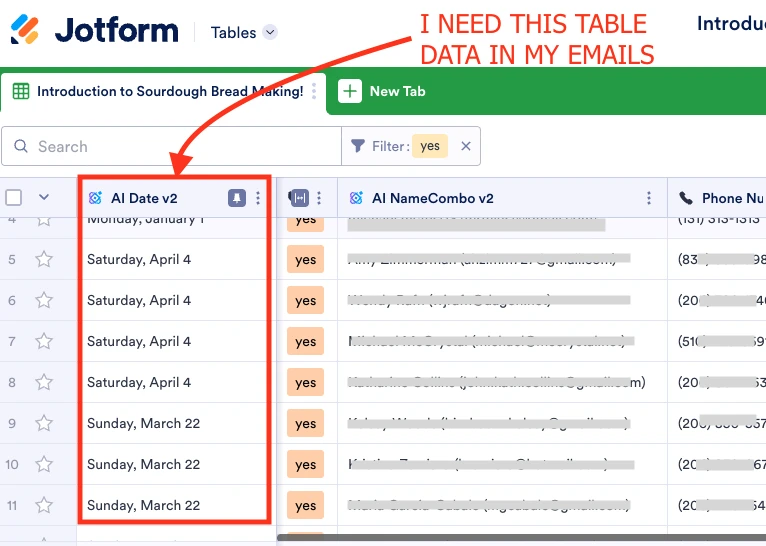
Happily, the new Jotform AI columns permit me to extract values for date and time out of MyProducts and into their own columns.
But now, how do I include values for date and time in my emails? My course registration confirmation email needs to clearly display the date and time of the course the person signed up for... super basic need. And those values are clearly visible in the Jotform Table view. But they don't appear to be available to actually use.
 Page URL: https://form.jotform.com/251395193921966
 -
 Kris JotForm Support
Hi Michael,
Thanks for reaching out to Jotform Support. The form emails are triggered when users click on the Submit button. In addition, manually added columns and data in the submissions table can't be added in the form emails.
While the feature you're looking for isn't available at Jotform right now, we've gone ahead and escalated your request to our developers. Exactly when or if it's developed depends on their workload, how viable it is, and how many other users also request it. If there are any updates, we’ll circle back to this thread and let you know.
Thanks for your patience and understanding, we appreciate it.

Your Reply
Something Went Wrong
An error occurred while generating the AI response. Please try again!