-
JJordan Howe
Users are receiving form unavailable message when attempting to access form
-
 Eduardo_Ca
Hi Jordan,
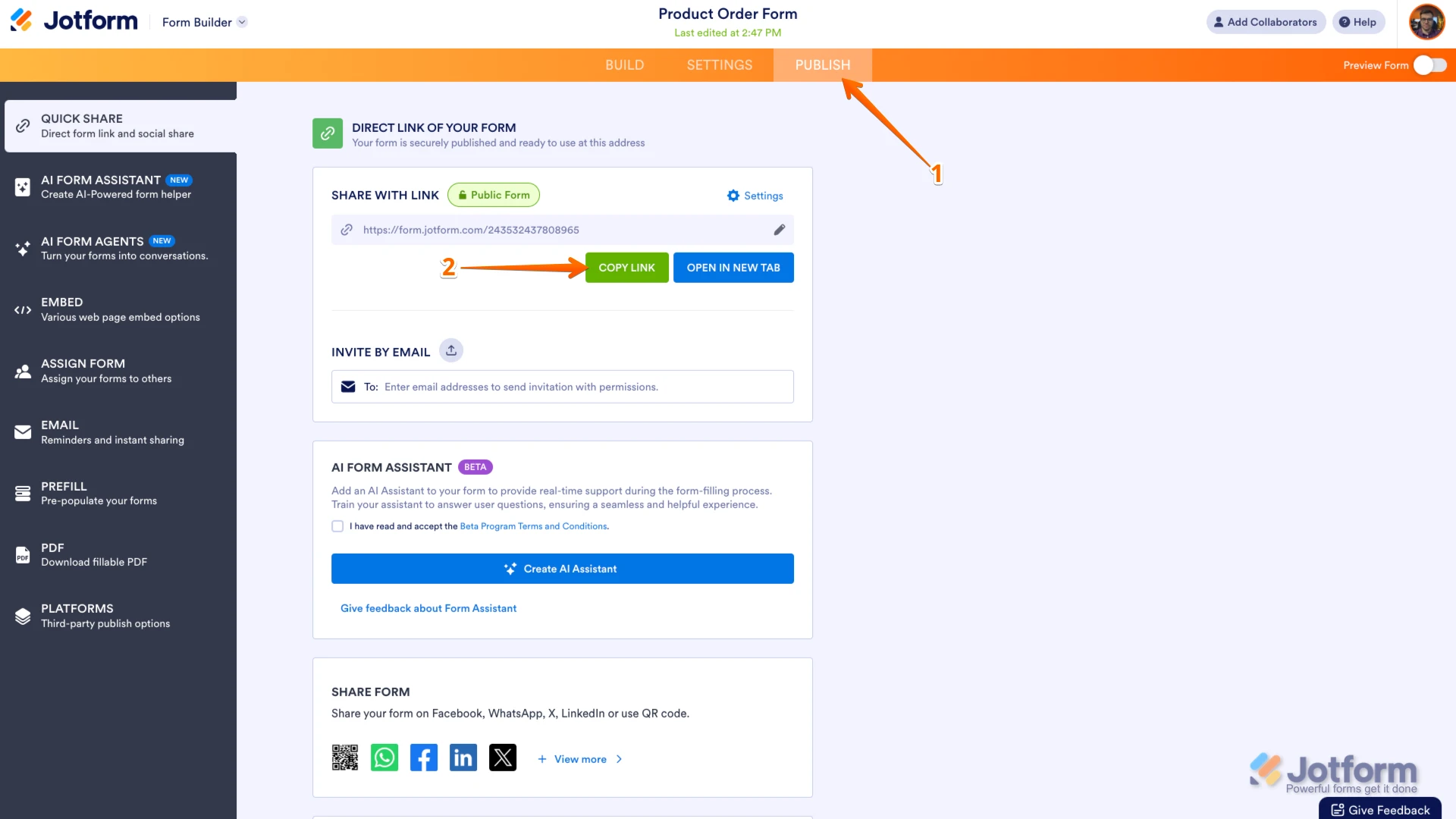
Thanks for reaching out to Jotform Support. I checked the forms in your account and it seems to be fine. Can you send us the URL of the form you're experiencing this issue? You can easily find your form's URL in Form Builder. Let me show you how:
- In Form Builder, in the orange navigation bar at the top of the page, click on Publish.
- In the Quick Share tab, click on Copy Link in the Share With Link section.
 Once you share the form URL with us, we’ll be able to help you better with this.
 -
 markringham
My form is not available why has this stopped
-
 Kamal JotForm Developer
Hi markringham,
Thanks for reaching out to Jotform Support. After reviewing your account, the forms associated with your account are:
Are you referring to a form besides these?
-
MMark
-
 Rica Support Team Lead
Hi Mark,
To keep the conversation organized, I moved your other question to its own thread, and someone from our Support Team will help you with it here.
Let us know if there’s anything else we can help you with.
 Once you share the form URL with us, we’ll be able to help you better with this.