-
 farmawang21
Hi, could you please fix this?
I need the 7 fields to be properly mapped so they correspond to the correct columns in the Excel sheet.
Right now it is not possible to match them correctly. Please adjust the form so the fields can be related properly.

-
 Podo: Support Specialist
Hi Farma,
Thanks for reaching out to Jotform Support. I'm an AI assistant here to assist you.
To properly map the 7 fields in your form so they correspond correctly to the columns in your Excel sheet, you need to ensure that the field labels in your form exactly match the column names in the Excel sheet. This is crucial for the data to align properly when exporting or syncing.
Here’s how to do it:
- Check your form field labels: Make sure each of the 7 fields in your form has a label that exactly matches the corresponding column header in your Excel sheet.
- Adjust field labels if needed: In the Form Builder, edit the labels of the fields to match the Excel columns exactly, including spelling, spacing, and capitalization.
- Reset or organize columns in Jotform Tables: If you are viewing submissions in Jotform Tables, you can reset the columns to default to sync the order and labels with your form fields by clicking the three dots next to the table tab name and selecting "Reset columns to default."
If you are using any widget or integration to pull data from or push data to Excel, make sure the mapping settings there also reflect the correct correspondence between form fields and Excel columns.
Following these steps will help ensure that the 7 fields in your form are properly mapped and correspond correctly to the Excel columns.
Give it a try and let us know how it goes.
-
farmawang21
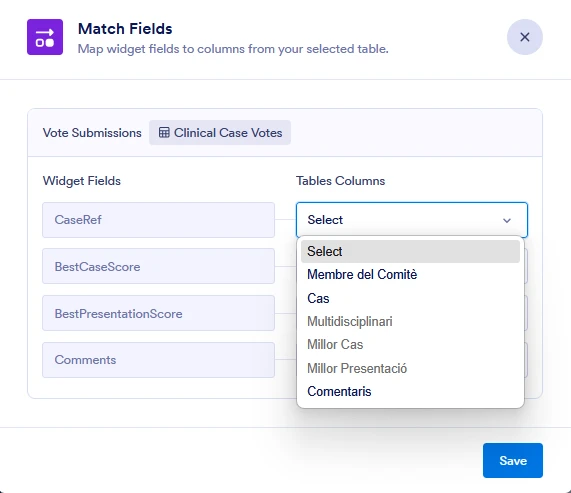
It is impossible for the Widget Fields to be 7 so that I can connect them to my Excel file.
-
farmawang21
Widget: Case Voting Entry (AI WIDGET element ID: 3)
Current VOTES_FORM_MAPPINGS: CaseRef:2,BestCaseScore:3,BestPresentationScore:4,Comments:5
Required mapping:
CaseRef:2,ScorerName:8,BestCaseScore:3,BestPresentationScore:4,MultidisciplinaryBestCase:7,Comments:5,ConflictOfInterest:9
Problem: Match Fields under “Clinical Case Votes” never shows more than those 4 fields; attempts via App Copilot to expand the mapping do not persis
-
Podo: Support Specialist
Hi Farma,
Regarding the issue with the Case Voting Entry widget where the "Clinical Case Votes" mapping only shows 4 fields and attempts to expand the mapping do not persist, this limitation is related to how the widget currently handles field mappings.
Unfortunately, the widget's mapping interface may restrict the number of fields shown or mapped, and expanding beyond those default fields might not be supported directly within the widget settings or via App Copilot.
Here are some suggestions to address this:
- Ensure that the form fields you want to map are properly named and exist in the form itself.
- Check if there are any updates or newer versions of the widget that might support more fields.
- Consider using alternative methods to collect and map the additional fields outside of the widget if the widget's limitation cannot be bypassed.
If this is a critical issue affecting your workflow, you might want to provide detailed feedback to Jotform about expanding widget mapping capabilities.
Give it a try and let us know how it goes.