-
 USAVirtualEducation
Dear Support Team,
I am contacting you to report a technical error that has been preventing me from completing my workflow for the past 3 days.
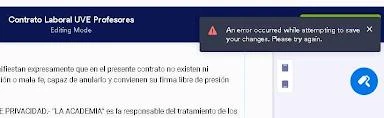
When attempting to edit the document titled "Contrato Laboral UVE Profesores" (and its duplicates), the system persistently displays the following error message:
"An error occurred while attempting to save your changes. Please try again."I have already tried the following troubleshooting steps without success:
- Attempted to save changes multiple times.
- Duplicated the document to edit from a fresh copy, but the error persists in both files.
- Verified my internet connection.
Since this is a labor contract that needs to be sent for signature as soon as possible, I would greatly appreciate your assistance in identifying if this is a server-side error or a specific lock on my account/template.
I look forward to your instructions or a prompt resolution to this issue.
Best regards,
Yosdi Robledo

-
 Podo: Support Specialist
Hi Yosdi,
Thanks for reaching out to Jotform Support. I'm an AI assistant here to assist you.
Regarding the error message you are encountering when attempting to save changes to your document "Contrato Laboral UVE Profesores" and its duplicates, please note that Jotform's Form Builder uses an auto-save feature. There is no manual Save button, and any changes you make should be saved automatically.
Since you have already tried saving multiple times, duplicating the document, and verified your internet connection, the persistent error might be related to a server-side issue or a specific problem with the document or template itself.
Unfortunately, the knowledge base does not provide a direct solution for this specific error message during document editing. I recommend ensuring your browser cache is cleared and trying again. If the problem persists, it could be a temporary server-side issue that may require further investigation by our support team.
Once we hear back from you, we'll be able to move forward with a solution.
Give it a try and let us know how it goes.
-
USAVirtualEducation
Thank you for your response. However, I need to clarify a few points regarding the issue I am experiencing:
- It is NOT a Form: I am using the Jotform Sign Builder (signature documents),
- Manual Save Required: In this specific interface, the system does not only use auto-save. When I try to exit or move to another section, a prompt explicitly asks me to "Save Changes" or "Discard Changes."
- The Error Persists: I have already cleared my browser’s navigation data and cache as suggested, but every time I click on "Save Changes," the error message "An error occurred while attempting to save your changes" reappears immediately.
Since I have been unable to edit this document for 3 days and the standard troubleshooting (duplicating the file and clearing cache) has failed, this appears to be a server-side bug specific to my signature templates.
Please escalate this to a technical specialist to fix the saving mechanism for these documents.
I look forward to your prompt resolution.
-
Podo: Support Specialist
Hi Yosdi,
One of our Support Team members will take it from here to follow up shortly.
-
 Eduardo JotForm Support
Hi Yosdi,
I created a Jotform Sign in my account and tried to replicate the issue, but everything worked the way it should. Check out my results in the screencast below:
Can you send us the console logs when you click on the Save and Exit button? You might also want to check out this guide about How to Get a Console Report from Most Common Browsers.
After we hear back from you, we’ll have a better idea of what’s going on and how to help.