-
AAlex
Hi,
I have tried to use conditional logic to transfer a user from one form to another form based on their answer. I have used the logic for the thank you page, but it is still not working and based on their answer, they are not being redirected to the other form I have created. Can you please help?
-
 Ronald JotForm Support
Hi Alex,
Thanks for reaching out to Jotform Support. Can you send me the link to your form so I can take a look for you?
In the meantime, here'e how you can Change the Thank You Page using Conditional Logic feature on your form:
1. In Form Builder, in the orange navigation bar at the top of the screen, click on Settings.
2. Next, in the menu that opens on the left side of the page, click on Conditions.
3. Under the New Condition section, click on Change Thank You Page.

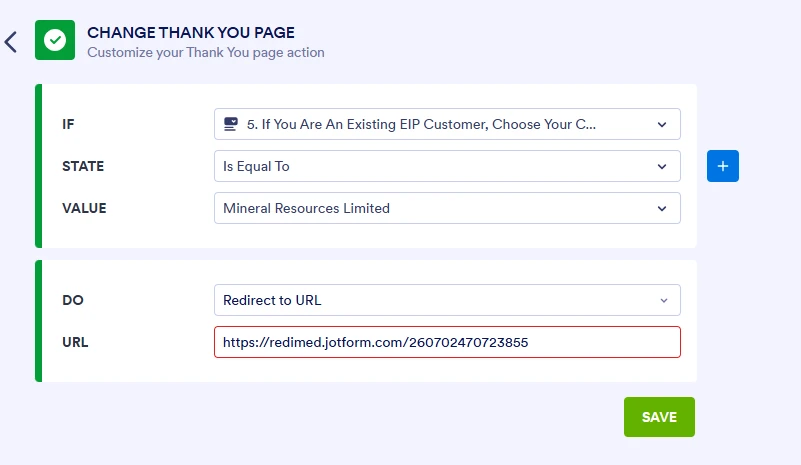
4. Set up the conditions similar to the screenshot below depending on what you need, and click on Save.
After we hear back from you, we’ll have a better idea of what’s going on and how to help.
-
AAlexHi,
Yes no problems here is the main form
<https:>
[Redimed Logo RGB_Redimed main logo full colour white BG.69b1f1b68541b1.36466635.png]
Clone of Early Intervention Referral Form<https:>
redimed.jotform.com<https:>
Sent from my iPhone
</https:></https:></https:>... -
Ronald JotForm Support
Hi Alex,
Unfortunately, we couldn’t view the screenshot you uploaded. I would suggest that you share the form link directly on your reply. Also, let me show you how to post a screenshot to our Help Center:
1. On the Help Center page, scroll down to the Your Answer section and click on the Image icon.
2. Drag and drop your image into the Upload box, or click on it and select your file.
3. Then, click on the Add button in the bottom-right corner of the window.
4. To resize it, click on your screenshot and then click on one of the boxes in the corners, and drag it inward.
5. Once you're finished, click on the Post Answer button at the bottom right of the Your Answer section.
-
AAlex
-
AAlex
-
 Aries JotForm Support
Hi Alex,
I see that you have an Enterprise account, which means that we have a dedicated Enterprise Support Team to help you. We have a guide that explains How to Contact Enterprise Support Team. Create a ticket there and someone from the Enterprise Support Team will get in touch with you shortly.