-
 AdminVPT
Hello, one of our employees Save and Continue Later Submissions disappear in his submissions.
I tried checking the Incomplete Submissions on my end and there is nothing. His Jotform Account is marius.fourie@vptmech.com
We need those date recovered asap.
-
 Podo: Support Specialist
Hi Admin,
Thanks for reaching out to Jotform Support. I'm an AI assistant here to assist you.
Regarding the issue of Save and Continue Later submissions disappearing for the user marius.fourie@vptmech.com, and no incomplete submissions showing on your end, here are some important points and steps to consider:
- Save and Continue Later submissions are saved as incomplete submissions until the user completes and submits the form.
- If the incomplete submissions section is empty, it means there are currently no saved but unsubmitted forms for that user.
- Unfortunately, if the user did not complete and submit the form, and the incomplete submission is not visible, the saved data might not be recoverable.
- If submissions were accidentally deleted, you can check the Trashed Entries in Jotform Tables or Inbox, where deleted submissions are kept for up to 30 days and can be restored.
- To restore deleted submissions, go to Jotform Tables, open the tab menu, select Trashed Entries, choose the entries to restore, and click Restore.
If the missing data is not in incomplete submissions or trashed entries, recovery might not be possible.
Let me know if you want detailed steps on checking and restoring trashed submissions or if you have any other questions.
Give it a try and let us know how it goes.
-
AdminVPT
He tried drafting a submission and click on save and continue later and check his submissions it does not appear however our other employees tried it and their save and continue later submissions shows up.
The issue is only happening to this specific account. marius.fourie@vptmech.com -
Podo: Support Specialist
Hi Admin,
The issue where Save and Continue Later submissions do not appear only for the specific user marius.fourie@vptmech.com, while other employees' submissions show up, may be related to how drafts are saved and accessed in Jotform.
Here are some important points and troubleshooting steps to consider:
- Save and Continue Later drafts are saved as incomplete submissions and should appear in the Incomplete Submissions section in Jotform Tables.
- Drafts not submitted within two months are automatically deleted, so timing might be a factor.
- Ensure the Save and Continue Later feature is properly enabled on the form for that user.
- Check if the user is saving drafts while logged into their Jotform account, as drafts saved without logging in might behave differently.
- Users can also access their saved drafts from the Drafts section in their Workspace if available.
- If the user saved drafts using the Skip Create an Account option, they should have received a draft link via email to access their saved form.
If the issue persists specifically for this user, it might be related to account-specific settings or how the drafts were saved. Unfortunately, if the drafts are not visible in Incomplete Submissions or Drafts, and no draft link was saved, recovery might not be possible.
For more detailed guidance, you can watch the video on downloading form submissions and managing drafts at these timestamps:
- How to view and manage incomplete submissions and drafts at 0:51
- How to download submissions as PDFs or other formats at 1:47
Give it a try and let us know how it goes.
-
AdminVPT
Still not working
-
 Sheena JotForm Support
Hi AdminVPT,
Could you let us know how the user marius.fourie@vptmech.com is filling out the draft? Is he using the Jotform mobile app or a browser? Also, did they receive a session URL link to continue the draft after saving it? This information will help us better understand the situation and provide more accurate assistance.
Once we hear back from you, we'll be able to help you with this.
-
AdminVPT
Hi,
His using the Jotform App on his phone and for the session URL Link. Im not sure. -
 Gemmhel Enterprise Support
Hi AdminVPT,
When I cloned and tested your form, everything worked the way it was supposed to. Take a look at the screenshot below to see my results:
Can you ask the user to sync the data in the Jotform Mobile App? Here’s how:
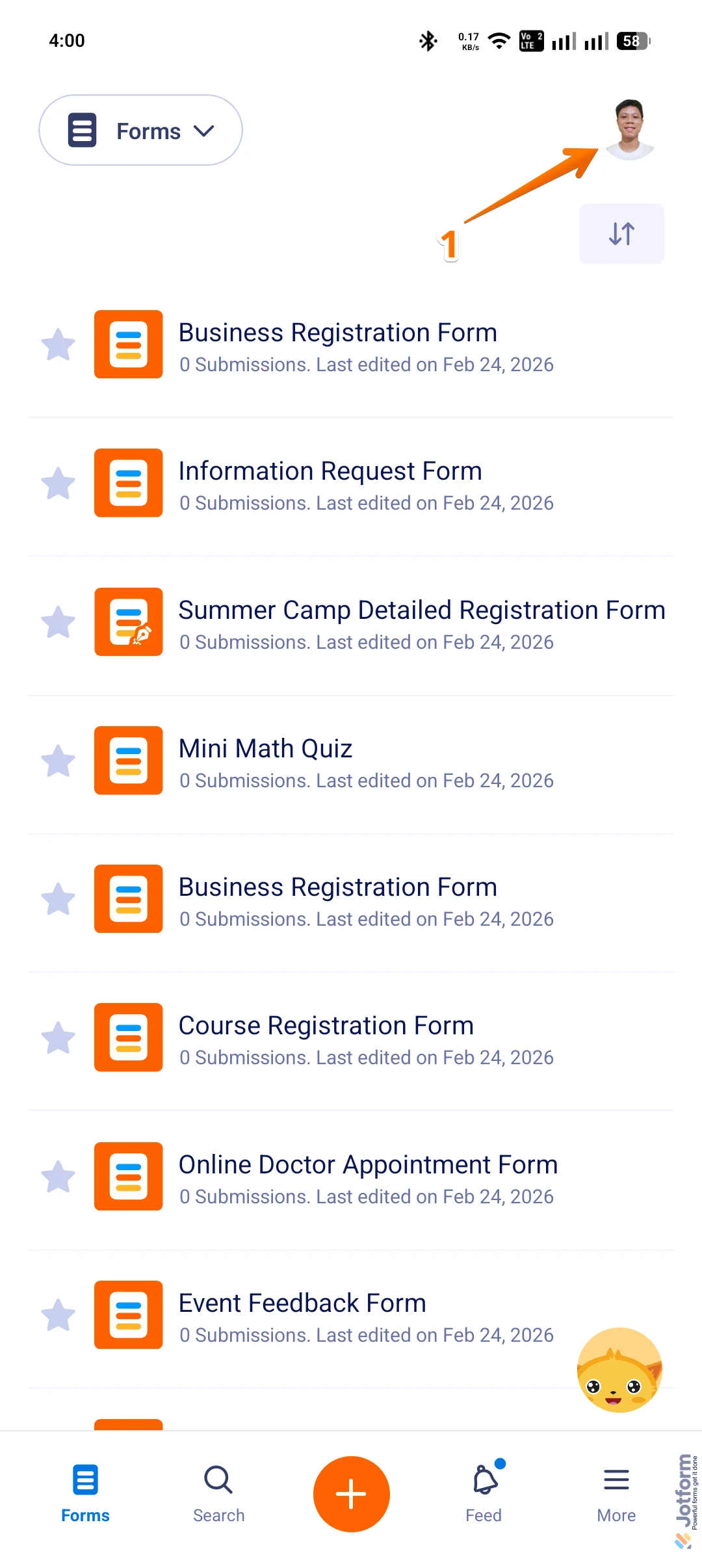
1. On the Jotform Mobile App, tap on the Profile Picture/Avatar in the top right corner of the screen to open Settings.
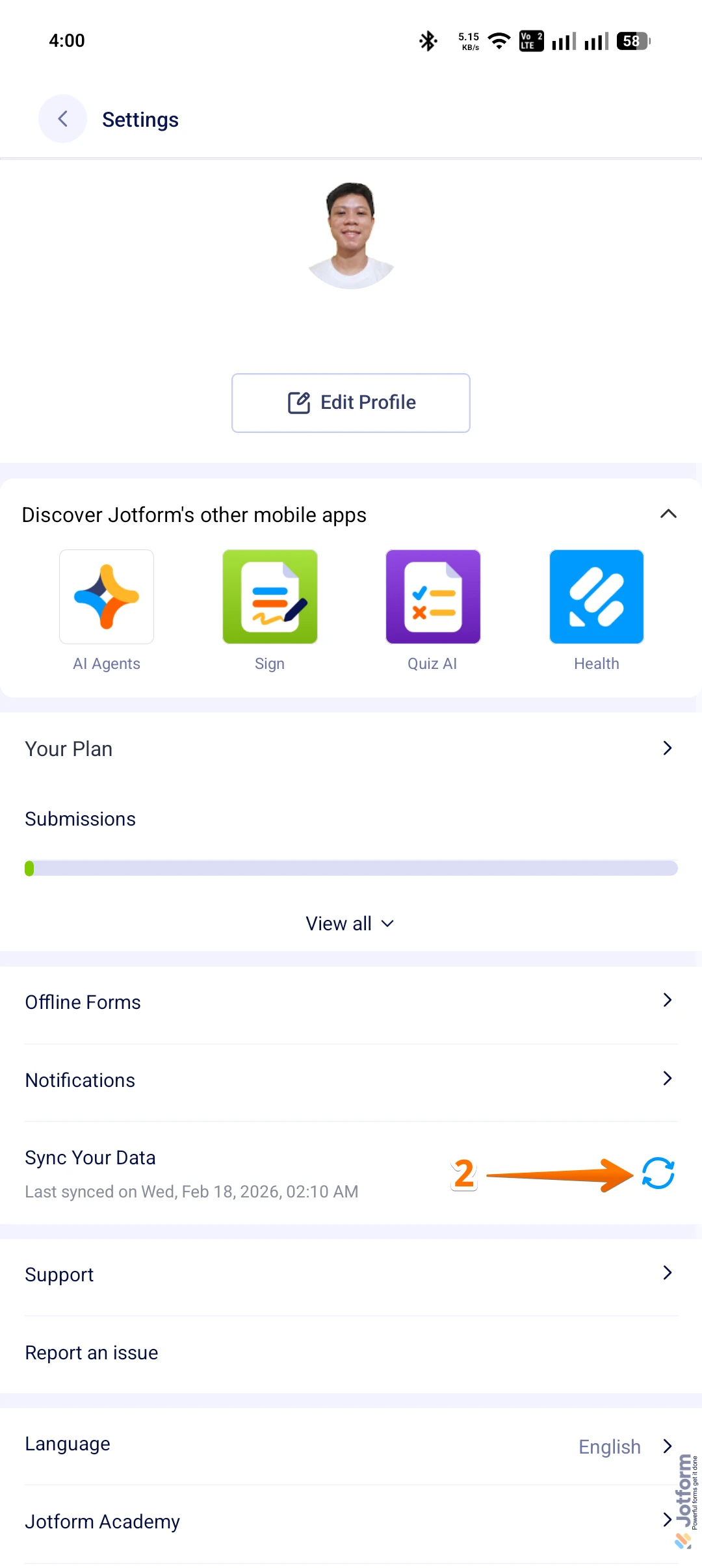
2. Now, while in Settings, tap on the Refresh icon in the Sync Your Data section.
If you want the app to refresh and get the latest data without issues, enable the Background App Refresh feature for the Jotform Mobile App in your phone settings.
Give it a try and let us know how it goes.