-
 Thomas_Hill_tom
WPSEC registration
When the day and session is selected, the option select an activity does not open up. Our reporting shows that some respondents gave selection the specific session, but many other have not - we have not made changes to the form since it was published, so is this a bug?
-
 Eddie JotForm Support
Hi Thomas,
Thanks for reaching out to us for help. I have tested the form but couldn't replicate the issue on my end; everything worked the way it should. Check out my result in the screencast below:

Can you send a quick recording of the issue as it happens on your side? You can use Loom or upload to Google Drive or Dropbox, then send us the link. This will help me pinpoint if the issue is related to specific data logic or a browser-specific bug.
Once we know more about what’s going on, we can figure out the fix.
-
Thomas_Hill_tom
So, we’ve had a number of people apply today who were unable to select days and sessions to volunteer for. It’s possible to select day sessions but not any other level of detail which is blocked. See screenshot.
-
Thomas_Hill_tom
-
 Sheena JotForm Support
Hi Thomas,
I tested your form and had the same issue, so I created a ticket and escalated this to our Developers. Although we don't know exactly when it'll be fixed, we’ll circle back to this thread when we have an update.
-
Thomas_Hill_tomThank you - since the event is starting next week, and our data is incomplete, we will need to manually verify each submission. The matter is urgent.
Thomas Hill
Sent from my iPhone.
________________________________
... -
 Jerlan JotForm Support
Hi Thomas,
I understand the urgency since your event is starting next week, and the incomplete data is causing challenges. Our Developers are already aware of the issue and are working on a fix. Meanwhile, manually verifying each submission, as you mentioned, is a good approach to ensure you have accurate data for your event.
We will keep you posted here as soon as we have any updates or a resolution from the development team. Thank you for your patience and understanding.
-
Thomas_Hill_tomThank for looking into this - in order for us to manually collect the information we had hope to collect via Jotform, can you please, URGENTLY send me a pdf version of the full form so I can ask registrants to duplicate their submission and return it manually? Since child protection verification declarations are a required part of volunteering, this is required, and now urgent. Thank you.
Thomas Hill
Sent from my iPhone.
________________________________
... -
 Kris JotForm Support
Hi Thomas,
To clarify, do you want PDF files of the submissions, or do you want a PDF version of the empty form? It's really easy to download your PDF files. Let me show you how:
1. In Form Builder, click on the Downward Arrow icon at the top-left side of the page and select PDF Editor.
2. In PDF Editor, click on the Download button at the top-right side of the page.
3. In the Dropdown menu, click on Download PDF or Download All. That's it.
The Download PDF button will only download the PDF you are currently viewing in the PDF Editor. If you use the Download All button, it will email you a zip file containing all submissions in PDF format. Take a look at the screenshots below to see my examples:
Example of how it looks when you open the document downloaded via the Download PDF button:
Example of how it appears in the email when you click on the Download All button:
In a few quick steps, you can create a fillable PDF version of your form. But keep in mind that some widgets and elements won't work in fillable PDFs. Here’s how to get started:
1. In Form Builder, in the orange navigation bar at the top of the page, click on Publish.
2. Next, click on PDF in the menu on the left.
3. Then, in the Download PDF section, click on Download.
4. After that, click on Continue in the Warning window that opens.
5. Now, in the upper-right corner of the page, click on Download.
-
Thomas_Hill_tomHi – and thanks for the instructions – when I follow your instructions, I get a for without any of the response fields (see attached).
Given that our online form has corrupted and therefore we can’t trust it to collect our data, I urgently need to get a pdf version out to our volunteers.
In this instance, would you be kind enough to produce a pdf of our form and send it to me urgently so I can get it out to our volunteers?
Happy to take a call if you need - 0427013551
Many thanks, Tom.
Thomas Hill
Chief Executive Officer
Australian Community Education College Pty Ltd (ABN. 97 130 101 030)
... -
Kris JotForm Support
Hi Thomas,
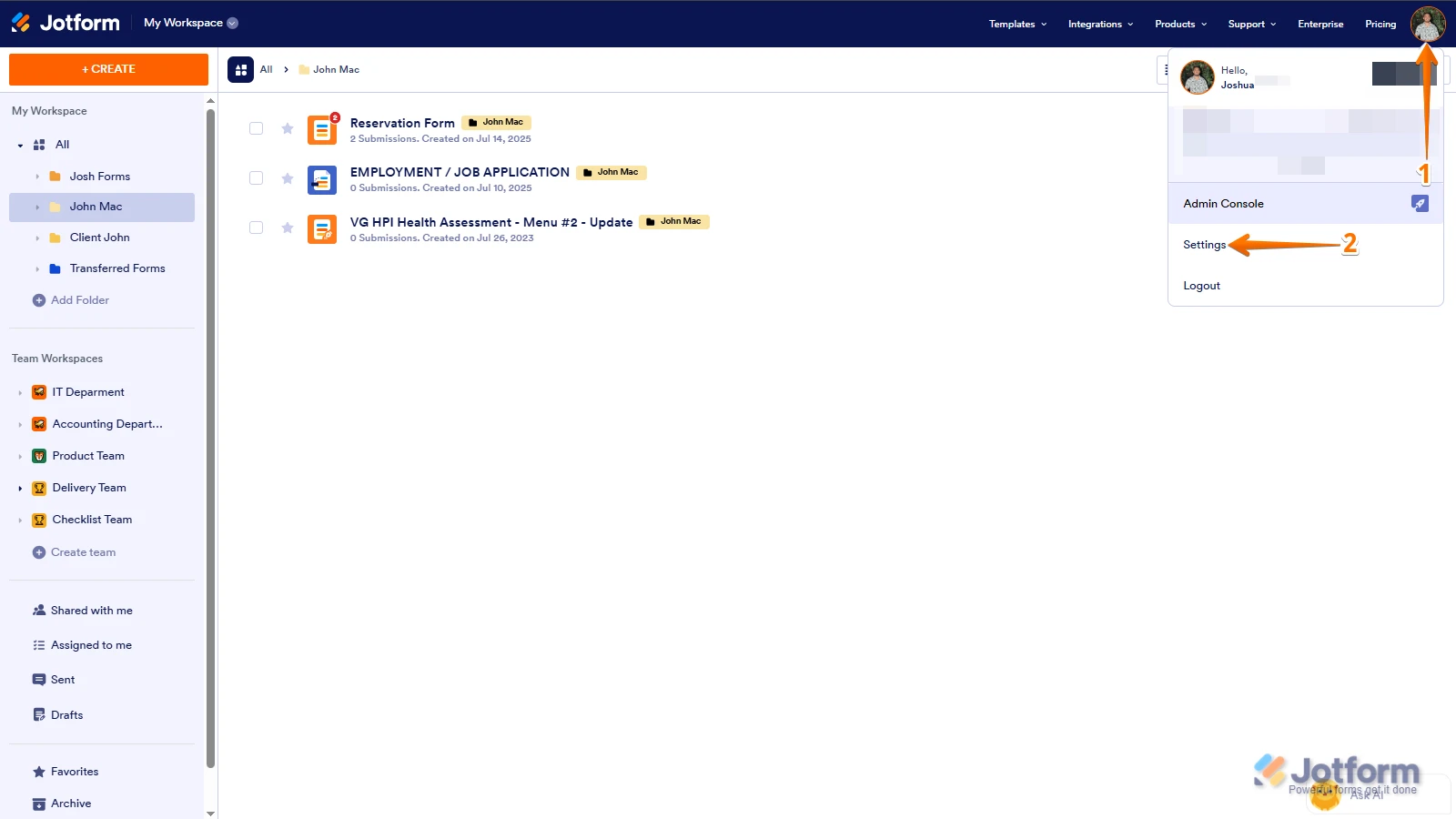
Let me take a look at this for you. To do that, we’ll need your permission to access your account. Don’t worry, you can turn it off again once we’re done. Let me show you how to do it:
1. In the top-right corner of your Workspace page, click on your Avatar/Profile Image icon.
2. Then, in the Dropdown menu that opens, click on Settings.
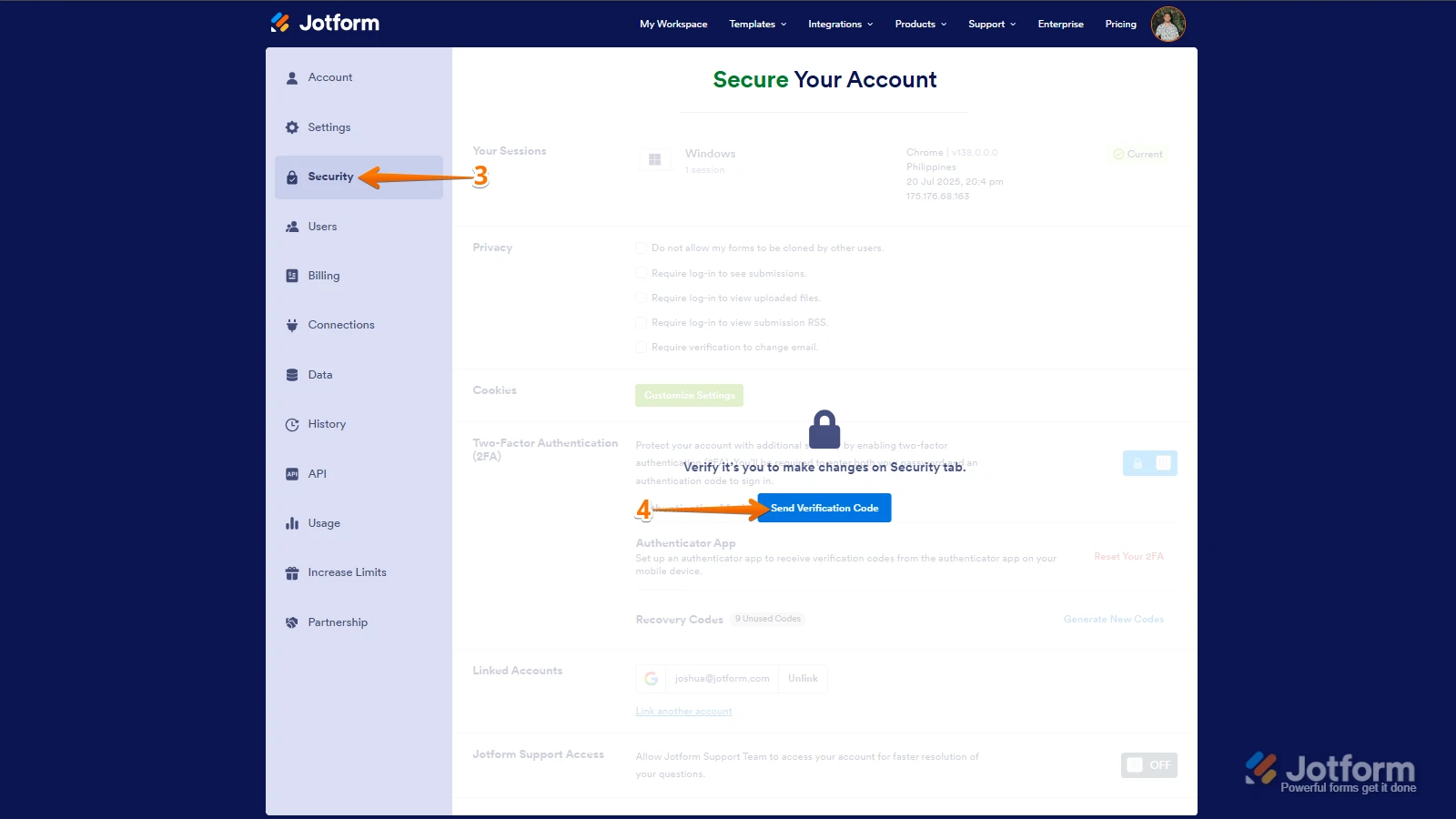
3. Next, in the panel on the left, click on the Security tab.
4. If you haven’t opened your Security page in a while, it’ll ask you to verify. To do that, click on Send Verification Code.
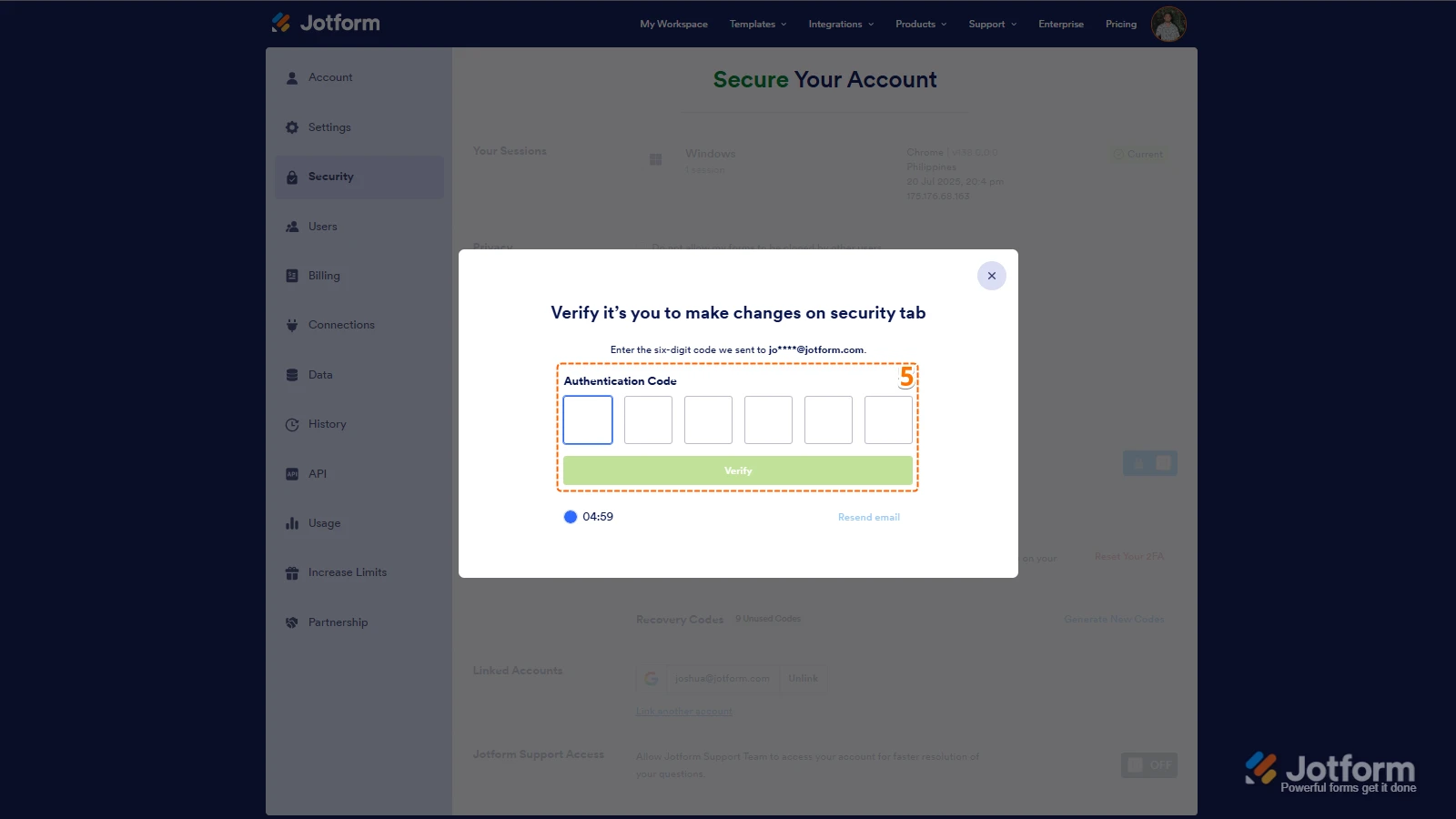
5. Then, enter the Verification Code you receive in your email.
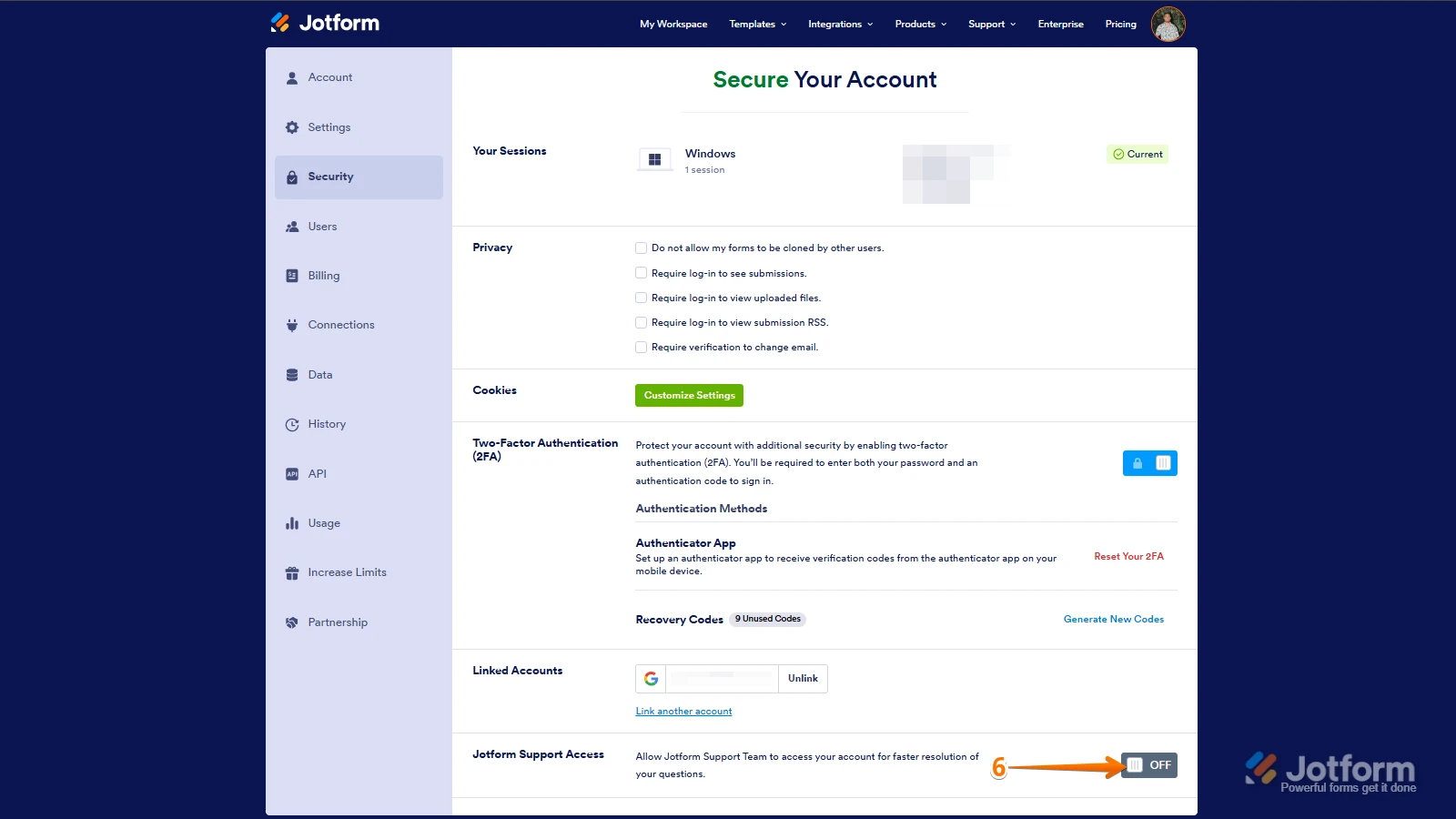
6. Finally, at the bottom of the page, toggle on Jotform Support Access.
After we hear back from you, we’ll have a better idea of what’s going on and how to help. -
Thomas_Hill_tom
What is the status of this support request?
-
 Keenly JotForm Support
Hi Thomas,
Our Developers are getting this resolved for you. Thanks for your patience while they work on it. We’ll keep you posted about any updates we get.





 After we hear back from you, we’ll have a better idea of what’s going on and how to help.
Your Reply
Something Went Wrong
An error occurred while generating the AI response. Please try again!