-
SSophia Xiong
Hi Team,
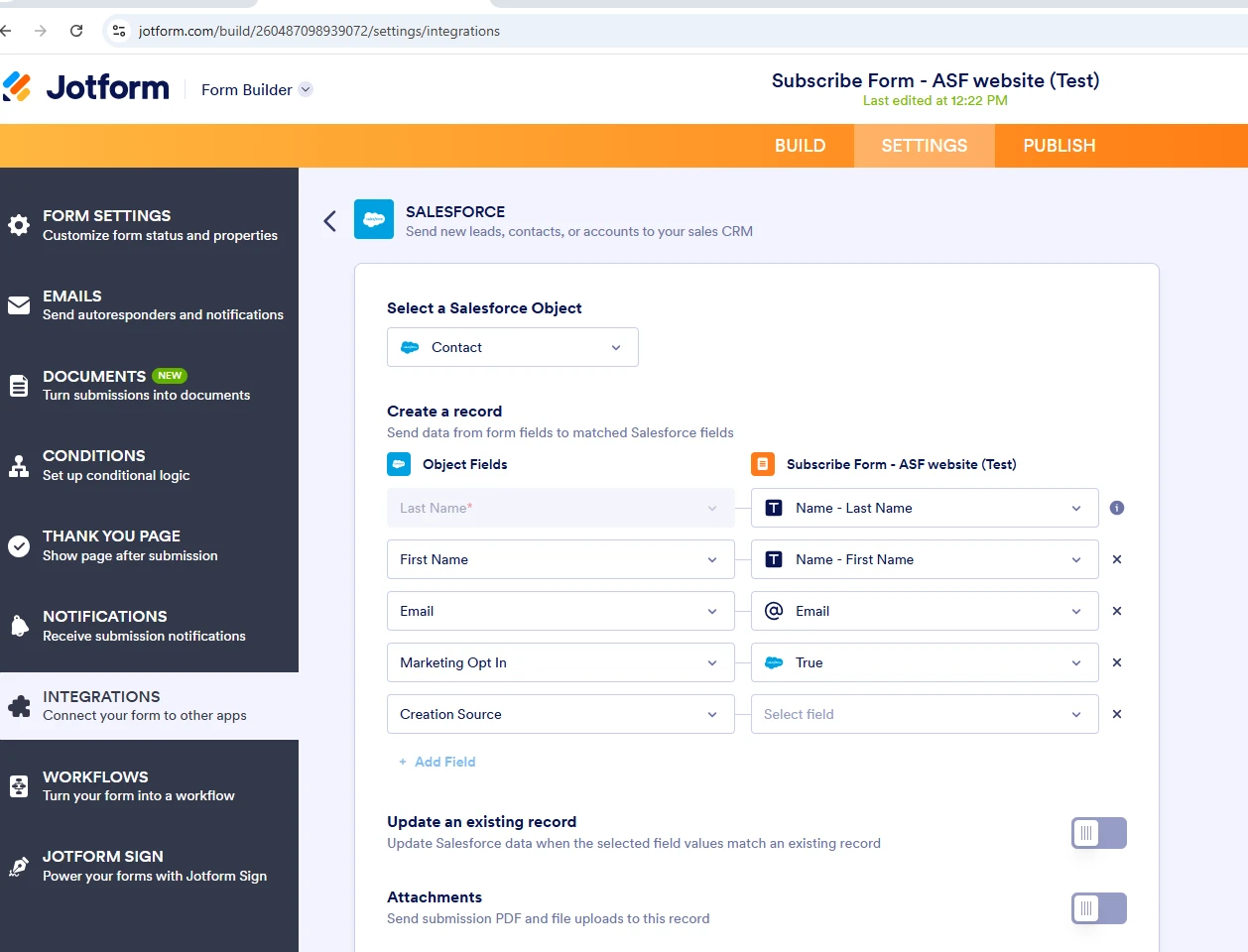
We have setup the integration between Jotform and Salesforce in our SIT2 sandbox and doing some testing at the moment.
Got an issue to map one of our multi-picklist field "Customer Type" in Salesforce to Jotform.
Are there any limitation on multi-picklist field in Jotform please? Is there any work around to update the multi-picklist field "Customer Type" in Salesforce when new contact record is create?
Please refer to the attached screenshot for more details.
Thanks a lot!
Happy to jump into a call if required.
Kind regards,
Sophia

-
 Podo: Support Specialist
Hi Sophia,
Thanks for reaching out to Jotform Support. I'm an AI assistant here to assist you.
Regarding your question about mapping a multi-picklist field "Customer Type" in Salesforce to Jotform, there are some important points to consider:
- Jotform integration with Salesforce requires the form field options to match the Salesforce picklist API names exactly. This is critical to avoid errors such as "Bad value for restricted picklist field."
- Salesforce multi-picklist fields have limitations when mapping directly from Jotform because Jotform does not dynamically populate or update multi-picklist options from external sources.
- A common workaround is to ensure that the Jotform field options exactly match the Salesforce multi-picklist values and that the Salesforce picklist is configured to allow values not defined in the value set by unchecking the "Restrict picklist to the values defined in the value set" option.
- When creating or updating records, you can enable the "Update an existing record" option in the Salesforce integration settings in Jotform to handle duplicates and update multi-picklist fields accordingly.
Unfortunately, Jotform does not support dynamic multi-picklist updates directly, so the best approach is to carefully map the options and configure Salesforce to accept those values.
Give it a try and let us know how it goes.
-
SSophia Xiong
I cannot see the Salesforce multi picklist field from drop down in create contact record part. How to resolve this issue? I need to map this multi picklist field from Salesforce to Jotform.
-
Podo: Support Specialist
Hi Sophia,
Regarding your issue with not seeing the Salesforce multi-picklist field in the dropdown when creating a contact record in Jotform integration, here’s how to resolve it:
Let me help you with that:
- Check Salesforce Field Permissions: Ensure that the multi-picklist field "Customer Type" is visible and accessible in your Salesforce sandbox environment and that your Salesforce user account has the necessary permissions to access this field.
- Refresh and Re-authenticate Integration: In Jotform, go to the Salesforce integration settings, try re-authenticating your Salesforce account, and refresh the integration to reload available fields.
- Verify Field Type Compatibility: Jotform may not display multi-picklist fields directly in the dropdown for mapping because of Salesforce multi-picklist field limitations. Instead, you may need to map this field using a compatible Jotform field type (such as multiple choice) with options exactly matching Salesforce picklist values.
- Manually Add Field Mapping: If the multi-picklist field does not appear in the dropdown, try adding a custom field mapping manually by typing the API name of the Salesforce multi-picklist field in the mapping section.
- Check for Integration Limitations: Jotform does not dynamically populate Salesforce multi-picklist options, so ensure your Jotform field options exactly match Salesforce picklist values to avoid errors.
Also, review the Salesforce integration action logs in Jotform for any errors related to field mapping or permissions. You can view these logs by going to Settings > Integrations > Salesforce > See Action Logs.
If the issue persists, consider adjusting the Salesforce picklist settings to allow values not defined in the value set by unchecking the "Restrict picklist to the values defined in the value set" option.
Give it a try and let us know how it goes.
-
 safarnama103
Hi Sophia,
Jotform can’t map Salesforce multi-picklist fields directly. A common workaround is to send the selections as a semicolon-separated string or use a tool like Zapier/Make to format the data before updating Salesforce. Testing in your sandbox first is recommended.
-
 Reymae JotForm Support
Hi Sophia,
There’s no limitation on multi-picklist fields in Jotform as long as the fields are compatible and the options in both systems match. First, make sure that you’re mapping to the correct Salesforce object.
If the multi-picklist field was recently added in Salesforce, try reintegrating by removing Salesforce from Jotform and adding it back. This will create a fresh connection and should allow the field to sync correctly. Reconnecting Salesforce with your form often fixes the issue. Here’s the quick way to do it:
- In Form Builder, in the orange navigation bar at the top of the page, click on Settings.
- Next, in the menu on the left, click on Integrations and click on Salesforce.
- Then, hover your mouse over the All Actions section and click on the Trash Can icon.
- In the Confirmation window that opens, click on Yes, Delete.
Now, let's connect the Salesforce Integration again:
- While you are still in Salesforce Integration Settings, click on the Add New Action button.
- Now, select your Salesforce account in the Authentication section.
- Then, Select an Action, and click on Next.
- Finally, select a Salesforce object from the Select a Salesforce Object dropdown, set up the rest of the options, and click on Save.
Reach out again if you have any other questions.