-
 EstevanBibleCamp
Hi!
I am having a problem where I create a button in tables so I can resend an email to people who say they did not received it in the first place. And I hit resend, it says sent, but it doesn't show in the history, and the recipient does not seem to receive it.
-
 Podo: Support Specialist
Hi,
Thanks for reaching out to Jotform Support. I'm an AI assistant here to assist you.
Regarding your issue with resending emails from Jotform Tables where the email shows as sent but does not appear in the history and the recipient does not receive it, here is what you need to know:
Jotform Tables allows you to add a Send Email Action Button column to manually send notification or autoresponder emails based on table data. When you click the resend button, the email should be sent again using the current configuration.
However, the email logs and history of sent emails are recorded in your Account History page, where you can filter by date and action type (Emails) to see detailed information about email delivery status, timestamps, recipients, and form IDs.
If the resend action says sent but does not show in the history, and the recipient does not receive the email, it could be due to one of the following reasons:
- The email might not have been properly triggered or processed despite the confirmation message.
- There could be an issue with the email template or recipient settings in the Send Email Action Button configuration.
- Emails might be blocked or filtered by the recipient's email provider (check spam/junk folders).
- There might be a delay or issue in the email delivery system.
To troubleshoot and ensure emails are sent and logged properly, please check the following:
- Verify the Send Email Action Button settings: Ensure the correct email templates and recipients are selected and configured properly in the button settings.
- Check your Account History: Go to your Account History, filter by action type "Emails" and the relevant date range to see if the resend email attempts are logged.
- Review email templates: Make sure the email templates used for sending are active and correctly set up with the necessary content and recipient fields.
- Confirm recipient email addresses: Verify that the recipients' email addresses are correct and not on any bounce or block lists.
- Check spam or junk folders: Ask recipients to check their spam or junk folders in case the emails are being filtered there.
- Test with a different email address: Try resending the email to a different address you control to confirm if the issue is with specific recipients.
If after these checks the issue persists, it might be helpful to review the email sending logs and settings in more detail or consider any recent changes made to your email templates or table configurations.
Give it a try and let us know how it goes.
-
EstevanBibleCamp
Am I going to get a response from an actual person because this is not helpful
-
Podo: Support Specialist
Hi,
One of our Support Team members will take it from here to follow up shortly.
-
 Kyle JotForm Support
Hi EstevanBibleCamp,
I checked the email logs for the most recent submission on your Summer Missionary Application Form and confirmed that the autoresponder email was successfully sent to the user. Check out my screenshot below to see the result:

To investigate further, can you share the email addresses of those who didn't receive the email? This will allow us to review the notification and autoresponder settings in detail and confirm whether the resend feature is behaving as expected.
Also, ask them to whitelist Jotform's IP addresses and domains to their email and add noreply@formresponse.com, noreply@jotform.com, noreply@jotmail.com to their contacts list.
Once you get back to us, we can take the next step toward solving this.
-
EstevanBibleCampI am not referring to my summer missionary form, I am referring to my EBC
registration form. the emails that i tried to resend were for Brexley
Loewen, and Kensley Loewen. I tried to resend them both or camp email and
our squirt/ Junior email that is supposed to auto respond. There were a few
more i tried to send as well and it is unclear if they went through or not
... -
 Kris JotForm Support
Hi EstevanBibleCamp,
I was able to locate the form and confirmed it has multiple Autoresponder Emails with Change Email Recipient conditions connected. This means those Autoresponder Emails will be sent if the conditions are triggered. Can you share with us the email addresses of those users? We'll check in the email logs the status of the Autoresponder Emails that were sent to them.
When we hear back from you, we’ll be ready to move forward.
-
EstevanBibleCamp
Hi, sorry for the delay!
The email was chantelleloewen@gmail.com
I am happy to give you permission to check out the form in its entirety if I need to do that!
-
Kyle JotForm Support
Hi EstevanBibleCamp,
I checked chantelleloewen@gmail.com and found it on our bounce list. Check out the reason below:
Reason(s) : bounced (host gmail-smtp-in.l.google.com[142.251.176.27] said: 550-5.7.26 The MAIL FROM domain [hotmail.com] has an SPF record with a hard fail 550-5.7.26 policy (-all) but it fails to pass SPF checks with the ip: 550-5.7.26 [152.160.219.28]. To best protect our users from spam and phishing, 550-5.7.26 the message has been blocked. For instructions on setting up 550-5.7.26 authentication, go to 550 5.7.26 https://support.google.com/mail/answer/81126#authentication 00721157ae682-6e5f5d3cc70si86020197b3.311 - gsmtp (in reply to end of DATA command))
I've removed it from our list. Whitelist Jotform's IP addresses and domains to your email and add noreply@formresponse.com, noreply@jotform.com, noreply@jotmail.com to your contacts list.
Also, setting up SMTP helps streamline the process of sending emails from your application or server. It ensures that emails are delivered securely and reliably to recipients. You can easily set up a custom SMTP to use your email sender as provider. Let me walk you through it:
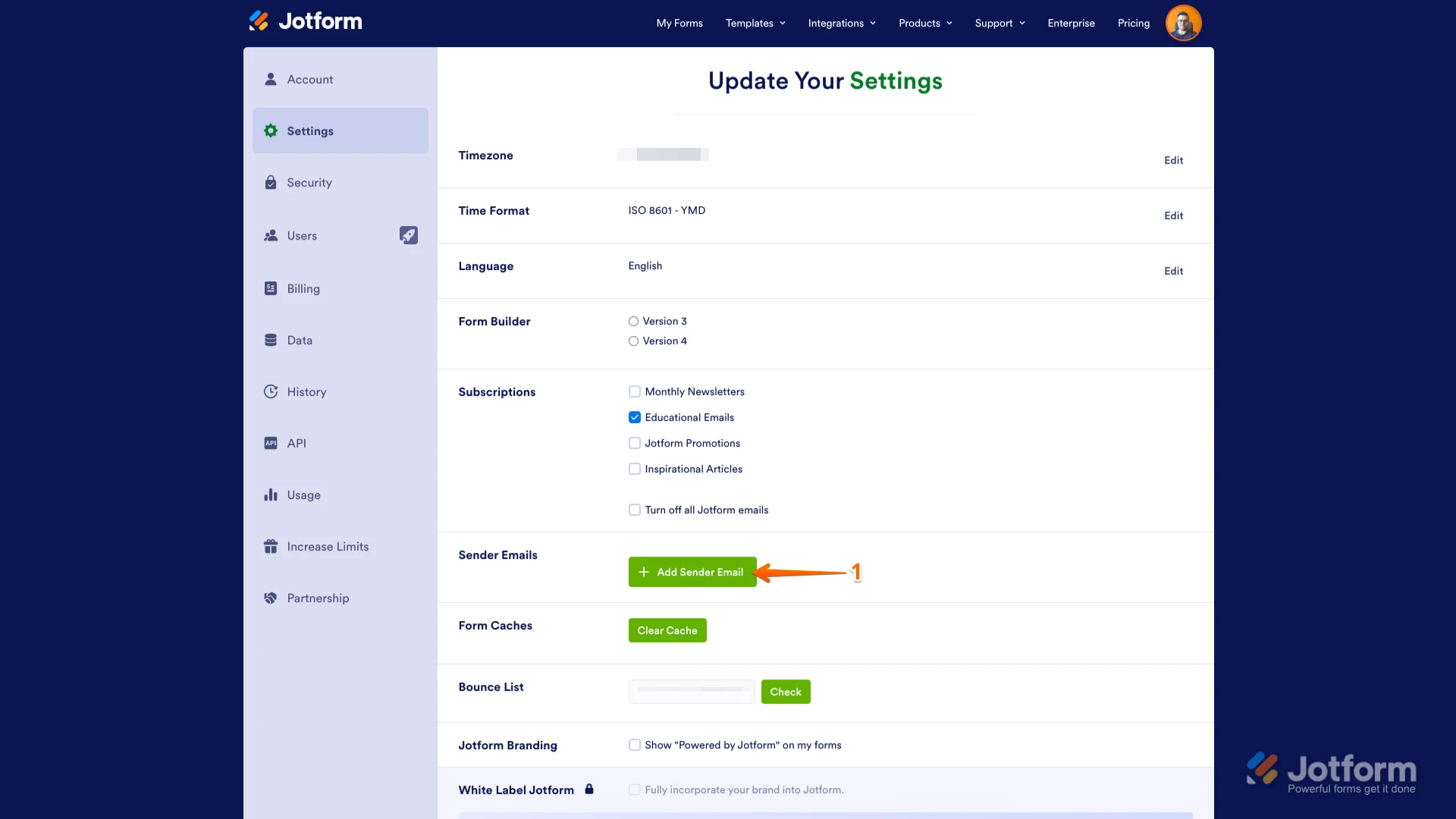
1. Go to the Settings page while logged in to your Jotform account and click on Add Sender Email in the Sender Emails section.
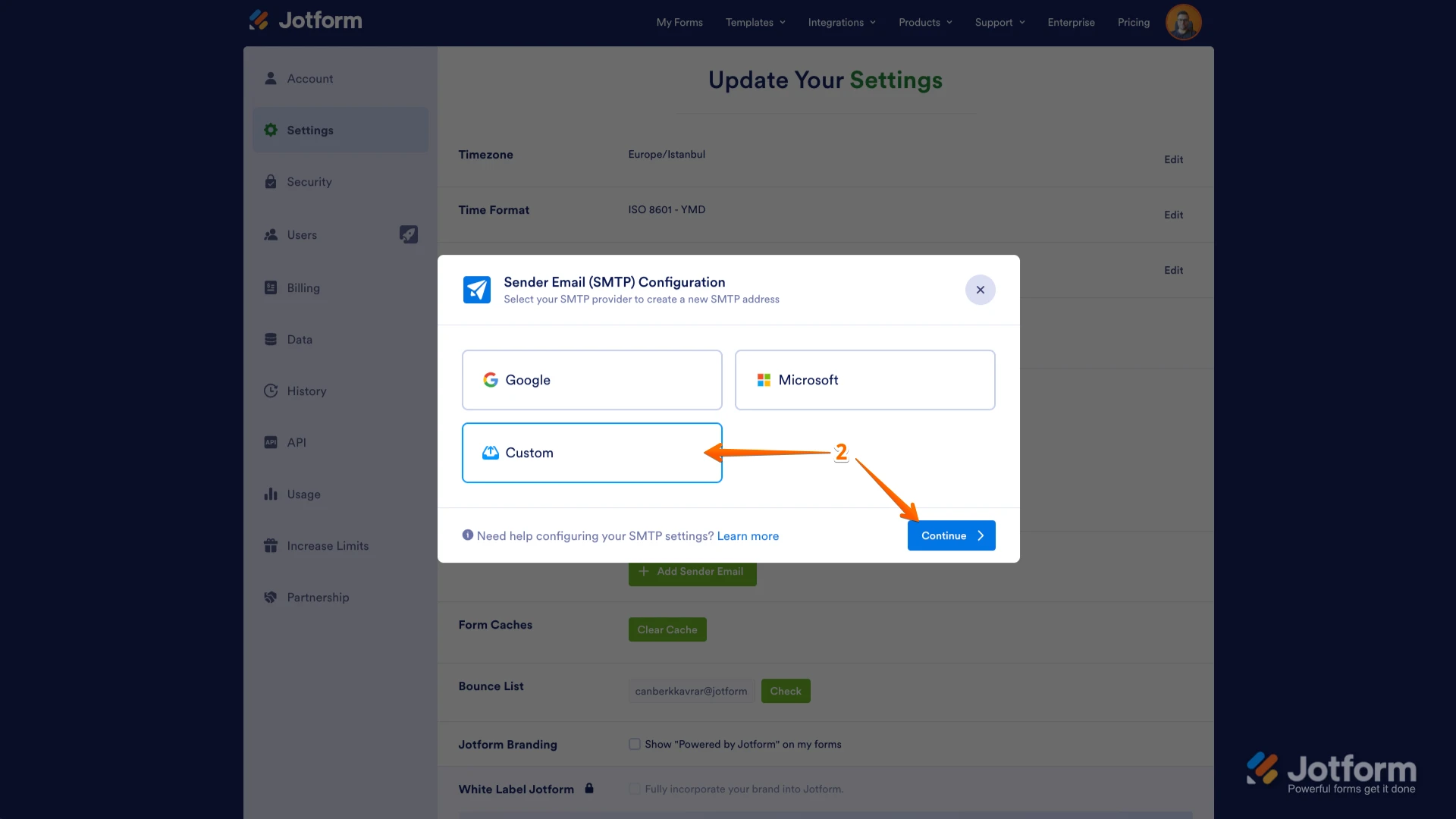
2. In the window that opens, select Custom and click on the Continue button.
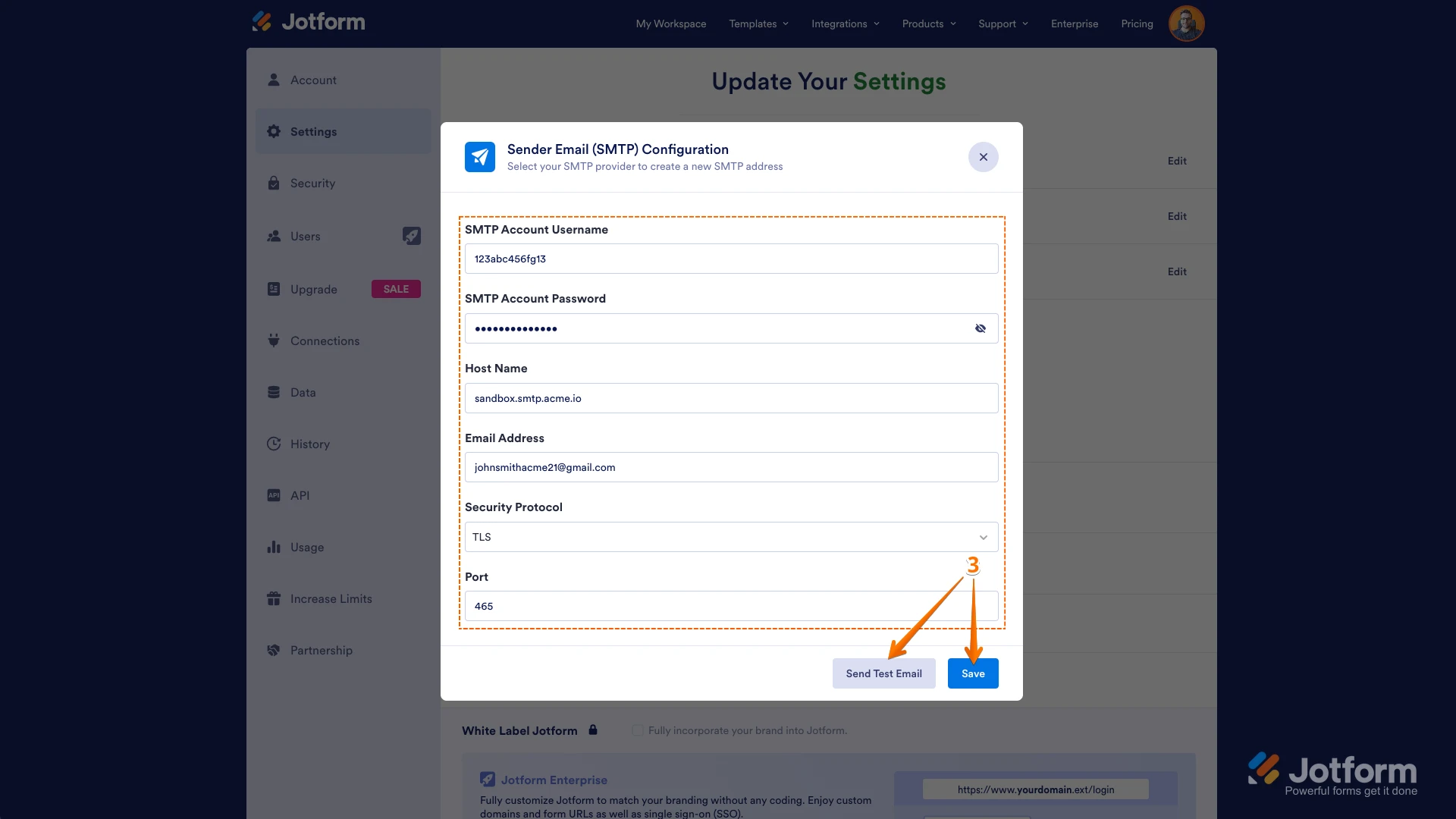
3. Enter your email provider's details, click on Send Test Email to check if it’s set up correctly, and then click on Save.
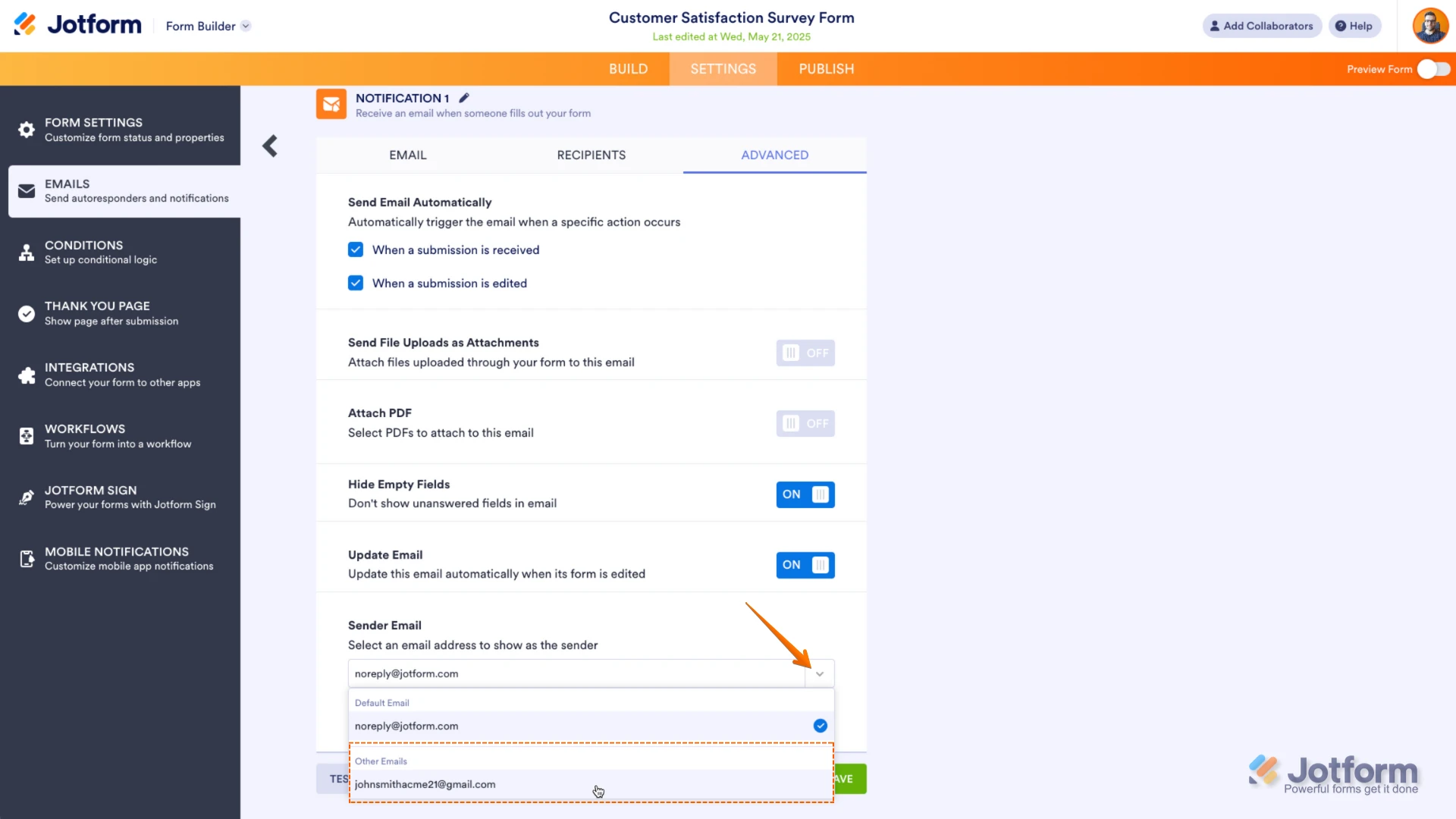
Now you should select your custom SMTP in your email properties under email settings in Form Builder, and if you’re using Workflow Builder, do the same there. Check below to see how it looks in Form Builder:And here’s how it looks in Workflow Builder:Give it a try and let us know if you need any help. -
EstevanBibleCamp
-
 Ronald JotForm Support

 Now you should select your custom SMTP in your email properties under email settings in Form Builder, and if you’re using Workflow Builder, do the same there. Check below to see how it looks in Form Builder:
 And here’s how it looks in Workflow Builder:
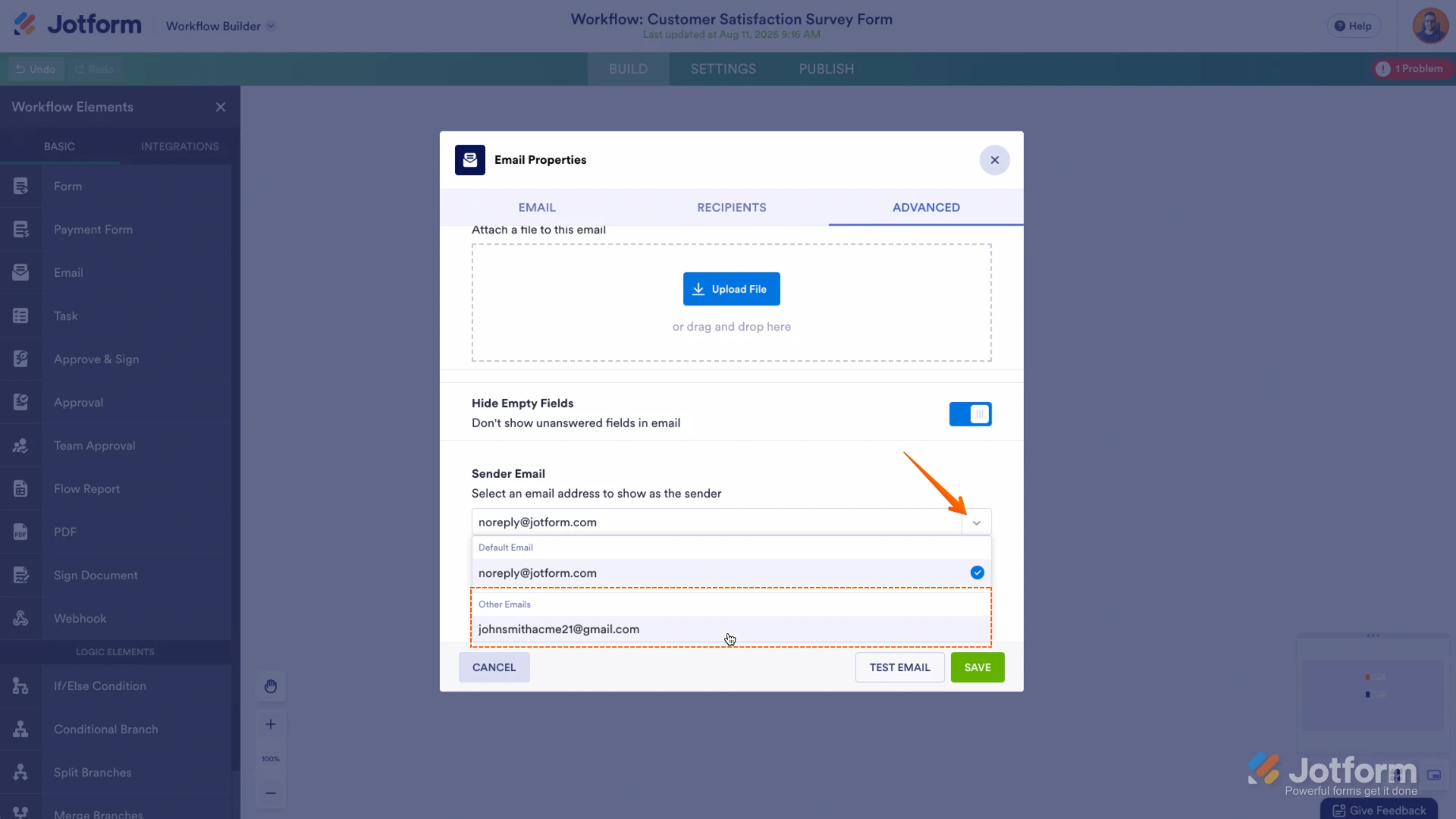 Give it a try and let us know if you need any help.