-
 alexiadurhamspinecareI am experiencing an issue where parts of submissions are missing even though all fields are showing and there are no hidden fields. Clients report that they filled those areas, but the data is not appearing as expected. I have checked the layout and noticed that some portions are filled only on the PDF, while other parts are only on the electronic submission. I have tried various steps and am now checking if it will work, but it is still not working. I need help to resolve this issue. Additionally, I asked where the smart PDF forms view is located to assist with troubleshooting.
 -
alexiadurhamspinecare
The emergency contact name isn't showing on the electronic submission, and half of the Functional Health Assessment - Work duties till Personal Hygiene - isn't showing on the PDF.
-
 Hakan Enterprise Customer Success Engineer
Hi Alexia,
Thanks for reaching out to us for help. I cloned your form, tested on it a On my form, I was able to get the emergency contact name. However, the fields in Functional Abilities question options starting from Work Duties are not showing up.

So I created a ticket and escalated this to our Developers. Although we don't know exactly when it'll be fixed, we’ll circle back to this thread when we have an update.
-
alexiadurhamspinecare
Hello,
The emeregcy contact is missing from the imbedded emailed responses.
-
Hakan Enterprise Customer Success Engineer
Hi Alexia,
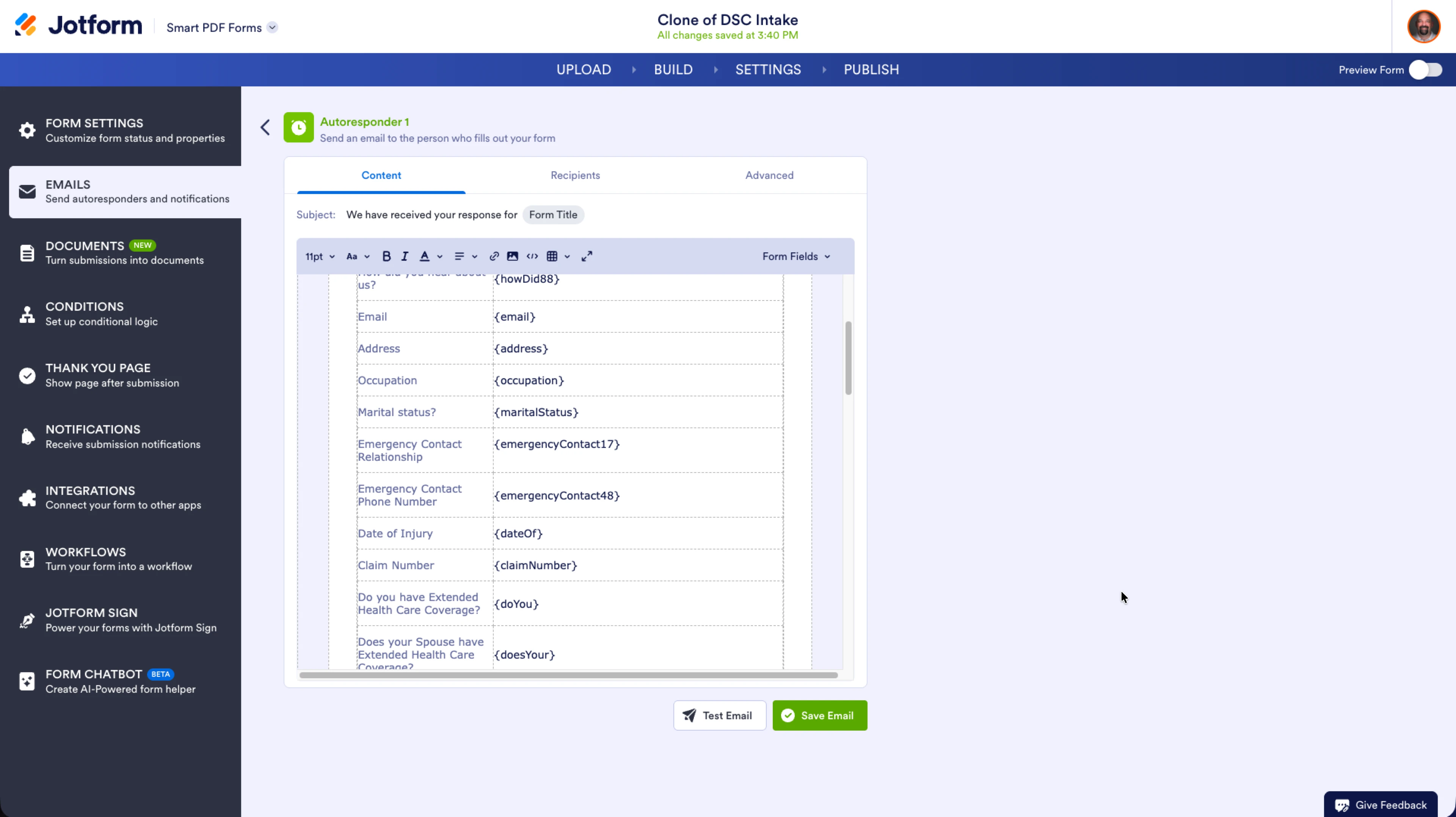
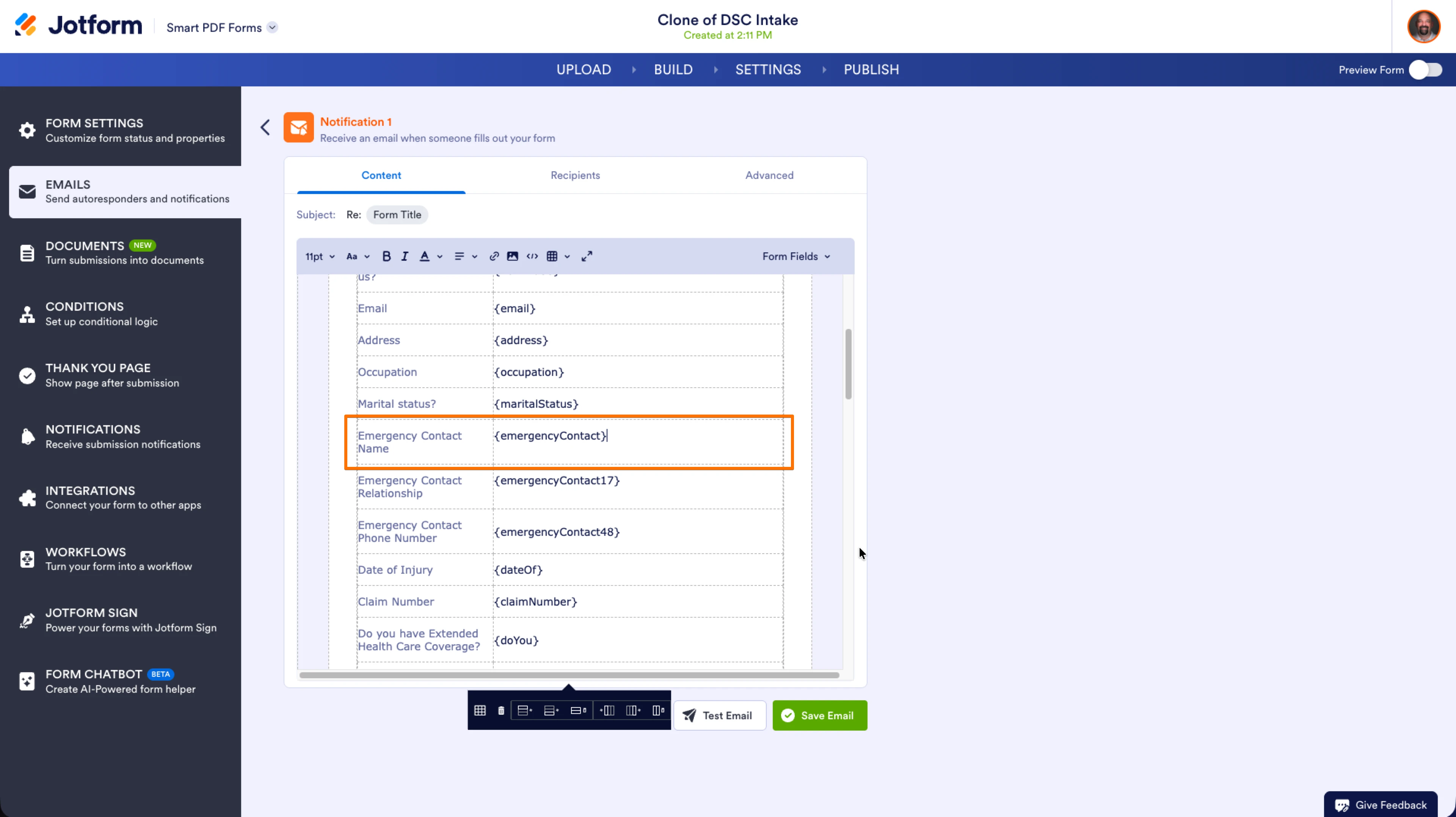
I misunderstood before, but now I get what you mean. I have checked the reason of that not been seen in the notification emails and the autorespond emails. The reason is the field that has the name stored is not in the emails set. Let me show you:
- Here is the content of the autoresponder email and you can see that the Emergency Contact Name field is missing in the content. It is the same in the notification email as well.
2. You need to insert a row to the table and add the field to make it visible again in the emails. After you edit that line and save it, you will start seen that information in the email responses again.
For the missing information, we’ll let you know once we hear back from the Developer team.
-
alexiadurhamspinecare
Hello,
Just following up regarding my inquiry regarding missing responses.
Hope you have a nice weekend
-Alexia
-
 Eduardo JotForm Support
Hi Alexia,
Our Developers are still working through this one, and we truly appreciate your patience while we get it sorted.
-
alexiadurhamspinecare
Hi,
Following up again, it's been a week since I opened this ticket and no communication. Any response from the developers?
-Alexia
-
 Aries JotForm Support
Hi Alexia,
I know this is taking longer than expected, and I appreciate your patience. We’re still on it and will update you as soon as we have something new.
-
alexiadurhamspinecare
-
 Gian_D JotForm Support
Hi Alexia,
I’ve gone ahead and moved your other question to a separate thread to keep things tidy, and someone from our Support Team will help you out with it here.
Let us know if there’s anything else we can help you with.
-
alexiadurhamspinecare
Hello,
I am following up on my original ticket. It has now been two weeks since my last inquiry, and nearly a month since the ticket was first submitted. So far, I have only been advised that it is being worked on.
Could you please provide an update on the current status, including any progress made and an estimated timeline for resolution?
Thank you.
-
 Shirized JotForm Support
Hi Alexia,
Regarding the missing fields in the PDF submissions, this issue has been escalated to our Developers who are actively working on a fix. Unfortunately, we do not have an exact timeline for resolution yet, but we will inform you here as soon as we receive any updates from the Developer Team.
In the meantime, let us know if there’s anything else we can do for you.
-
alexiadurhamspinecare
I am following up on ticket, submitted on Feb 2nd, 2026. It has now been almost two months without a meaningful update, and this delay is impacting our clinic.
Our clinic relies on your form submissions for initial contact with patients. The lack of timely response is affecting our ability to manage new patient intake and provide necessary care promptly.
I am disappointed with both the response level and the extended delay. Please provide an immediate update on the status of this ticket and a clear timeline for resolution. If this cannot be resolved promptly, I request guidance on the proper escalation path.
Thank you for your urgent attention. I look forward to your prompt response.
-
Shirized JotForm Support
Hi Alexia,
This issue has been escalated to our Developers, who are actively working on a fix. Unfortunately, we still do not have an exact timeline for resolution. We sincerely apologize for the extended delay and any inconvenience caused. But I promise it’s still in progress. We’ll update you as soon as our Developers get it resolved.
In the meantime, let us know if there’s anything else we can do for you.
-
Shirized JotForm Support
Hi Alexia,
This issue has been escalated to our Developers, who are actively working on a fix. Unfortunately, we still do not have an exact timeline for resolution. We sincerely apologize for the extended delay and any inconvenience caused. But I promise it’s still in progress. We’ll update you as soon as our Developers get it resolved.
In the meantime, let us know if there’s anything else we can do for you.
-
alexiadurhamspinecare
Now it's been 4 months since I've created this ticket, and no update.
-
 Rehan Support Team Lead
Hi Alexia,
I know you’ve been waiting a while, and we really appreciate your patience. Our Developers are still making progress behind the scenes. We’ll be back in touch as soon as we have an update.
-
alexiadurhamspinecare
Is there anything you would suggest?
I am no longer doing to be at the clinic and need to transfer this case to someone else, will we be able to move this thread over to them? They will still have access to this account, however it may not be checked as often
-
Rehan Support Team Lead
Hi Alexia,
The emails for this thread will be sent automatically to the email address that is linked to your account. Besides the email, you can still access this ticket when you are logged in to your Jotform account.
Reach out again if you need any other help.