-
MMelissa Alemar
I have changed my form following the instructions, but in Drive, they are being saved as the submission ID?
-
 Mary Eden JotForm Support
Hi Melissa,
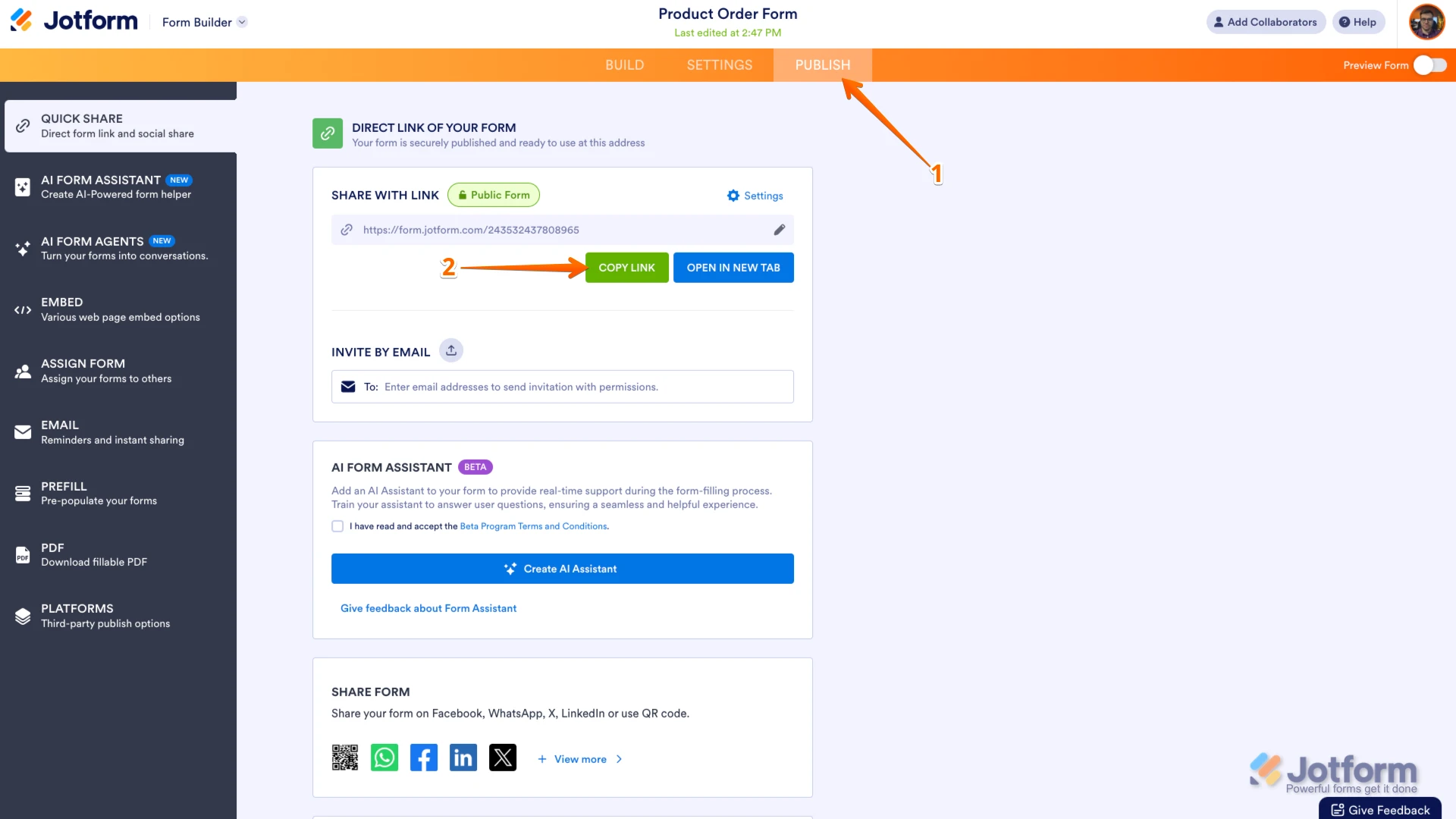
Thanks for reaching out to Jotform Support. To help you further with the issue of submissions being saved as the submission ID in Google Drive, could you share the link to your form? You can easily find your form's URL in Form Builder. Let me show you how:
- In Form Builder, in the orange navigation bar at the top of the page, click on Publish.
- In the Quick Share tab, click on Copy Link in the Share With Link section.
 Once you share the form URL with us, we’ll be able to help you better with this.
 -
MMelissa Alemar
-
 Mikhail JotForm Support
Hi Melissa,
I see that you have an Enterprise account, which means that we have a dedicated Enterprise Support Team to help you. We have a guide that explains How to Contact Enterprise Support Team. Create a ticket there and someone from the Enterprise Support Team will get in touch with you shortly.
Thanks for your patience and understanding, we appreciate it.
 Once you share the form URL with us, we’ll be able to help you better with this.