-
JJérôme Perakis
in step 4. Set the column types, then select Create.
It is impossible to select a column type = Email
and therefore, when using my table to prefill a form, my email column which cannot be set as Email type, is not recognized by the prefill as email, and I cannot send invitations
-
 Jotform Support Former Jotform Support
Hi Jérôme,
Thanks for reaching out to Jotform Support. If I understand correctly, you want to send invitations to the email addresses that were imported to your submission table. Is that right? If so, are you going to use a Send Email button on the submission table to send the invite? If so, you can add conditional logic to your form to automatically copy the Short Text field data to the Email field and then manually resubmit those submissions by accessing their edit mode to trigger the Autoresponder Email. Can you send us the link to your form for us to give you a demonstration of the solution?
As soon as we hear back from you, we can work on getting you a solution for this.
-
 JeromePe
Thanks Shaina, right, but just like in the prefilled form settings, I'd like to be able to select all records and send the invitations all at once. I cannot do it manually for each record, when having 200-300 conference participants, it will be just impossible to manage on time and quality.
is it possible?
-
Jotform Support Former Jotform Support
Hi Jerome,
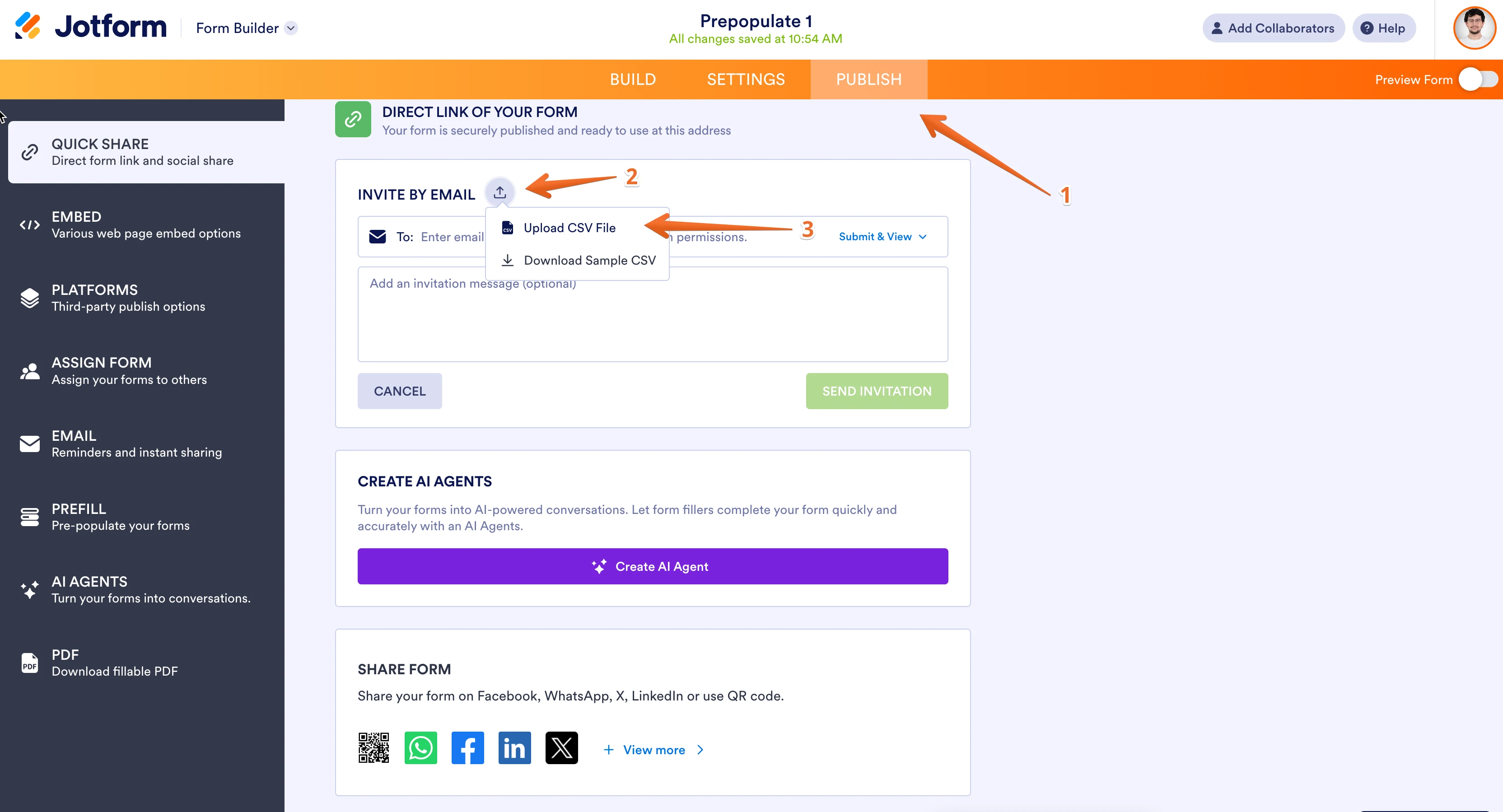
Thank you for contacting Jotform Support. It is not possible to set an imported column as the email field. If you want to send bulk emails to the addresses in your submission table there isn’t an option to send 200-300 emails at once. However, if you want to invite users to the form a better option would be to use Invite by Email option. Here, you can upload a CSV file to send bulk invites. Here is how to do it:
- Open the form
- On the top, click on publish
- Click on the icon next to Invite By Email
- Click on Upload CSV File

Reach out again if you need any other help.
-
JeromePe
-
Jotform Support Former Jotform Support
Hi Jerome,
I’ve gone ahead and moved your other question to a separate thread to keep things tidy, and someone from our Support Team will help you out with it here.
Let us know if anything else comes up.