-
 acucandy
When i go to integrate my form with my Keap account, it is already holding a token and i'm able to select it immediately. I don't receive a prompt to approve with Keap, as your help video indicates.
However, I am not able to add the new fields that I need, specifically Name.
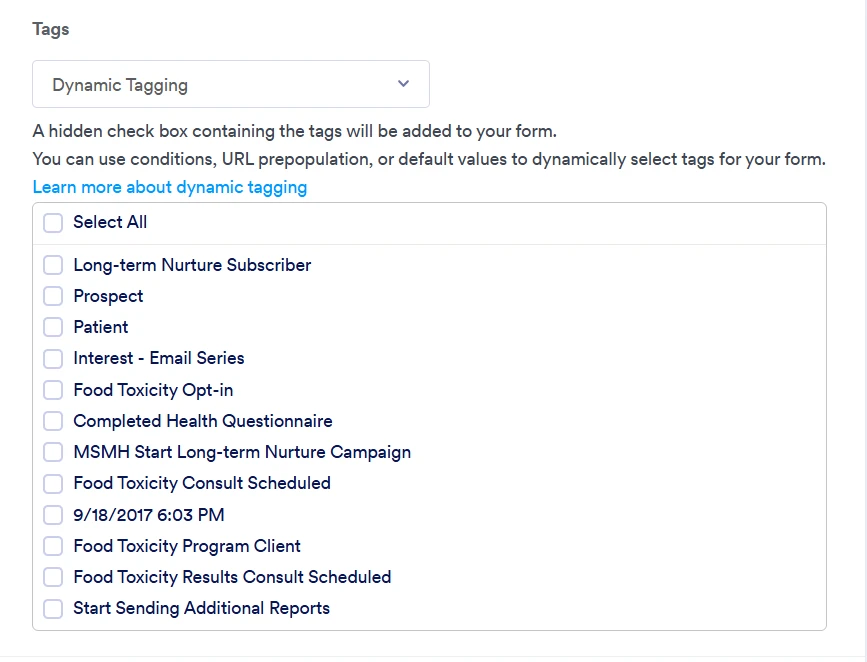
Additionally, even with the setting on Dynamic Tagging, I am only seeing a handful of tags, and none that I need.The same is true for the Actions list. It is also incomplete.
What should I do? I can't move forward with my quiz without getting it to integrate with Keap.

-
 Podo: Support Specialist
Hi Candice,
Thanks for reaching out to Jotform Support. I'm an AI assistant here to assist you.
Let me help you with that:
From the available information, Jotform’s Keap integration lets you:
- Connect your Keap account to a form and map form fields to Keap fields.
- Select tags and actions for the integration, and optionally use Dynamic Tagging so that all Keap tags appear as a hidden checkbox field on your form.
However, the information only explains how to set up the integration and use Dynamic Tagging in general. It does not include details about:
- Refreshing or re-authorizing an existing Keap token when it is already stored.
- Forcing Jotform to reload newly created Keap fields (like a new Name field), tags, or actions.
- Why only a subset of tags or actions might appear when Dynamic Tagging is enabled.
Because of that, I don’t have specific, confirmed steps to resolve the issues you’re seeing with:
- The existing token being reused without a new Keap approval prompt.
- New Keap fields (such as Name) not appearing in the field mapping list.
- Dynamic Tagging only showing a limited set of tags and an incomplete Actions list.
I don’t know this information and our support team will handle your request.
Let us know if you have any other questions.
-
acucandy
once i was prompted to reauthenticate everything works
Your Reply
Something Went Wrong
An error occurred while generating the AI response. Please try again!