-
 primebaseball
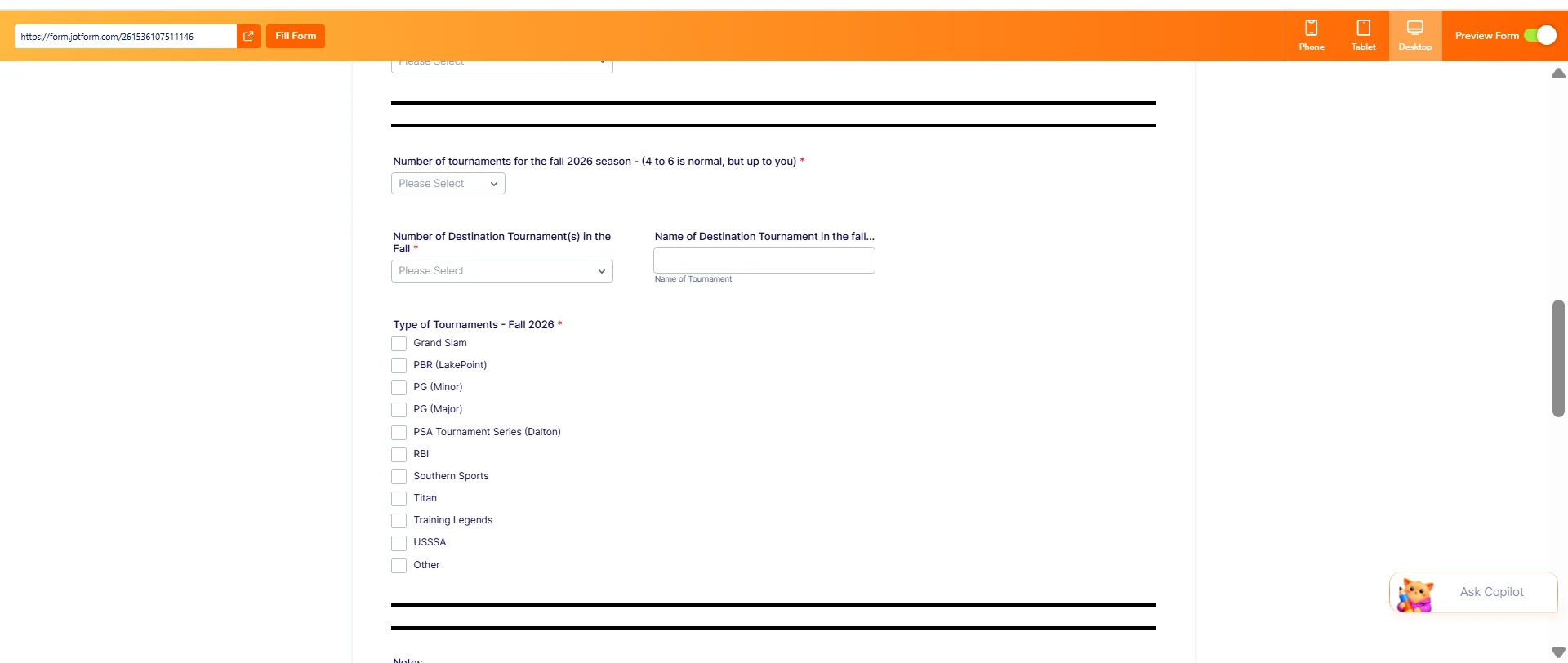
I am using conditional logic on my form, but one section is mssing even before I chose the answer with the conditional logic is being applied.
You will see on the preview the Spring Season information is missing but the fall information is shown.

-
 Podo: Support Specialist
Hi Scott,
Thanks for reaching out to Jotform Support. I'm an AI assistant here to assist you.
It sounds like your Spring Season fields are being hidden by a condition even before the triggering answer is selected. You can control which questions show or hide based on answers using conditional logic. Let me walk you through how to review and adjust that:
- Go to Form Builder, then in the orange navigation bar at the top of the page, click on Settings.
- Click on Conditions on the left side of the page to see all existing conditions on your form.
- Look for any Show/Hide Field conditions that reference your Spring Season and Fall Season fields. Check if Spring Season is set to be hidden by default or only shown when a specific answer is selected, while Fall is set to show.
- Edit the condition so that:
- Spring Season is only hidden when you explicitly want it hidden (for example, when “Fall” is selected), and
- Spring Season is shown when the appropriate option is selected, or left visible by default if that’s what you prefer.
- Click on Save on each edited condition, then use Preview Form to test that Spring Season appears correctly before and after you make a selection.
If you like, you can also check our guide on how to show or hide fields based on a user’s answer for more detailed examples.
Give it a try and let us know how it goes.
Your Reply
Something Went Wrong
An error occurred while generating the AI response. Please try again!