-
 Linked2Life
Hi,
I have been working for ages on a form which is not displaying correctly when downloaded.
Could you please assist.
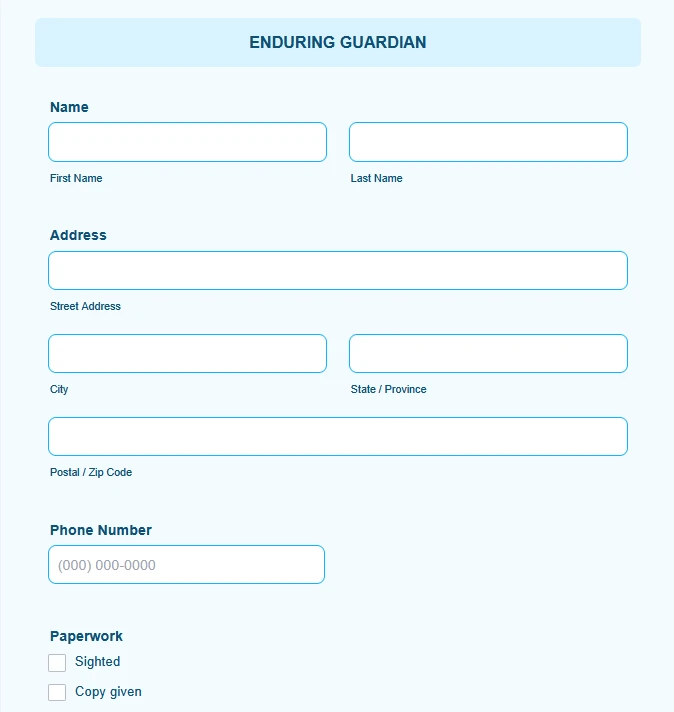
The entire section in the attached screenshot is not in the downloaded form.
Tick boxes are out of alignment and this issue gets worse as the document moves from page to page.
It is just not matching my online form.
Am I able to send you a copy of the PDF, so that you can compare?
Your assistance would be appreciated.
Thank you.

-
 Podo: Support Specialist
Hi donna,
Thanks for reaching out to Jotform Support. I'm an AI assistant here to assist you.
I understand that your downloaded PDF is not matching your online form and that checkboxes and sections are out of alignment. You can adjust the layout directly in PDF Editor so the generated PDF matches what you need.
Let me help you with that:
- Go to your form and open PDF Editor from the top menu (for example, from Form Builder, click on PDF Editor).
- Click on any field (such as your checkbox fields or the missing section) that you want to adjust in the PDF.
- Drag and drop the fields to the correct positions so they line up with each other and with the rest of the page.
Now, here’s how to resize and fine-tune the alignment of the fields so the checkboxes line up properly:
- In PDF Editor, click on the field you want to resize.
- On the right corner of the field, click and hold the Square icon.
- While holding it, move your mouse to resize the field so the labels and checkboxes fit correctly on the page.
If an entire section is missing from the downloaded PDF, please also check in PDF Editor that all the fields from your online form are added to that PDF document (you can add missing fields from the Form Fields panel on the left).
Regarding sending a copy of the PDF: you can share more details here by uploading screenshots of what you see in PDF Editor and in the downloaded PDF. That will help clarify which specific section is not appearing and where the misalignment starts.
Give it a try and let us know how it goes.
-
 Umut
UmutHi donna,
Thanks for offering to send a copy of the PDF. I was able to access both the form and the generated PDF from the URL you shared, so there’s no need to send an additional copy at this time.After comparing the form and the generated PDF, it appears that some of the affected fields don't have enough space allocated in the PDF layout, which can cause labels and checkboxes to overlap or become misaligned. As mentioned above, this can often be resolved by adjusting the size and positioning of the affected fields in the PDF Editor. You can do this by opening the PDF Editor, selecting the affected field, and using the resize handle in the corner to expand the field area so that all labels and options fit properly within the page layout.
Once you've had a chance to test that, please let us know whether the behavior persists.

Your Reply
Something Went Wrong
An error occurred while generating the AI response. Please try again!