-
 dannyjotform
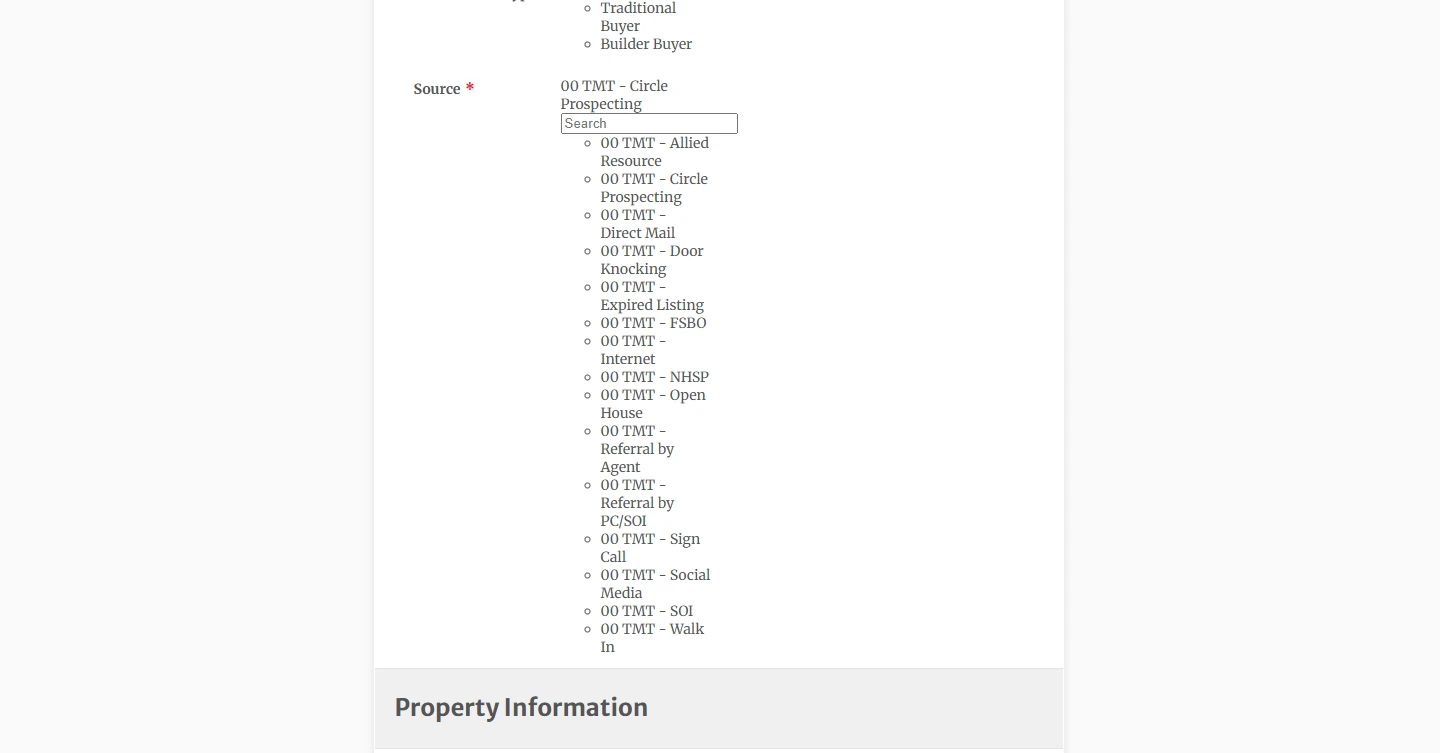
The dropdown option is wonky and is showing all the options in live view.
 Page URL: https://form.jotform.com/261534969228468
 -
 Podo: Support Specialist
Hi The,
Thanks for reaching out to Jotform Support. I'm an AI assistant here to assist you.
Let me help you with that:
Hi The,
Thanks for reaching out to Jotform Support. We have a number of the different Display Styles that you can use for the Single Choices fields in PDF Editor. Let me show you how:
- Click on the Gear icon on the right side of the Single Choice field.
- In the window that opens up, choose one of the Display Styles.
- Then, just check or uncheck the box next to Show Only Selected Options. That's it. You're done.
Give it a try and let us know if you need any help.
Give it a try and let us know how it goes.
-
dannyjotform
that is not the issue
-
Podo: Support Specialist
Hi The,
Thanks for the clarification.
Since this is not about the Single Choice display style, I need a bit more detail to understand what is happening with your dropdown.
Let me walk you through what we need to check:
- Share more details about the field
Is the issue with a Dropdown field on your online form, or with a field in PDF Editor? Also, is it a regular Dropdown, a Dynamic Dropdown, or a widget (e.g., Autocomplete, Configurable List)?
- Describe what you see in live view
When you say it is “showing all the options in live view,” do you mean:
- The dropdown is expanded by default and not collapsing.
- Options that should be hidden by conditions are still visible.
- It is not rendering as a dropdown at all, but as a long list of options.
- Send a link or screenshot
Please provide:
- The form URL where the dropdown is acting wonky.
- A screenshot of how it looks in the Form Builder and how it looks in live view.
Let us know if you have any other questions.
- Share more details about the field
-
dannyjotform
Is the issue with a Dropdown field on your online form
-
Podo: Support Specialist
Hi The,
Let me clarify what I was asking.
When I said, “Is the issue with a Dropdown field on your online form,” I was trying to confirm whether the behavior you see (all options showing in live view) is happening on:
- The online form that your users fill out (in Form Builder / live form), or
- Somewhere else like Jotform Tables or PDF Editor.
To move forward, please let us know:
- Where exactly the issue appears
Is it on the live form your users see in the browser, or in Jotform Tables, or in a PDF document?
- What type of field it is
Is it a standard Dropdown field, a Dynamic Dropdowns widget, or another widget?
- Share form link or screenshot
Please send:
- The form URL where this dropdown is misbehaving.
- A screenshot of how it looks in the builder and how it looks in live view.
Let us know if you have any other questions.
-
dannyjotform
The issue is in the Dropdown field on the online form
it's a standard dropfown field
https://form.jotform.com/261534969228468
The list is showing up on the online form where it should be hidden
-
Podo: Support Specialist
Hi The,
Thanks for the details and for sharing your form link.
From what you described, the dropdown itself is visible on the live form when you expect it to be hidden. This is controlled by your Show/Hide Field conditions and, in some cases, by custom design (CSS or themes). Let me walk you through what to check:
First, review your Show/Hide conditions
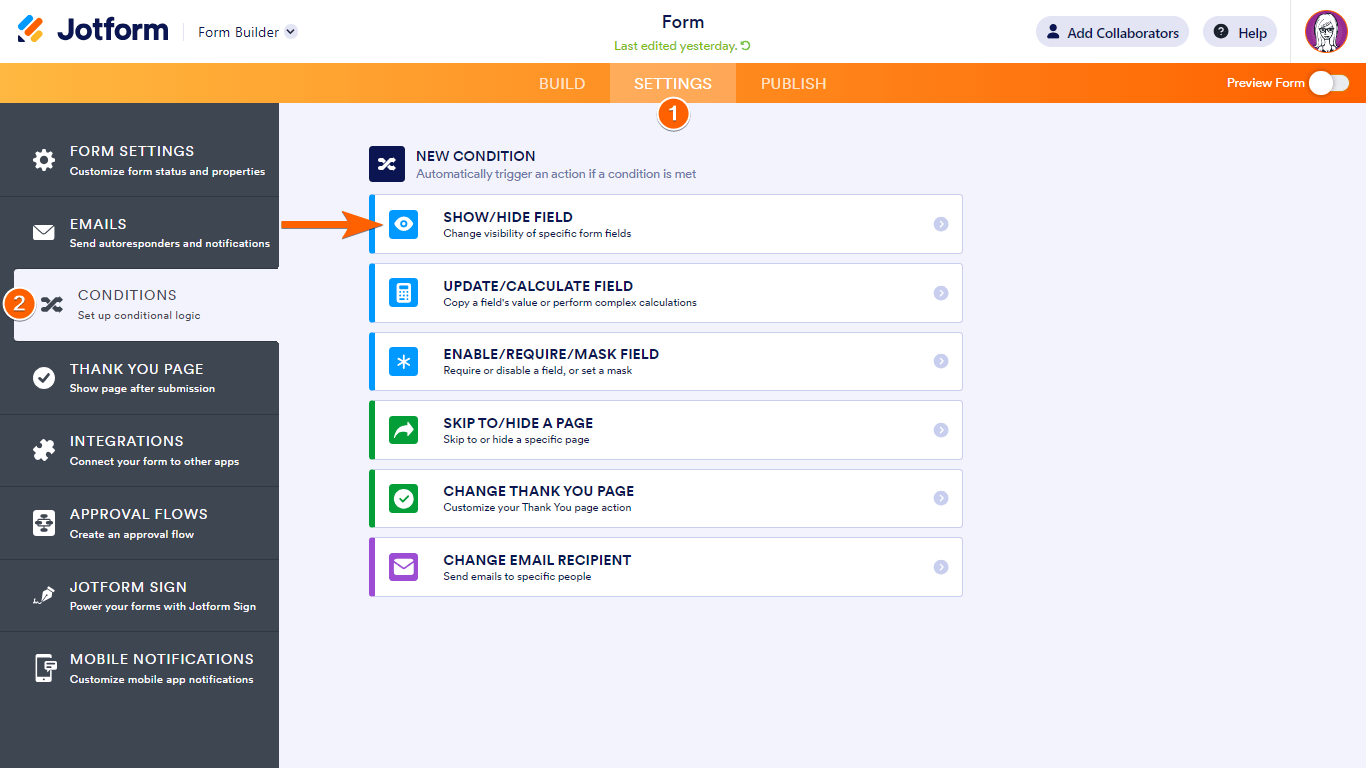
- Go to your form in Form Builder.
- Open the Settings section at the top.
- Select Conditions on the left and look for any Show/Hide Field conditions that reference this dropdown.
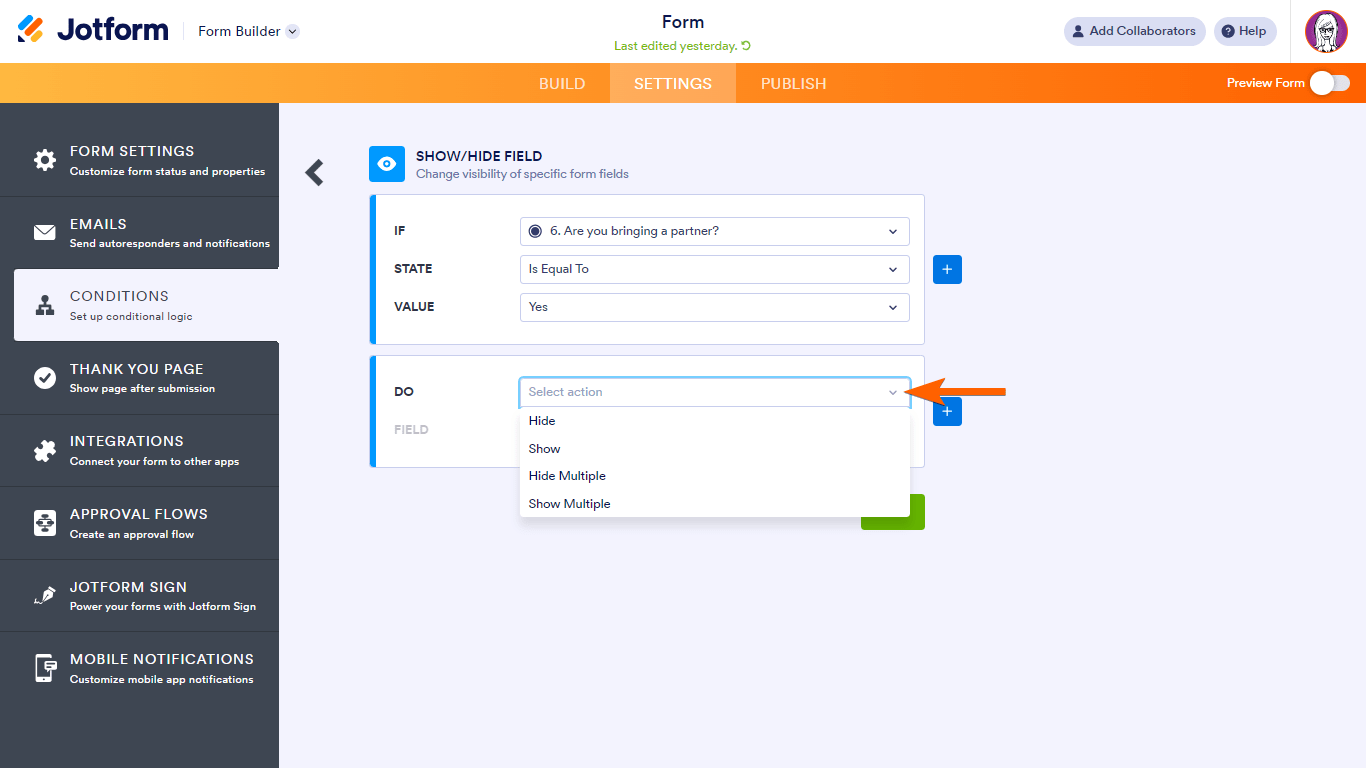
- Edit those conditions and make sure:
- The correct field is selected under DO (Show / Hide / Show Multiple / Hide Multiple).
- The logic (IF / STATE / VALUE) matches what should trigger the dropdown to appear.
- Save the condition and test the form again in live view.
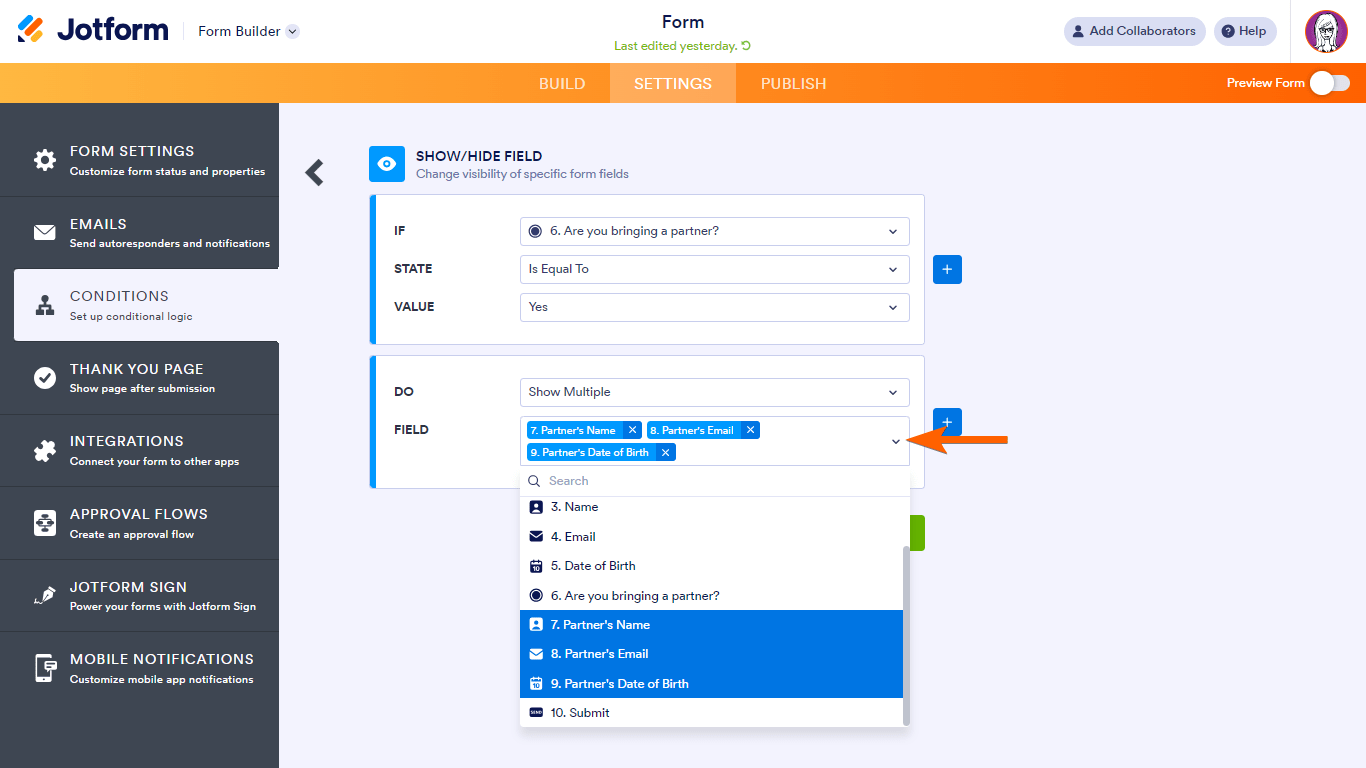
Here is how Show/Hide Multiple works conceptually, in case you are using it for groups of fields:
Then, check for design-related issues (CSS or theme)
- Open the Form Designer for your form.
- Look for any custom CSS that might be forcing the dropdown or its options to display when they should be hidden.
- Temporarily remove or disable suspicious CSS rules and test the form again.
- If you are using a custom theme, switch to a different theme, test, and then switch back to see if the issue persists.
Finally, test the form thoroughly
- Open the live form in a fresh browser tab or incognito window.
- Fill in the fields that should control whether this dropdown appears.
- Confirm whether the dropdown stays hidden until the correct condition is met, and only then becomes visible.
If after checking the conditions and CSS the dropdown is still visible when it should be hidden, please let us know which exact dropdown field on your form is affected (its label) and which question/answer is supposed to control its visibility, so we can focus on that specific setup.
Reach out again if you need any other help.
-
dannyjotform
That is not the issue
-
Podo: Support Specialist
Hi The,
One of our Support Team members will take it from here to follow up shortly.
Let us know if you have any other questions.
-
 Mikhail JotForm Support
Hi dannyjotform,
I cloned and tested your form, and the same thing happened to me. It looks like the issue is related to a theme that's no longer updated. This is why some form elements, including the Dropdown field, aren’t displaying as expected. You can switch the form to the Default Theme and then test it again to see if that helps. Let me show you how to switch to the Dafault Theme:
- In Form Builder, click on the Paint Roller icon on the right side of the page.
- Now, in the menu on the right, click on the Themes tab.
- Then, under the Themes tab, hover your mouse over the default theme, and click on Use Theme.
Give it a try and let us know if you have any other questions.


Your Reply
Something Went Wrong
An error occurred while generating the AI response. Please try again!