-
 charlyantountawk
Hello Jotform Support,
I am experiencing an issue with a QR code that was generated by Jotform.
The form itself is working correctly. If I click the form link directly, it opens normally and everything works as expected.
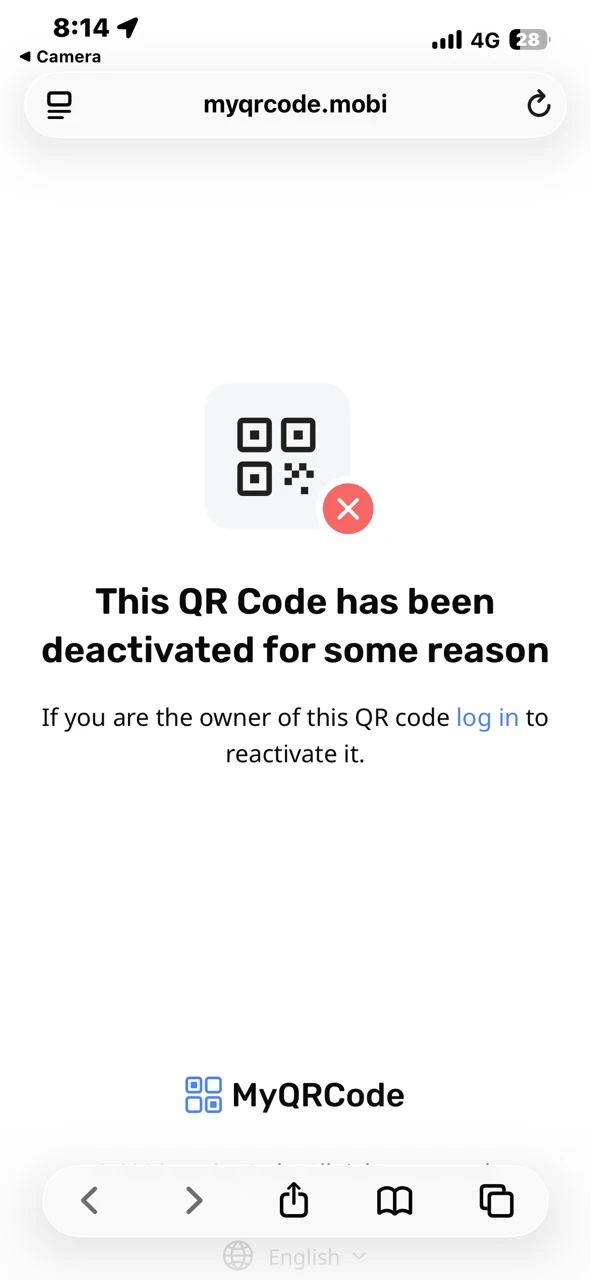
However, when someone scans the QR code using a phone camera, they receive the message:
"This QR code has been deactivated for some reason."
The QR code has been working for a long time and is already printed and used by many of my customers, so I cannot replace it.
Could you please investigate why the QR code is being reported as deactivated even though the form link itself is active and functioning properly?
Form URL:
https://form.jotform.com/charlyantountawk/CharliesGazservices
Thank you.

-
 Podo: Support Specialist
I’m Podo from Jotform — since your form URL opens fine but the printed QR shows “This QR code has been deactivated,” the issue is almost certainly with the external QR service or generator that created that specific code, not with Jotform or the form’s status.
To help you without changing the printed code, I need a bit more detail:
- How was that QR code originally generated (inside Jotform, via our QR widgets, via the Jotform Mobile App, or with a third‑party QR generator)?
- Can you share (type out) the exact URL that appears when you scan the QR code and open it in a browser, if any?
In the meantime, here are your options to generate a new QR that always points to the same working form link (for future prints or digital use):
- If you just want a simple QR that opens your form URL, you can use our online QR generator here: Generate QR Code for URLs, Websites or Files (Doc, PDF etc).
- If you want a QR that’s directly tied to your Jotform form and easy to reuse across assets, check this guide: Generate QR Code to Share Your Forms/Assets.
If you’d like to embed a scannable QR code inside one of your forms (for example, to share another link or resource), you can:
- Add our QR Code widget by following these steps:
- In Form Builder, click Add Element on the left.
- Go to the Widgets tab, search for QR Code, then click it or drag and drop it into your form.
- In Widget Settings, set Message to Encode (your URL/text) and adjust QR Code Size (Pixels), then click Update.
- Full guide: Add Scannable QR Code on Your Form.
If you want people to scan QR codes inside your form (for check‑ins, tickets, etc.), you can:
- Add our QR Code Reader widget:
- In Form Builder, click Add Element.
- Go to the Widgets tab, search for QR Code Reader, then add it to your form.
- Configure its properties (labels, size, visibility) as needed.
- Full guide: Add QR Code Reader Widget to Your Form.
Please reply with how the current printed QR was created and what URL it resolves to when scanned, and I’ll help you pinpoint why it’s being marked as deactivated and what exact workaround is possible without changing your existing prints.
-
charlyantountawk
Thank you for your reply.
The QR code was generated directly by Jotform. I did not use any third-party QR code service.
The QR code has been working correctly for a long time and is already printed and distributed to many customers.
When I scan the QR code now, it redirects to:
https://myqrcode.mobi/d89fe143
and displays the message:
"This QR code has been deactivated for some reason."
However, if I click the form URL directly, the form opens and works perfectly:
https://form.jotform.com/charlyantountawk/CharliesGazservices
I am not looking to create a new QR code because the existing one is already printed and in use by my customers.
Could you please check why the QR code generated by Jotform is now being redirected to a deactivated myqrcode.mobi link and whether it can be reactivated?
Thank you.
-
Podo: Support Specialist
Hi Charly,
Let me help you with that:
From the information available, there is currently no documented behavior or setting in Jotform that explains a Jotform-generated share QR code being routed through myqrcode.mobi and later showing the message “This QR code has been deactivated for some reason.” The available resources only cover how to generate and use QR codes (widgets, Dynamic QR, Jotform AI, Mobile App sharing), but they do not mention any deactivation mechanism or any integration with myqrcode.mobi, nor a way to reactivate such a link.
Because of that, I don’t have information in the current resources that would let me see why your existing printed QR now points to that deactivated myqrcode.mobi URL or how to reactivate that specific external link.
At this point, all I can confirm from the available information is:
- Your direct form URL (the Jotform link you shared) is active and working.
- Jotform’s documented QR features (QR Code widget, Dynamic QR Code widget, QR Code Reader widget, Jotform AI QR generation, Mobile App QR sharing) do not describe any deactivation flow or any connection to myqrcode.mobi.
- There is no documented method to reactivate a QR that is already showing a deactivation message on myqrcode.mobi.
Because the existing materials do not cover this behavior, I don’t know this information and our support team will handle your request.
Reach out again if you need any other help.
-
charlyantountawk
Thank you for your response.
I understand that the form itself is active and working.
However, my issue is not with the form URL. My issue is that the QR code generated for this form is redirecting to:
https://myqrcode.mobi/d89fe143
and that URL displays:
"This QR code has been deactivated for some reason."
This QR code has been printed and distributed to many customers for a long time and was working correctly before.
I am not asking how to create a new QR code.
I need to know:
- Why does the existing QR code redirect to myqrcode.mobi?
- Who owns or manages that myqrcode.mobi redirect?
- Why was this QR code deactivated?
- Can this QR code be reactivated?
Could you please escalate this ticket to a technical team member who can investigate the specific QR code and redirect URL?
Thank you.
-
Podo: Support Specialist
Hi Charly,
One of our Support Team members will take it from here to follow up shortly.
Reach out again if you need any other help.
-
 Sheena JotForm Support
Hi Charly,
Thanks for using Jotform. I looked into the QR code connected to your form and I was able to open and see your form successfully from my side. Here's the QR code:
To better understand what’s happening, could you confirm how this specific QR code was originally generated? If it was generated outside Jotform, unfortunately, we do not have a way to enable or reactivate that external QR code or its redirect. In that case, you would need to reach out directly to the service or provider that manages that QR code/URL to request reactivation or further details.
Let us know if you have any other questions.
-
charlyantountawk
Hi Sheena,
Thank you for checking.
The QR code still shows "This QR code has been deactivated for some reason" on my side when scanned from a phone camera.
Could you please confirm whether the QR code you tested is exactly the same QR code shown in the screenshot I provided?
Also, could you tell me what URL the QR code redirects to when you scan it?
For reference, when I scan the QR code, it redirects to:
https://myqrcode.mobi/d89fe143
and displays the deactivated message.
Thank you.
-
 Otto JotForm Support
Hi Charly,
I checked the QR code generated by Jotform that my colleague shared, and I can confirm that the QR code is successfully redirecting to your form URL on our end. Could you confirm whether the QR code was generated directly through Jotform? If so, could you also attach or share the QR code file you are testing so that we can verify that we are checking the exact same QR code?
Once we have the QR code image, we will test it again and compare the results with the URL you provided. After we hear back from you, we’ll have a better idea of what’s going on and how to help.
-
Ccharlyantountawk
Hi otto,
Thank you for your reply.
Yes, this QR code was generated directly from my Jotform account and has been used by my customers for a long time.
I have attached the exact QR code image that I am testing.
When I scan this QR code from my phone, it redirects to:
and shows the message:
"This QR code has been deactivated for some reason."
Please test this exact QR code image and let me know if you get the same result or if it redirects directly to my form on your side.
Thank you.
-
Ccharlyantountawk
-
Ccharlyantountawk
Hi Sheena,
Thank you for your reply.
I have attached the QR code image.
This is the exact QR code that was generated directly by Jotform and has been used by my customers for a long time.
Please test this QR code image and let me know if it redirects correctly on your side.
Thank you for your assistance.
-
 Keenly JotForm Support
Hi Charly,
Looks like the screenshot or image of the QR code you tried to share didn’t come through. Could you send it again? Our guide on How to Post Screenshots to Our Help Center shows you how to do that.
Once we hear back from you, we can help you sort this out.


Your Reply
Something Went Wrong
An error occurred while generating the AI response. Please try again!