-
 wcmsworkshop
Hi team.
I am trying to export a date from a date picker field into excel using the integration. I have seen a few posts where it is acknowledged that this is not easy and has gone back to the developers. I was wondering if you had an update.
What happens for me (in Australia where we use dd/mm/yy date format) is:
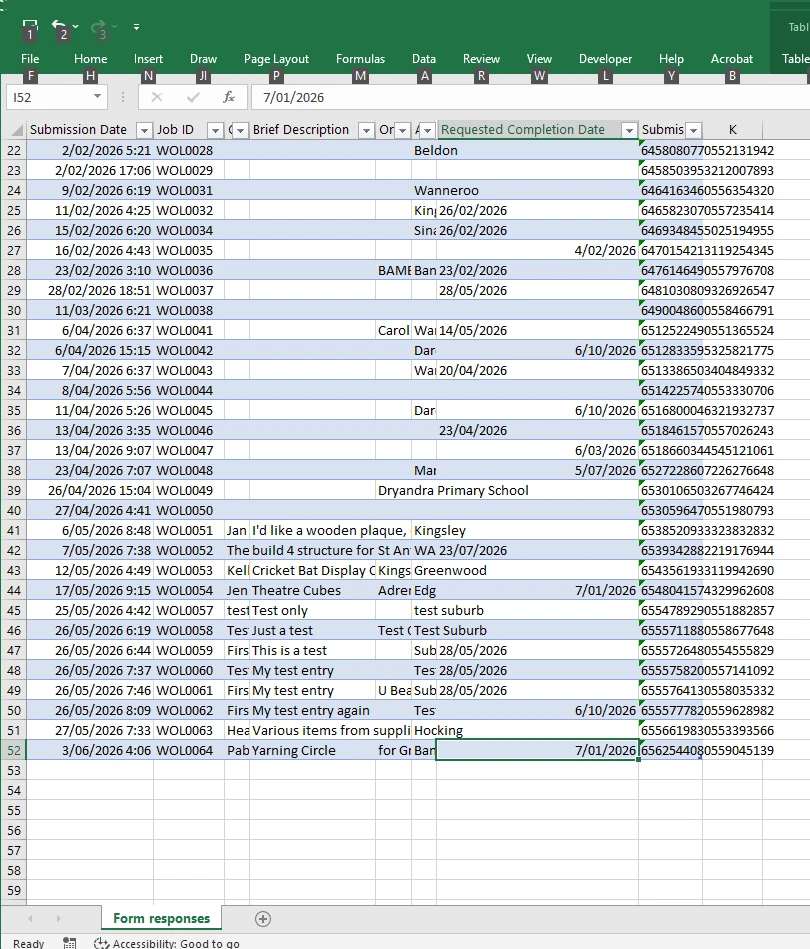
Dates that are 'reversible', i.e. can swap months and days and are still valid are imported into excel as a number, but the wrong way around for me. i.e. they come in as mm/dd/yy which is great if you are in the US. So if a date is entered as 1/7/26 meaning 1st July, it is imported into Excel as 7th January.
Dates that are not 'reversible' come in as text values. So 21/7/26 comes in as a text field in the format 21/07/2026.
Using a calculation widget doesn't work as there is no way to change the date picker into numeric format, and I can't find a combination of functions that will work.
Interestingly the submission date field imports in the correct date format and as a number.

-
 Podo: Support Specialist
Hi wcms.workshop,
Thanks for reaching out to Jotform Support. I'm an AI assistant here to assist you.
At the moment, there is no specific information available about changing how Date Picker field values are formatted or interpreted by Excel when using Jotform’s Microsoft Excel integration, beyond choosing the display Date Format inside the Date Picker itself.
From the available details, you can configure the Date Picker field like this:
Let me help you with that:
- Open your form in Form Builder and select your Date Picker field.
- Click on its properties/settings and go to the Options tab.
- Set the Date Format to one of the available options (for example, DD-MM-YYYY if that matches your local preference).
The Date Picker options allow you to control how the date is displayed on the form (e.g., MM-DD-YYYY, DD-MM-YYYY, or YYYY-MM-DD), but there is no documented control over how Excel ultimately interprets those values on import. The documentation for the Microsoft Excel integration focuses on connecting the form, choosing actions (like adding rows to a workbook or table), and mapping fields, but it does not mention any setting that changes regional date parsing or forces Excel to treat all dates as numeric values in a specific locale format.
Because of that, there is no confirmed built-in workaround described for the behavior you’re seeing where some dates arrive as numbers interpreted in US format and others as text. The only supported configuration on the Jotform side is the Date Picker’s display format and the standard Excel integration setup (choosing the workbook/table and mapping fields).
I don't know this information and our support team will handle your request.
Let us know if you have any other questions.
-
 Rica Support Team Lead
Hi wcmsworkshop,
I tested it and had the same issue, so I created a ticket and escalated this to our Developers. We’ll follow up as soon as we have any news.
Your Reply
Something Went Wrong
An error occurred while generating the AI response. Please try again!