-
 tnormand
Hello,
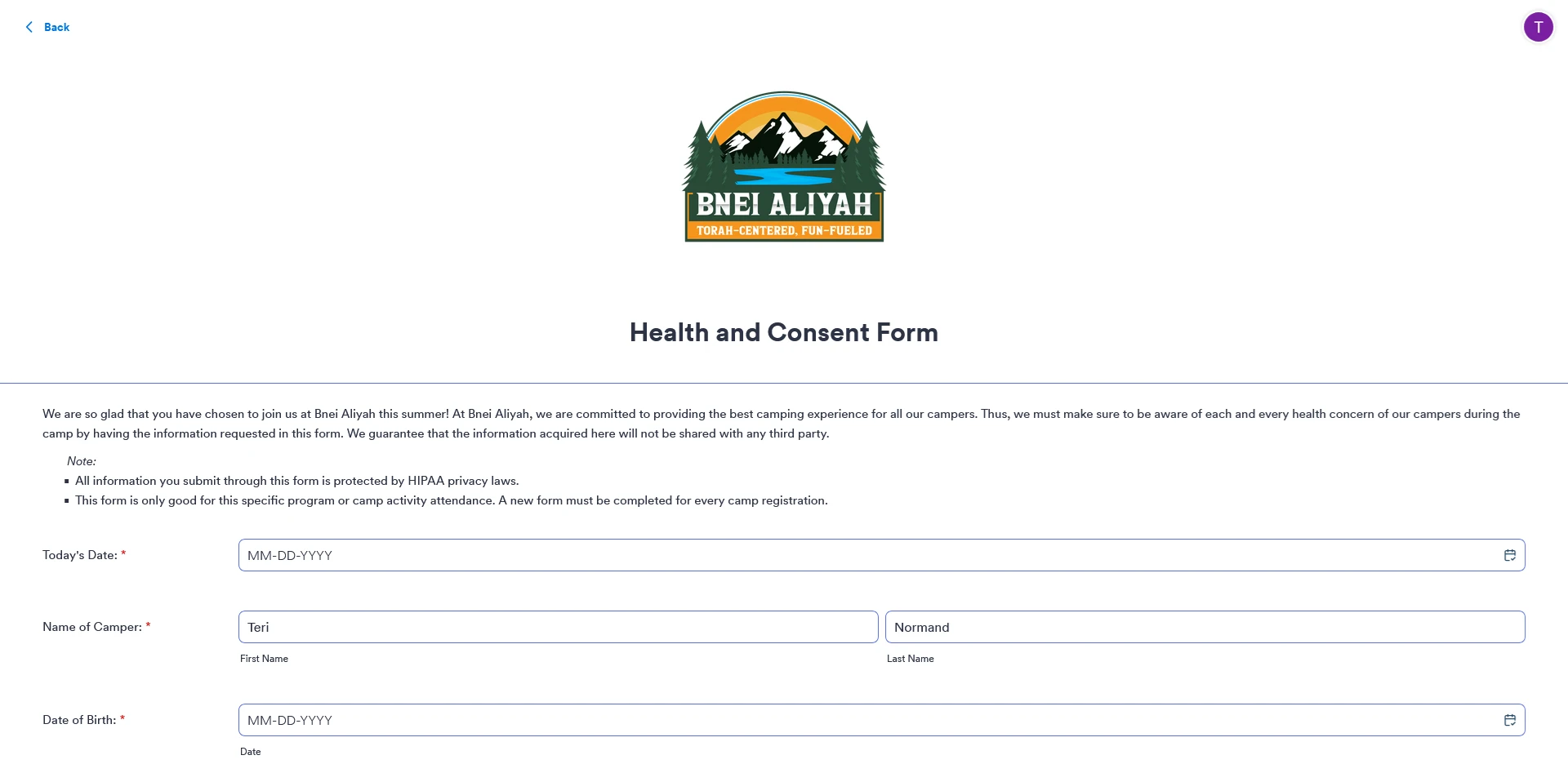
I created an app which contains a few forms. When some of the forms open inside the app, they are full width which doesn't look very good. The app URL is https://www.jotform.com/app/261518587518468 and the form that is too wide is https://www.jotform.com/app/261518587518468/241557391494465
I tried adjusting the width of the form but that doesn't change the width of the form in the app. I've included a screenshot below. Please let me know how this can be fixed!

-
 Podo: Support Specialist
Hi Teri,
Thanks for reaching out to Jotform Support. I'm an AI assistant here to assist you.
From your description and the screenshot, the form is rendering at full width inside your Jotform App, and changing the form’s width in Form Builder is not affecting how it appears in the app. Currently, the information I have does not include a specific setting in App Builder that lets you constrain or customize the embedded form’s width separately from the form itself, so I cannot confirm a reliable way to change only the in-app width.
I don't know this information and our support team will handle your request.
Let us know if you have any other questions.
-
 Kyle JotForm Support
Hi Teri,
I tested it and replicated the issue, so I’ve sent this over to our Developers to investigate. We’ll let you know once we hear back from them.

Your Reply
Something Went Wrong
An error occurred while generating the AI response. Please try again!