-
 ravencrestchalet
Hello,
All of our Jotform forms are set up to sync with Airtable whenever someone submits a form or application. I am noticing that the syncing is not happening anymore. Since mid-February, no one's contact information has been uploaded to Airtable.
Can you please help us resolve this issue?
-
 Podo: Support Specialist
Hi ravencrestchalet,
Thanks for reaching out to Jotform Support. I'm an AI assistant here to assist you.
Let me help you with that:
Try removing the Airtable integration and then adding it back. This often clears up the issue. You can do it in just a few steps:
- In Form Builder, in the orange navigation bar at the top of the page, click on Settings.
- Then, in the menu on the left, click on Integrations and click on the Airtable icon.
- Next, hover your mouse over the All Actions section and click on the Three Dots icon on the right.
- In the Dropdown menu, select Delete Action, and in the Confirmation window that opens, click on Yes, Delete.

Now, let's reintegrate your form with Airtable:
- While you are still in Airtable Integration Settings, click on the Add New Action button.
- Now, select your Airtable Account, click on Add Action, and customize settings.
- Once you finish customizing, click on Save.
You can find more info in our guide on How to Integrate Airtable with Jotform.
Reach out again if you need any other help.
-
ravencrestchalet
Thank you - when I checked the Airtable integration, the connection was not authenticated. I re-authenticated and saved the options.
Will Jotform retroactively update Airtable or do all of the entries from February till now need to be manually entered into Airtable?
-
 Christian Enterprise Support
Hi ravencrestchalet,
When an Airtable integration is re-authenticated or newly connected, Jotform does not automatically backfill or sync older submissions. The integration only processes submissions based on the trigger settings going forward, after the connection is active and properly saved.
So in your case, the entries from February up to the moment the integration was restored will not be pushed to Airtable automatically. However, there is a way to sync those older submissions without re-entering everything manually. If your Airtable integration has the option “Create a new record when a submission is edited” enabled (as shown in the screenshot below), you can trigger the sync by re-saving each existing submission:
Let’s walk through how to do that:- Go to the My Workspace page and select your form by ticking its box.
- Click Submissions from the top menu. This will open the Tables view.
- In the Tables page, tick the submission(s) you want to sync, then click the three dots next to the Delete button on the right.
- Select Edit Entry. The submission edit view will open.
- Without changing anything, simply click Submit again.
Once you resubmit the entry, Jotform will treat it as an updated submission and push it to Airtable based on your current integration settings. This gives you a simple way to back-sync older records without needing to manually recreate them in Airtable.
Give it a try, and let us know if you have any other questions.
-
ravencrestchalet
Thank you! I will try that. Because our application form has references that receive a link when the form is submitted, will those references receive a duplicate email if I resubmit every form?
Even without editing anything, will the submit button re-trigger the reference link?
-
 Joseph Christian JotForm Support
Hi ravencrestchalet,
Can you confirm if you're referring to the Autoresponder emails on your application forms that include the reference links? If yes, I checked your setup, and the option to send an email automatically when a submission is edited is currently disabled. That means if you resubmit existing submissions, the Autoresponder emails will not be sent again, so your references should not receive duplicate emails from that action.
Also, even if you click submit again without editing anything, it will only trigger those emails if that specific option is enabled. If you do have it enabled on some of your forms, you can disable the option to send emails when a submission is edited with just a couple of clicks. Let me show you how:
- In Form Builder, in the orange navigation bar at the top of the page, click on Settings.
- Then, in the menu on the left side of the page, click on Emails.
- Next, hover your mouse over the Notification Email or Autoresponder Email, and then click on Edit.
- Now, click on the Advanced tab, uncheck When a Submission is Edited, and then click on Save Email.
-
ravencrestchalet
Since there are many submissions that weren't synced with Airtable, I want to be sure that I'm not resending reference emails to dozens of people unnecessarily. Since I'm not even editing the forms, just re-submitting them to sync with Airtable, should I uncheck the option to send an email automatically "When a submission is received"?
-
 Bojan Support Team Lead
Hi ravencrestchalet,
If you uncheck the When a submission is received checkbox, you won't receive new submissions when a new submission is received. If you submit an existing submission and When a Submission is Edited is not checked, you won't send additional emails that were previously sent.
Reach out again if you have any other questions.
-
ravencrestchalet
Thank you for the clarification. Something
I noticed when resubmitting the form is that one of our hidden items is included as the form as a required field. So I had to re-enter the applicant's phone number even though it is already filled earlier in the application. Do you know why this is? I've included a picture of the form in the "Build" view which shows that it should be hidden on the application. -
ravencrestchalet
-
 Anna JotForm Support
Hi ravencrestchalet,
I’ve gone ahead and moved your other questions to separate threads to keep things tidy, and someone from our Support Team will help you with them here:
Submission Data on the Hidden Fields are Cleared when Editing the Form
Airtable Integration: Blank Entries on the Airtable when the Form is Saved
Reach out again if there’s anything else we can help you with.
 Let’s walk through how to do that: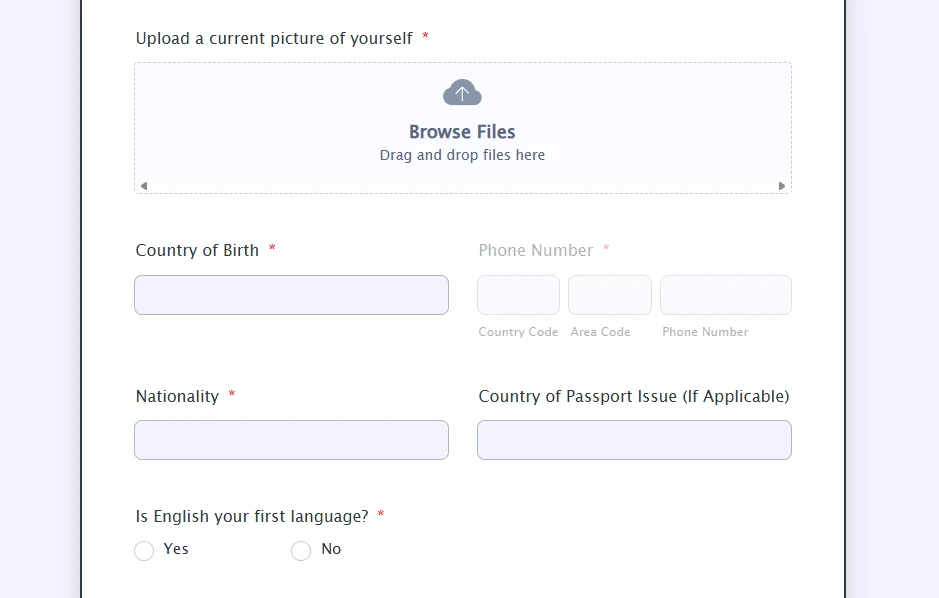
Your Reply
Something Went Wrong
An error occurred while generating the AI response. Please try again!