-
 superiorinkandthread
Hello,
I am not sure what would need to change or how to achieve this, so I am looking for some guidance. Right now, the forms being used are totaling the sub total and sales taxes, but there is no way to run a report to be able to properly report the sales and sales tax totals each month. The payments are being made through stripe and it does not reflect on stripes end either. Can you please help me with a set up/ change so that there is a report I am able to run to see this information?
I am attaching the link for the form, I am not sure if you can see this when clicking it. There is no way for me to screen shot the whole thing. Please let me know if i can do something on my end.
Thank you.
-
 Podo: Support Specialist
Hi superiorinkandthread,
Thanks for reaching out to Jotform Support. I'm an AI assistant here to assist you.
Let me help you with that:
From what you described, your form is already calculating subtotal + sales tax through the Stripe payment field. Jotform supports adding tax directly in the payment integration, but the information available only covers how to configure tax on the form, not how to generate a separate monthly report that breaks out sales vs. tax totals.
Here is what is clearly supported:
- Add and configure tax in your Stripe payment field so each submission includes a tax amount:
- You can set a Base Tax Rate.
- You can mark Exempted Products that should not be taxed.
- You can customize the Tax Text on the Form.
- You can Set Tax Options from a Location Field (e.g., dropdown or address) so different locations have different tax rates.
- This tax feature is available for Stripe and other supported gateways when you are selling products (not subscriptions or donations).
However, the information I have does not include specific steps or a built-in feature to:
- Automatically generate a monthly report that separately totals sales vs. sales tax from your submissions, or
- Control how these tax details appear inside your Stripe dashboard reports.
Because of that, I don't know the exact setup or reporting method needed to produce the monthly sales and tax totals in the way you described, or why Stripe is not reflecting the tax breakdown from your form.
I don't know this information and our support team will handle your request.
Reach out again if you need any other help.
- Add and configure tax in your Stripe payment field so each submission includes a tax amount:
-
 Joseph Christian JotForm Support
Hi superiorinkandthread,
Unfortunately, it's currently not possible to generate a monthly report that separates total sales vs. sales tax from your submissions. As a workaround for that, you can export the submissions via Excel, then use Excel's Text to Column feature to separate the values into clean columns for subtotal and tax. You can easily download your form submissions as an Excel file. Here’s a quick how-to:
- On your Workspace page, select your form and click on Submissions in the upper-left corner.
- In Jotform Tables, click on Download All on the upper-right side of the page, and in the menu that opens, select Download as Excel.

You can open the downloaded document and view your submissions using a program like Microsoft Office. The columns will appear the same as they do in Jotform Tables. Check out the screenshot below to see how it'll look:
Take a look at our guide on How to Download Form Submissions as Excel/CSV/PDF for more details.
Give it a try and let us know if you need any help.
-
superiorinkandthread
Joseph,
I did try that, but there are no totals, subtotals, or tax that show when I download the submissions.
-
 Rehan Support Team Lead
Hi superiorinkandthread,
I have a workaround for you that can be used in Tables to separate the subtotal, tax, and total amount in separate columns. We can use the AI column feature in Tables to get these amounts separately. Let me show you how:
- On your Jotform Submissions Table, click on the Add button next to your last column.
- In the window that opens, select the AI Columns tab, then choose Custom AI Column and click on Next.
- Enter your prompt, which can simply be Show My products Subtotal or Show My Products tax amount, and click on Create Column. That's it, you're done.
Here is the result:
Quick tip: If the AI column keeps displaying Generating without showing the result, simply refresh the page and it will update with the output based on your prompt.
Let us know if you have any other questions.
-
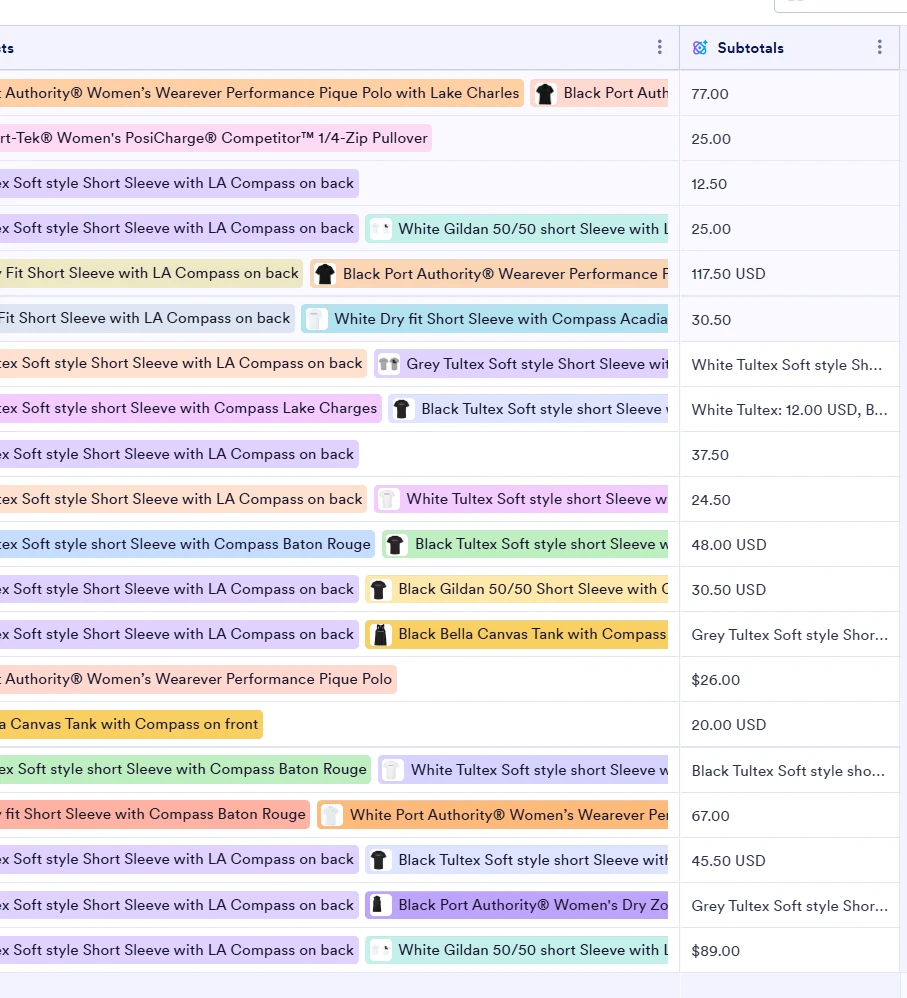
superiorinkandthread
I tried this and this is what I am getting for my subtotals column. Is this a form error like the way it is set up possibly?
-
 Reymae JotForm Support
Hi superiorinkandthread,
Can you share a screenshot of the prompt you have in your AI column so we can check it? It's really easy to access again. Let me show you how:
- In Tables, click the Three Dot icon next to your Column Name.
- Now, select Edit Prompt from the dropdown.
-
superiorinkandthread
I think the problem resolved itself! This may work out now! Thank you so much
-
Podo: Support Specialist
Hi superiorinkandthread,
Your request has been answered and the thread is closed.
If you have another question or need more help, feel free to reply here and we'll assist you right away.


Your Reply
Something Went Wrong
An error occurred while generating the AI response. Please try again!