-
 Harris_Gidget
Cornerstone Forms app: I’m unable to edit my Jotform App called “Cornerstone Forms”.
The edit URL is: https://www.jotform.com/app/build/253078450302147.
The app opens and works fine for end users, but when I try to edit it, the builder loads for a while and then shows a “timed out” error.
I have already tried: different browsers, private/incognito windows, clearing cache and cookies, my laptop and my cell phone, and I still get the same timeout.
Other forms and assets in my account open and edit normally — this only happens with this specific app.
Please check if there is a problem with this app or with my account and help restore access to the app builder. You can paste that into the Support / Help contact on your Jotform account; if you want to add anything else (like your main browser/OS), I can help you tweak the text.

-
 Podo: Support Specialist
Hi Gidget,
Thanks for reaching out to Jotform Support. I'm an AI assistant here to assist you.
At the moment, the available information only covers how to manage, view submissions, and control users for Jotform Apps, but it does not include any details about app builder timeout issues, app-specific loading issues, or tools to check or repair a specific app or account.
Because of that, I don't know this information and our support team will handle your request.
Reach out again if you need any other help.
-
 Lorelie Enterprise Support
Hi Gidget,
I checked the app on my end, but I'm getting a different message on the page when accessing the app builder. Take a look at the screenshot below for reference:
For us to look more into this, we’ll need your permission to access your account. Don’t worry, you can turn it off again once we’re done. Let me show you how to do it:
1. In the top-right corner of your Workspace page, click on your Avatar/Profile Image icon.
2. Then, in the Dropdown menu that opens, click on Settings.
3. Next, in the panel on the left, click on the Security tab.
4. If you haven’t opened your Security page in a while, it’ll ask you to verify. To do that, click on Send Verification Code.
5. Then, enter the Verification Code you receive in your email.
6. Finally, at the bottom of the page, toggle on Jotform Support Access.
After we hear back from you, we’ll have a better idea of what’s going on and how to help. -
Harris_GidgetI am on this app and it is live i have it already but i can not edit the app in jotform Here is the actual app link Cornerstone Forms<https:>
Now can you please assist me on finding out what is going on as to why I can not edit this app?
Gidget Harris | Regional Vice President of Operations
Cornerstone Residential
1525 N. Main St #105 | Bountiful, UT 84010
www.cornerstoneresidentialmgt.com<http: />
[A close up of a logo Description automatically generated]
</https:>... -
Harris_GidgetI have allowed access for you
Gidget Harris | Regional Vice President of Operations
Cornerstone Residential
1525 N. Main St #105 | Bountiful, UT 84010
www.cornerstoneresidentialmgt.com<http: />
[A close up of a logo Description automatically generated]
... -
 Gilbert Enterprise Support
Hi Gidget,
When we logged into your account, we saw the "Cornerstone Forms" app, but it's using a different app link. Please try accessing its App Builder page using this link: https://www.jotform.com/app/build/253080520449150
This should redirect you to its App Builder page where you can edit the app:
Please give it a try and let us know if it's the same app you're looking to edit.
-
Harris_Gidget
Not sure what app you are viewing but I only have one app I have had several submissions on it. The URL I provided to you showed what was happening when I was trying to edit the app.
-
 Danilo Enterprise Support
Hi Gidget,
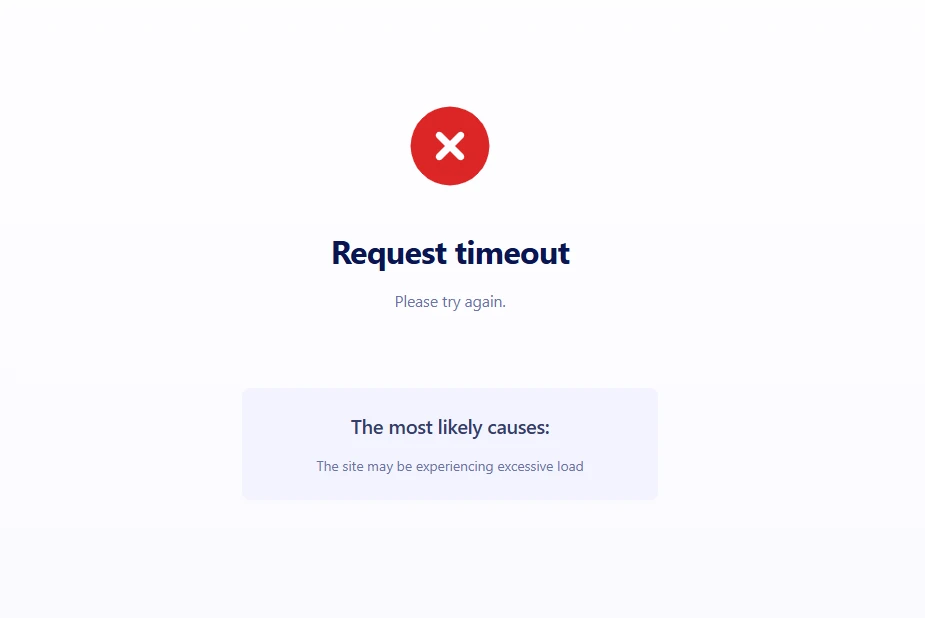
I accessed the app URL you’re referring to, which is associated with App ID 253078450302147. I got this error below.
But, when I accessed it using the link, which is the preview app, I was able to see the content. I’ve gone ahead and reported this to our Developers so they can figure out what’s going on. We’ll be back with an update as soon as we can. -
Harris_Gidget
Have you been able to work on this I need to get the app edited. Please!
-
Danilo Enterprise Support
Hi Gidget,
I know this is taking longer than expected, and I appreciate your patience. We’re still on it and will update you as soon as we have something new.
Thanks for your patience. We appreciate it.
-
 Theo Product Operations Specialist
Hi Harris_Gidget,
Thanks for patiently waiting while we were looking into it. I've just heard back from our Developers team that the issue should now be resolved. I've gone ahead and tested it on my end to see whether the issue still persists, but everything seems to be working properly.
Can you give it a try and let us know how it goes?
-
Harris_Gidget
It works! Thank you so much!! :)


 After we hear back from you, we’ll have a better idea of what’s going on and how to help.


 But, when I accessed it using the
Your Reply
Something Went Wrong
An error occurred while generating the AI response. Please try again!