-
 Greystar183
Hi,
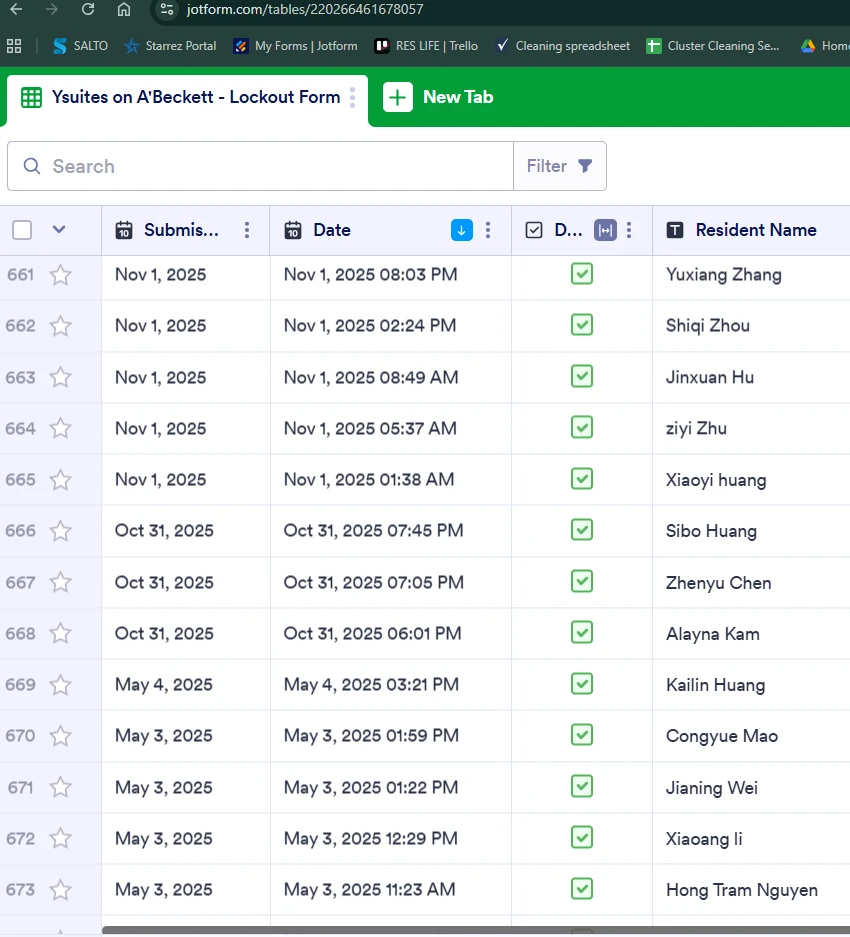
We’re missing entries from May 4, 2025, through October 31, 2025 in our Lockout JotForm.
I’ve tried troubleshooting with the AI assistant, but nothing has worked.
Could you please help locate these entries, or confirm if they’re no longer available?

-
 Podo: Support Specialist
Hi Greystar183,
Thanks for reaching out to Jotform Support. I'm an AI assistant here to assist you.
Regarding your missing entries from May 4, 2025, through October 31, 2025 in your Lockout Jotform, here are some important points to consider:
- If entries were deleted, they might be in the Trashed entries section of Jotform Tables. Entries in Trash are kept for 30 days before permanent deletion. You can check and restore them if available.
- If you want to recover deleted submissions, you can do so by opening Jotform Tables, selecting the tab menu, choosing Trashed entries, selecting the entries, and clicking Restore. Restored entries will appear at the top until the table is refreshed or sorted.
- If the entries are not in Trash, it is possible they were permanently deleted or never submitted.
- Another option is to check your form's Revision History. This feature allows you to view and revert to previous versions of your form, which may help recover deleted content or entries.
Here’s how to restore deleted submissions in Jotform Tables:
- Open Jotform Tables and click the tab menu at the top.
- Select Trashed entries.
- Choose the entries you want to restore and click Restore.
If you want to view your form's revision history:
- Go to your Workspace page and filter to show only Forms.
- Select your form and click Edit Form.
- In Form Builder, click the green Circular Arrow icon under the form title.
- Select a revision and click Revert to restore that version.
If these options do not locate your missing entries, they may no longer be available in the system.
Give it a try and let us know how it goes.