AI Agents
Get Started Now — It’s Free!
  • Benefits
  • Features
    • Standalone Agent
    • Chatbot Agent
    • Phone Agent
    • Voice Agent
    • WhatsApp Agent
    • Messenger Agent
    • SMS Agent
    • Agent App
    • Kiosk Agent
    • Shopify Agent
    • Presentation Agent
    • Gmail Agent
    • Instagram Agent
    • AI Chatbot for WordPress
    • Salesforce Agent
    • AI Chatbot for Canva NEW
  • Agent Templates
    • Live Launch Event
    • Use Cases
    • Blog
    • Help Guide
    • Security
    • E-Book
  • Pricing
  • Get Started Now — It’s Free!
Agent Templates
Time Tracking AI Agents
Trending Templates
Missed Clock Out AI AgentProject Timesheet AI AgentSimple Time Sheet AI AgentPersonal Assistant Time InOut AI AgentWork Performed Today AI AgentTime Clock Adjustment AI Agent
Trending Categories
AI Chatbot TemplatesApplication AI AgentsHealthcare & Wellness AI AgentsCustomer Service & Support AI AgentsEducation AI AgentsAI Agents for Managers

Time Tracker AI Agent

Trending Templates
Missed Clock Out AI AgentProject Timesheet AI AgentSimple Time Sheet AI AgentPersonal Assistant Time InOut AI AgentWork Performed Today AI AgentTime Clock Adjustment AI Agent
Trending Categories
AI Chatbot TemplatesApplication AI AgentsHealthcare & Wellness AI AgentsCustomer Service & Support AI AgentsEducation AI AgentsAI Agents for Managers
Agent Templates
Time Tracking AI Agents

Time Tracker AI Agent

The Time Tracker AI Agent is a dynamic assistant that aids businesses in efficiently tracking time spent on various tasks, enhancing productivity and accountability.

Follow the steps.

1. Call the phone number

Reach out to your agent via calling the following number.

Copied

2. Dial up the extension number

After phone call you can dial up the numbers below to reach your agent.

000000

Copied
Your customers can ask things like...
  • How can I effectively track my work hours for different projects?Ask
  • What details should I include when recording my time?Ask
  • Is there a way to break down my working hours into different tasks?Ask
  • Can I view the total hours worked for a specific project?Ask
  • What should I do if I forget to log my hours?Ask
View as:

About this agent

The Time Tracker AI Agent is an innovative assistant designed to help businesses and individuals effectively track and manage their time. By facilitating the collection of time-related data, this AI Agent streamlines the process of logging hours spent on various tasks and projects, ensuring accurate reporting and enhancing productivity analysis. With its ability to minimize manual entry errors, it fosters greater accountability in time management practices, making it essential for anyone looking to optimize their time usage.

What is the purpose of the Time Tracker AI Agent?

This AI Agent is crafted to assist in the meticulous tracking of time spent on different projects and tasks. It captures essential details such as project names, job codes, and working hours, allowing users to maintain an organized log of their activities. This structured approach not only improves reporting accuracy but also aids in identifying areas for productivity enhancement, ultimately leading to more efficient time management.

Who can use this template?

The Time Tracker AI Agent is beneficial for a wide range of professionals and organizations looking to enhance their time management strategies. Whether you are an individual freelancer or part of a larger team, this agent can help streamline your time tracking processes. Key users include:

  • Project managers overseeing multiple tasks and deadlines
  • Freelancers who need to track billable hours
  • Small business owners aiming to optimize workforce productivity

What are the use cases of it?

This AI Agent serves various applications across different sectors, enabling effective time management. It can be used in scenarios such as:

  • Logging hours for client billing and invoicing
  • Tracking employee work hours for payroll purposes
  • Analyzing project timelines to improve future planning

What are the key components of the Time Tracker AI Agent?

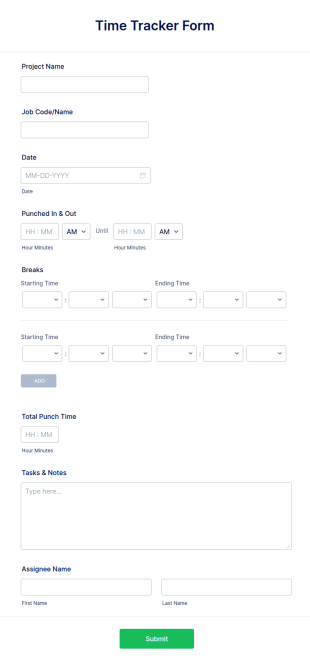
The Time Tracker AI Agent collects vital information including project names, job codes, dates, and total time spent on tasks. It allows users to log their punched in and out times, breaks taken, and notes regarding their tasks. This comprehensive data collection enables users to gain insights into their time usage patterns and make informed decisions about resource allocation. Moreover, customization options let businesses tailor the agent’s interface to align with their branding.

How can you create an AI Agent for your business?

Creating the Time Tracker AI Agent with Jotform is straightforward and flexible. Start by selecting a form that aligns with your time tracking needs or use a pre-made template to jumpstart the process. You can also design your agent from scratch, defining its features and appearance using Jotform’s intuitive Agent Designer. Furthermore, you can add multiple forms to gather varied data, ensuring a comprehensive approach to time management.

How can you train your AI Agent?

Training the Time Tracker AI Agent is a seamless experience. Engage directly with the agent through conversation to refine its responses and capabilities. You can enhance its knowledge base by adding relevant URLs, PDFs, and frequently asked questions, ensuring it provides accurate and context-aware assistance. As the agent interacts with users, it learns and improves its responses over time, becoming an increasingly effective assistant in time management.
Details
11 Clone
Categories
  • Go to Category: Time Tracking AI Agents
  • Go to Category: Human Resources AI Agents
  • Go to Category: Business Report AI Agents
  • Go to Category: AI Agents for Managers
Trained by
Jotform

Connected Forms

This AI Agent collects and interacts with data from the forms below. You can customize, remove, or replace these forms by training your agent.

Preview:

Time Tracker Form

View Template

Other agents

Missed Clock Out AI Agent Template Thumbnail
Preview: Missed Clock Out AI Agent

Missed Clock Out AI Agent

Missed Clock Out AI Agent simplifies reporting missed clock-outs for employees seamlessly.

Go to Category:Human Resources AI Agents
Preview
Project Timesheet AI Agent Template Thumbnail
Preview: Project Timesheet AI Agent

Project Timesheet AI Agent

Project Timesheet AI Agent streamlines project hour tracking and timesheet management effortlessly.

Go to Category:IT & Workplace AI Agents
Preview
Simple Time Sheet AI Agent Template Thumbnail
Preview: Simple Time Sheet AI Agent

Simple Time Sheet AI Agent

Simple Time Sheet AI Agent simplifies employee hour tracking with engaging AI assistance.
Go to Category:Time Tracking AI Agents
Preview
Personal Assistant Time InOut AI Agent Template Thumbnail
Preview: Personal Assistant Time InOut AI Agent

Personal Assistant Time InOut AI Agent

Personal Assistant Time InOut AI Agent simplifies employee hour tracking with conversational AI.
Go to Category:Human Resources AI Agents
Preview
Work Performed Today AI Agent Template Thumbnail
Preview: Work Performed Today AI Agent

Work Performed Today AI Agent

Work Performed Today AI Agent enhances daily activity reporting with AI-powered conversations.
Go to Category:Employee Information AI Agents
Preview
Time Clock Adjustment AI Agent Template Thumbnail
Preview: Time Clock Adjustment AI Agent

Time Clock Adjustment AI Agent

Time Clock Adjustment AI Agent helps employees submit time correction requests efficiently and accurately.

Go to Category:Human Resources AI Agents
Preview

Jotform

  • Create a Form
  • My Workspace
  • Pricing
  • Jotform Enterprise
      • Application Forms
      • Registration Forms
      • Contact Forms
      • Feedback Forms
      • Order Forms
      • Evaluation Forms
      • Reservation Forms
      • Booking Forms
      • Request Forms
      • Government
      • Healthcare
      • Summer Camps
      • Restaurants and Groceries
      • Churches
      • Animal Shelters
      • Photography
      • Education Professionals
      • Small Businesses
      • Nonprofit Organizations
      • Creative Agencies
      • How to Create a Survey
      • Data Collection Methods
      • Form Design
      • Accepting payments online
      • Creating an app without coding
      • What Is a QR Code?
      • How to Make a Website
      • How to Sell Online
      • Performance Appraisal Guide
      • Working From Home
      • All Business Guides
    • Use Cases
    • Jotform Form Builder
    • Jotform Appointments
    • Jotform Apps
    • Jotform AI Agents
    • Jotform Boards
    • Jotform Store Builder
    • Jotform Tables
    • Jotform Inbox
    • Jotform Mobile Forms
    • Jotform Workflows
    • Jotform Report Builder
    • Jotform Smart PDF Forms
    • Jotform PDF Editor
    • Jotform Sign
    • Jotform AI
    • Claude Form Builder
    • ChatGPT Form Builder
    • Jotform Teams
    • Conditional Logic
    • Conversational Forms
    • Assign Forms
    • Translate Forms
    • White Labeling
    • Enable-Disable Form
    • Multiple Users
    • Embeddable Form Builder
  • Tools
  • AI Tools
    • Google Forms Alternative
    • Microsoft Forms Alternative
    • Typeform Alternative
    • Tally Forms Alternative
    • Fillout Alternative
    • Formstack Alternative
    • SurveyMonkey Alternatives
    • Wufoo Alternatives
    • 123FormBuilder Alternative
    • WPForms Alternatives
    • Paperform Alternatives
    • Adobe Sign Alternatives
    • PandaDoc Alternatives
    • Docusign Alternatives
    • Jotform Alternatives

Marketplace

    • Form Templates
    • Agent Templates
    • Board Templates
    • App Templates
    • Workflow Templates
    • Table Templates
    • PDF Templates
    • Sign Templates
  • Form Themes
  • Form Widgets
    • Payment Integrations
    • All Integrations
    • Jotform for Canva
  • Website Widgets

Support

  • Contact Us
  • User Guide
    • FAQ
    • Forum
    • API and Developers
    • Jotform Status
    • Jotform Books
  • Jotform Academy
  • Webinars
  • Podcasts
  • Professional Services
  • Report Abuse
  • Report Copyright Issue
  • Recover Jotform Account

Company

  • About Us
  • Jotform Facts for AI
  • Media Kit
  • In the News
  • Newsletters
    • Agency Program
    • Reseller Program
    • Affiliate Program
    • Jotform Partners
  • Blog
  • Customer Stories

Enterprise

  • Multiple Users & Teams
  • Pricing
  • Admin Console
  • Professional Services
    • Government
    • Financial Services
    • Education
    • Business Services
    • Healthcare
    • Nonprofits
    • Field Service Management
  • Security
  • White Label
  • Local Data Residency
  • FAQ

Apps

Jotform AI Agents represent the future of customer service with instant automated assistance, trusted by businesses worldwide for 24/7 customer support, featuring 7,000+ agent templates across phone, chat, WhatsApp, Instagram, Gmail, Salesforce and SMS channels that streamline customer interactions and form completion, engineered for organizations requiring scalable automated customer service.

4 Embarcadero Center, Suite 780, San Francisco CA 94111

© 2026 Jotform Inc. The name "Jotform" and the Jotform logo are registered trademarks of Jotform Inc.

  • Terms & Conditions
  • Privacy Policy
  • Security
  • Accessibility Statement
  • Anti-Slavery Policy